
Not sure how to wire or select an RS485 SPD for a PLC control panel?
RS485 communication lines are common in PLC systems, Modbus RTU networks, remote monitoring panels, meters, sensors, pump stations, and industrial automation projects. These lines are often long, exposed, or routed near power cables. That makes them vulnerable to lightning-induced surges, switching transients, and ground potential differences.
This guide explains how to select and wire an RS485 surge protective device for industrial control panels. It focuses on practical wiring, A/B line connection, shield grounding, PE bonding, installation position, and common mistakes before ordering.
Table of Contents
Quick Answer: How to Wire and Select an RS485 SPD
- Install the RS485 SPD in series with the communication line, usually at the cable entry point of the control panel.
- Connect the field-side RS485 cable to the LINE or IN side of the SPD.
- Connect the protected side of the SPD to the PLC, RTU, meter, gateway, or monitoring device.
- Keep A to A and B to B. Do not reverse the polarity unless the device labeling requires it.
- Bond the PE terminal of the SPD to the local PE bar with the shortest practical grounding wire.
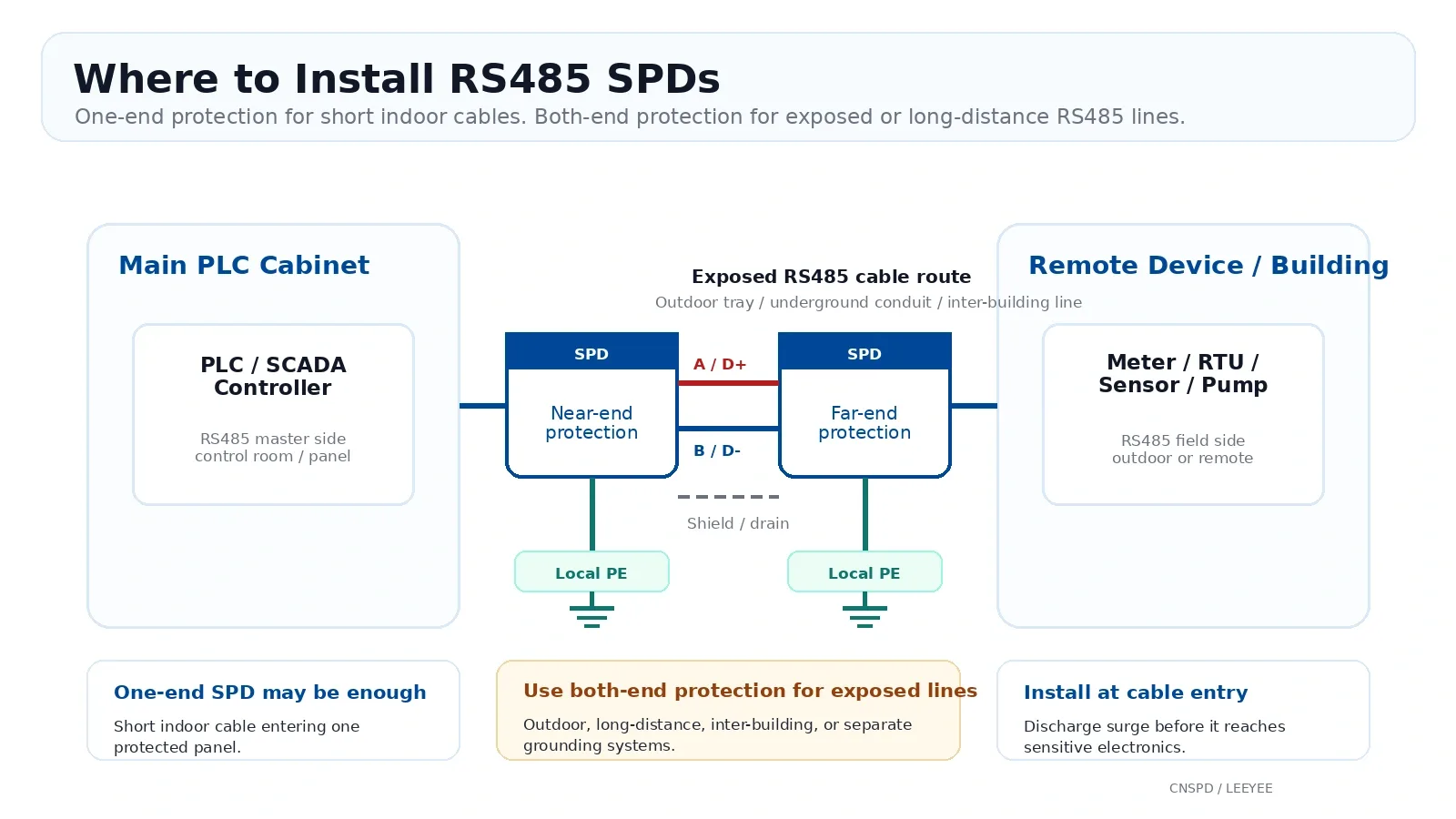
- For outdoor, long-distance, inter-building, or separate grounding systems, install RS485 SPDs at both ends of the cable.
- Select a signal-line SPD designed for RS485. Do not replace it with an AC power SPD.
Why RS485 Lines Need Surge Protection
RS485 is a differential communication interface. It has better noise immunity than many single-ended signal lines. But this does not mean it is immune to surge voltage.
In real industrial sites, RS485 cables may run across long distances, outdoor trays, separate buildings, pump stations, solar monitoring boxes, or factory areas with motors and variable frequency drives. During lightning events or switching operations, transient voltage can be induced into the cable.
If this transient voltage reaches the RS485 port of a PLC, RTU, meter, inverter gateway, or sensor controller, it may damage the communication chip or cause unstable data transmission. A correctly selected RS485 SPD helps divert surge energy to earth before it reaches the equipment port.
Where Should an RS485 SPD Be Installed?
The best installation point is usually where the RS485 cable enters the electrical enclosure. This allows the SPD to discharge surge current before the cable continues deeper into the panel.
| RS485 System | Recommended SPD Position | Buyer Meaning |
|---|---|---|
| PLC cabinet with indoor RS485 cable | At the cable entry point of the control cabinet | Protect the PLC or communication module before the line reaches sensitive electronics. |
| Outdoor RS485 line to a remote meter or sensor | At both the control panel side and the field device side | Both ends may experience induced surges or ground potential differences. |
| RS485 cable between two buildings | At both building entry points | Separate grounding systems increase surge and ground potential risk. |
| Remote pump station or water treatment system | At the PLC panel and remote equipment cabinet | Long cable runs and outdoor exposure make dual-end protection more suitable. |
| Solar monitoring or inverter communication line | At the monitoring box, inverter communication cabinet, or gateway panel | Communication lines often run near DC strings, AC cables, and exposed structures. |
RS485 SPD Wiring Method
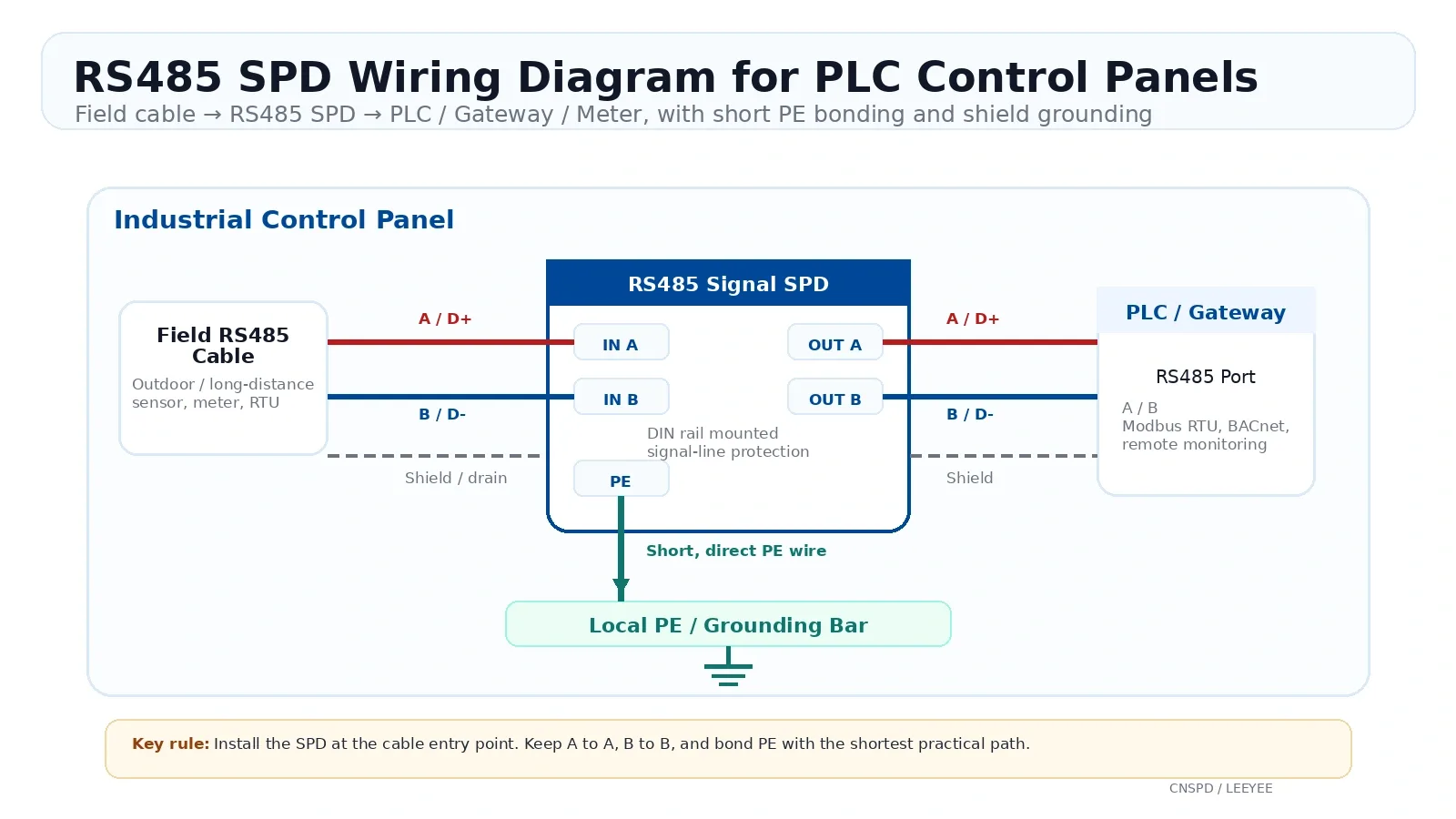
An RS485 SPD is normally wired in series with the communication line. The field cable enters the SPD first, then the protected output goes to the PLC, RTU, meter, or communication module.
Basic wiring logic
| SPD Terminal | Connect To | Notes |
|---|---|---|
| LINE / IN A | RS485 A from field cable | Connect the incoming exposed cable side here. |
| LINE / IN B | RS485 B from field cable | Keep the same polarity through the system. |
| OUT / EQUIP A | RS485 A of PLC, RTU, gateway, meter, or controller | This is the protected equipment side. |
| OUT / EQUIP B | RS485 B of PLC, RTU, gateway, meter, or controller | Keep the wire from SPD to equipment as short as practical. |
| PE / Ground | Local PE grounding bar or enclosure bonding bar | This connection must be short and direct. It is critical for surge discharge. |
| Shield / Drain wire | Shield grounding point according to panel grounding design | Usually grounded at one point, often at the control panel side, unless the project grounding design requires otherwise. |
Step-by-step wiring
- Identify the incoming RS485 cable from the field side.
- Confirm whether the system is 2-wire half-duplex or 4-wire full-duplex.
- Connect A and B to the matching IN or LINE terminals of the SPD.
- Connect the OUT or EQUIP terminals to the PLC, RTU, meter, gateway, or device port.
- Connect the PE terminal to the local PE bar using a short, straight grounding conductor.
- Route the protected RS485 cable away from high-voltage power cables where possible.
- After installation, check communication status before energizing the whole system.
Shield and Grounding Rules for RS485 SPD Installation
Grounding is the part that decides whether the RS485 SPD can work correctly. The SPD needs a low-impedance path to discharge surge current.
PE grounding for the SPD
The PE terminal of the SPD should be connected to the local grounding bar or enclosure bonding bar. Keep this wire as short and direct as practical. Do not coil it, route it around the panel, or run it together with the RS485 signal pair for a long distance.
Shield grounding for the RS485 cable
For many RS485 systems, the cable shield is grounded at one point, often at the main control panel or supervisor controller side. This helps reduce ground loop current.
However, grounding practice can vary by project. In high-EMC or lightning-prone sites, the shield strategy should follow the full system grounding design. The important point is not to leave the shield floating by accident and not to create uncontrolled ground loops.
How to Select an RS485 SPD
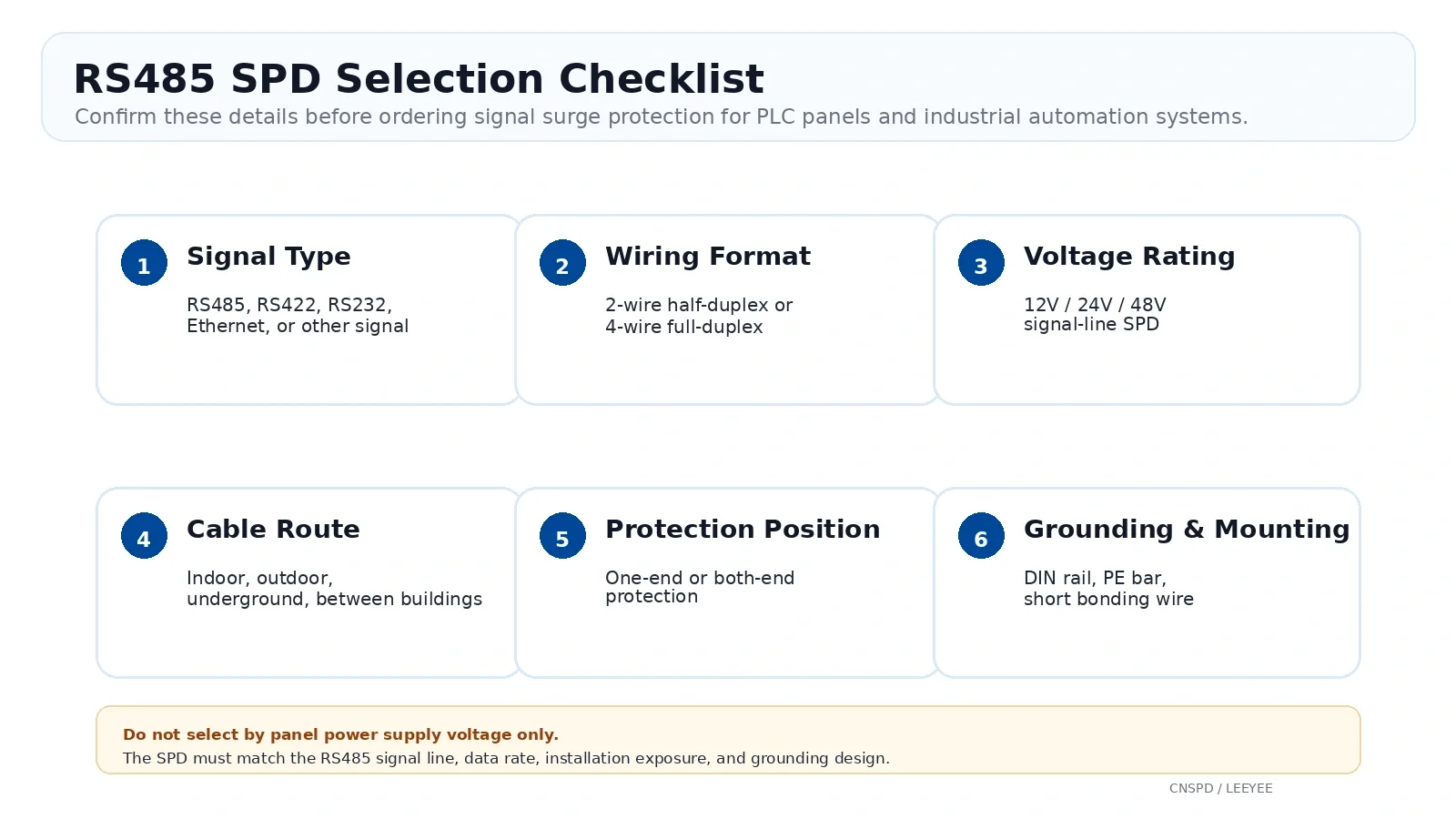
RS485 SPD selection should start from the communication interface, not from the power supply voltage of the whole panel. A signal-line SPD must match the RS485 line, signal topology, working voltage, data rate, and installation environment.
1. Confirm it is for RS485 signal lines
Do not use an AC power SPD on an RS485 communication line. Power SPDs and signal SPDs are designed for different circuits, voltage levels, waveforms, and protection behavior.
2. Confirm 2-wire or 4-wire RS485
| RS485 Topology | Common Use | SPD Selection Meaning |
|---|---|---|
| 2-wire half-duplex | Modbus RTU, PLC communication, meters, many industrial sensors | Use an SPD that protects one twisted pair, A and B. |
| 4-wire full-duplex | Some legacy or special industrial communication systems | Use a device or combination that protects both transmit and receive pairs. |
3. Confirm the signal-line voltage rating
RS485 systems may use different signal-line protection ratings, such as 12V, 24V, or 48V versions. The SPD voltage rating should be high enough for normal communication, but low enough to clamp dangerous transient voltage before it reaches the equipment port.
If the selected voltage is too low, the SPD may interfere with normal communication or age faster. If the selected voltage is too high, the protected device may see a higher residual voltage during a surge.
4. Check data rate and insertion loss
RS485 communication may be used for Modbus RTU, BACnet MS/TP, meters, industrial sensors, remote monitoring, and automation networks. The SPD should support the required transmission rate and should not add excessive capacitance or insertion loss to the line.
5. Check discharge capability and standard
For industrial control panels, the SPD should be selected according to the expected exposure level. Outdoor and long-distance cables usually require stronger surge withstand capability than short indoor cabinet wiring.
For signal-line surge protection, IEC 61643-21 is the relevant SPD standard family to check. This is different from IEC 61643-11, which applies to low-voltage power-line SPDs.
6. Check mounting and maintenance
For control panels, DIN rail mounting is usually preferred. It allows easier installation, cleaner wiring, and faster replacement during maintenance.
RS485 SPD Applications in Industrial Control Panels
RS485 SPDs are most valuable when the communication line leaves the protected cabinet, runs over a long distance, or connects to equipment in a different electrical environment.
Common RS485 SPD Wiring and Selection Mistakes
| Mistake | Possible Result | Better Practice |
|---|---|---|
| Using an AC power SPD on RS485 lines | Wrong clamping behavior, communication failure, or no real signal protection | Use a signal-line SPD designed for RS485 communication. |
| Reversing A and B wires | No communication or unstable data | Check terminal labels on both devices and keep polarity consistent. |
| Leaving the PE terminal unconnected | SPD cannot discharge surge energy effectively | Bond PE to the local grounding bar with a short, direct wire. |
| Installing only one SPD on a long outdoor cable | The unprotected end may still be damaged | Use both-end protection for exposed, long-distance, or inter-building cables. |
| Selecting the wrong voltage rating | Communication interference or weak protection | Confirm the RS485 interface and required signal-line SPD voltage before ordering. |
| Ignoring data rate and insertion loss | Signal distortion or unstable communication | Choose an SPD suitable for the required communication speed and protocol. |
| Routing RS485 cable next to high-power cables | More noise, more induced surge risk | Keep communication wiring separated from power wiring where possible. |
Before Ordering an RS485 SPD, Confirm These Details
For OEM control panel projects, distributor orders, or replacement purchases, send these details to the supplier before choosing a model.
- Is the communication line RS485, RS422, RS232, Ethernet, or another signal type?
- Is the RS485 network 2-wire half-duplex or 4-wire full-duplex?
- What is the required signal-line protection voltage, such as 12V, 24V, or 48V?
- What protocol is used, such as Modbus RTU, BACnet MS/TP, or another industrial protocol?
- What is the cable length?
- Is the cable indoor, outdoor, underground, on a tray, or between buildings?
- Will the SPD be installed at one end or both ends?
- Is DIN rail mounting required?
- Is there a local PE grounding bar inside the panel?
- Do you need OEM label, private label, packing, or bulk supply support?
Recommended LY10 Signal SPD for RS485 Control Panels
For RS485, telemetry, remote-control, PLC, sensor, and industrial communication lines, LEEYEE offers LY10 data signal surge protective devices. For PLC control panels and cabinet installation, the DIN rail version is more suitable because it supports clean wiring, standard panel mounting, and easier maintenance.
The LY10 series is available in 12V, 24V, and 48V signal-line versions. The selection should be based on the RS485 interface voltage, wiring format, data rate, cable exposure, and grounding condition. Do not select the signal SPD only according to the power supply voltage of the control panel.
| Specification | LY10 12V | LY10 24V | LY10 48V |
|---|---|---|---|
| Rated operating voltage | 12V | 24V | 48V |
| Max continuous operating voltage | 15V | 30V | 60V |
| Rated load current | 500mA | ||
| Flow withstand capacity | 10kV / 5kA | ||
| Clamping voltage x-x, 1.2/50 | 60V | 80V | 160V |
| Transmission rate | 10Mbps | ||
| Insertion loss | ≤0.2dB | ||
| Installation | DIN rail / plug-in type | ||
| Connection type | Connection terminal or screw IN/OUT, depending on version | ||
| Protection grade | IP20 | ||
Need help choosing the right RS485 SPD model?
Send us your PLC panel wiring, communication type, cable route, and required signal-line voltage. Our team can help recommend a suitable LY10 signal SPD for OEM panels, distributors, and industrial automation projects.
FAQ: RS485 SPD Wiring and Selection
Does RS485 need surge protection?
Yes, in many industrial systems it does. RS485 is more noise-resistant than many signal lines, but long cables, outdoor routes, separate grounding systems, motors, VFDs, and lightning-induced surges can still damage RS485 ports.
Where should I install an RS485 SPD?
Install it at the cable entry point of the control cabinet or equipment enclosure. For outdoor lines, long-distance cables, inter-building communication, or separate grounding systems, install RS485 SPDs at both ends of the cable.
How do I wire an RS485 surge protector?
Connect the incoming field cable to the LINE or IN side of the SPD. Connect the OUT or EQUIP side to the PLC, RTU, meter, gateway, or controller. Keep A to A and B to B, then bond the PE terminal to the local grounding bar with a short and direct wire.
Should the RS485 cable shield be grounded?
In many RS485 systems, the shield is grounded at one point, usually at the main control panel side, to reduce ground loop risk. However, shield grounding should follow the complete site grounding and EMC design, especially in lightning-prone or high-noise industrial sites.
Can I use an AC power SPD on an RS485 signal line?
No. AC power SPDs are designed for power circuits, not low-voltage communication signals. An RS485 line needs a signal-line SPD with suitable voltage rating, capacitance, transmission performance, and protection behavior.
Will an RS485 SPD affect communication?
A correctly selected RS485 SPD should not affect normal communication. Problems may occur if the SPD voltage rating, wiring format, capacitance, data-rate suitability, or grounding method is wrong.
Do I need one RS485 SPD or two?
For a short indoor cable that only enters one control panel, one SPD at the panel entry point may be enough. For outdoor, long-distance, inter-building, or separate-grounding applications, both-end protection is usually recommended.
Is RS485 the same as Modbus RTU?
No. RS485 is a physical communication interface. Modbus RTU is a common communication protocol that often runs over RS485 wiring. When selecting an SPD, confirm the RS485 wiring type, signal voltage, cable route, and grounding condition.
Does an RS485 SPD replace termination resistors?
No. An RS485 SPD protects against surge voltage. Termination resistors help maintain signal integrity and reduce reflections on the communication line. They solve different problems and should not replace each other.
What information should I send before buying an RS485 SPD?
Send the communication type, 2-wire or 4-wire wiring, required signal-line voltage, protocol, cable length, indoor or outdoor route, installation position, grounding condition, and whether OEM labeling is required.