
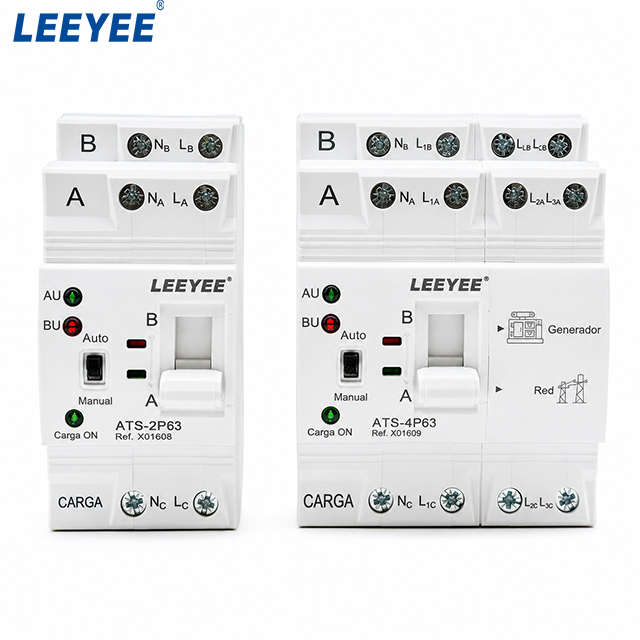
Compact automatic transfer switches use a simpler front-panel interface than large ATS controllers. On the LEEYEE compact ATS shown below, the user mainly sees A/B source identification, AU/BU indicators, Auto/Manual control, a load-related indicator and the physical A/B transfer position.
This guide explains how to read these ATS status indicators without confusing source condition with actual switch position. It also explains how common industry terms such as Source Available, Load Connected and Alarm relate to a compact ATS, and what panel builders or OEM buyers should confirm before requesting external status signals.
สารบัญ
Quick Answer: How Should You Read This Compact ATS?
Read the panel in three separate layers:
- Source-related status: the A-side and B-side indications provide information associated with the two incoming sources.
- Actual transfer position: the A/B mechanism position shows which side the switching mechanism is physically connected to.
- Operating mode: Auto and Manual identify how the ATS is being operated.
Do not assume that a compact ATS provides the same dedicated Normal Available, Emergency Available, Load on Normal, Fault Alarm, dry-contact or Modbus indications found on larger ATS controllers.
What Do the Indicators on the LEEYEE Compact ATS Show?
The product photograph gives a much better starting point than a generic ATS-controller illustration because it shows the interface the buyer will actually receive.
| Visible item | What can be stated safely | สิ่งที่ยังต้องยืนยัน |
|---|---|---|
| A / B | Identifies the two source or transfer positions on the ATS. | Which project source is wired to A and which is wired to B. |
| AU / BU | A-side and B-side source-related indicator labels visible on the product. | The exact electrical conditions that turn AU and BU on or off. |
| Auto | Relates to automatic ATS operation. | The exact automatic transfer and recovery sequence for the selected version. |
| คู่มือ | Relates to manual operation of the transfer mechanism. | The approved operating procedure before manual switching. |
| Carga ON | A load-related status indication printed on the product. | The exact electrical condition represented by the indicator. |
| A / B mechanism position | Shows the physical transfer position of the switching mechanism. | Which source assignment corresponds to each position in the project. |
Important: the product photo confirms the labels that are physically present. It does not, by itself, prove the exact internal logic behind AU, BU or Carga ON. Use the model-specific wiring and operating documentation for that confirmation.
What Do A and B Mean on This ATS?
A and B identify the two source sides and the two transfer positions of the compact ATS.
In a typical backup system, one side may be assigned to the normal supply and the other to the backup supply. However, A should not automatically be described as utility and B should not automatically be described as generator unless the project wiring and model documentation define them that way.
What Do AU and BU Mean?
AU and BU are clearly visible beside the A-side and B-side indicator lamps on the LEEYEE product.
Without the model-specific indicator logic, the technically safe description is A-side source-related status และ B-side source-related status. It would be inaccurate to rename them Normal Source Available and Emergency Source Available based only on appearance.
Source Status Is Not the Same as ATS Position
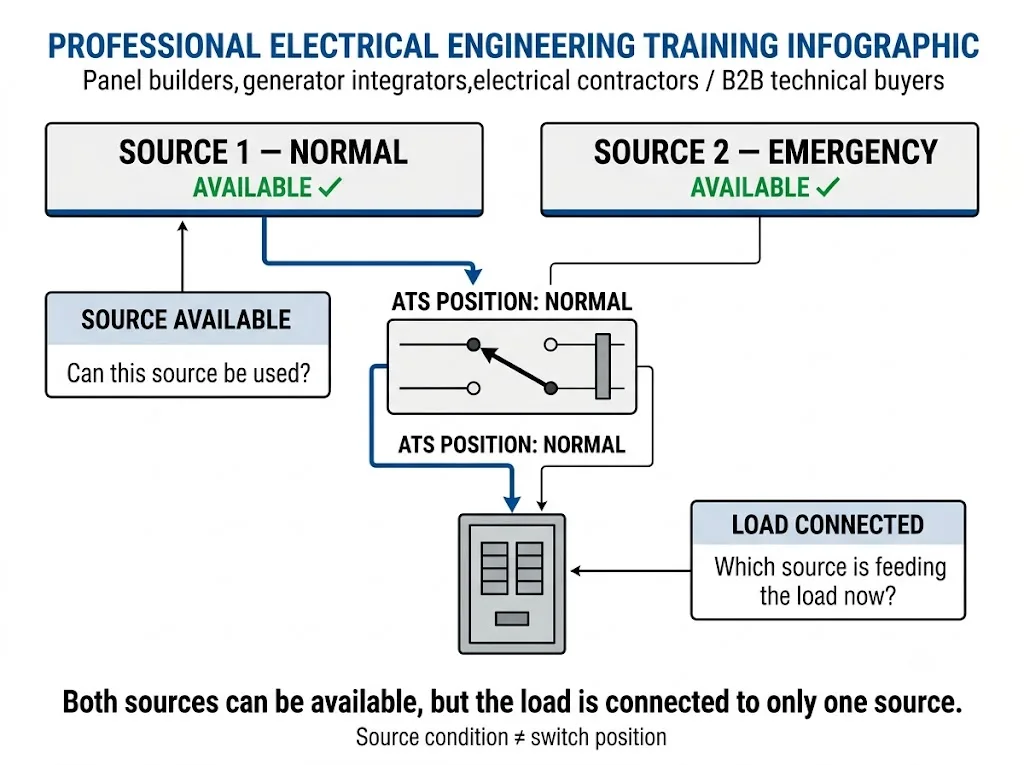
This distinction is central to ATS operation and is also used by larger industrial ATS controllers. Manufacturers such as ASCO and Eaton distinguish between the condition of a source and whether the transfer mechanism is actually connected to that source. [2][4]
Can Both Sources Be Available at the Same Time?
Yes. In a two-source transfer system, both incoming sources can be energized or acceptable while an open-transition ATS remains connected to only one source.
This is why a source-related indicator should not automatically be interpreted as proof that the load has transferred to that source.
What Does Auto Mean on This Compact ATS?
The product front panel includes an Auto indication and a Manual control. These are highly relevant to the actual product and should be treated as core operating information.
Manual operation should not automatically be described as a fault. Larger ATS controllers may provide a separate “Not in Auto” alarm or status output, but that function should not be assumed on this compact model.
What Does Carga ON Mean?
The product front panel includes the text Carga ON. “Carga” is Spanish for “load,” so the label is clearly load-related.
However, the photograph alone does not establish the precise sensing logic behind the indicator. It should therefore not be rewritten as “Load on Normal” or “Load on Emergency.”
How Does the Grid / Generator Version Relate to A and B?
The 4P product photograph also shows Generador และ สีแดง markings. These identify generator and grid application concepts on that product version.
For project drawings, the correct approach is still to document which terminals and A/B position correspond to the grid and generator sources. Do not rely on visual assumptions when approving the panel wiring.
Does This Product Have a Dedicated Fault Alarm?
The visible front panel shown in the LEEYEE product photograph does not show a dedicated large-controller-style FAULT, COMMON ALARM or alarm-code display.
Larger ATS controllers from ABB, ASCO and Eaton can provide dedicated alarm indications, event information or programmable alarm outputs. Those features are useful for explaining industry terminology, but they should not be presented as standard functions of this compact LEEYEE ATS without model-specific confirmation. [2][3][4]
Can ATS Status Be Sent to a PLC, BMS or Remote Alarm?
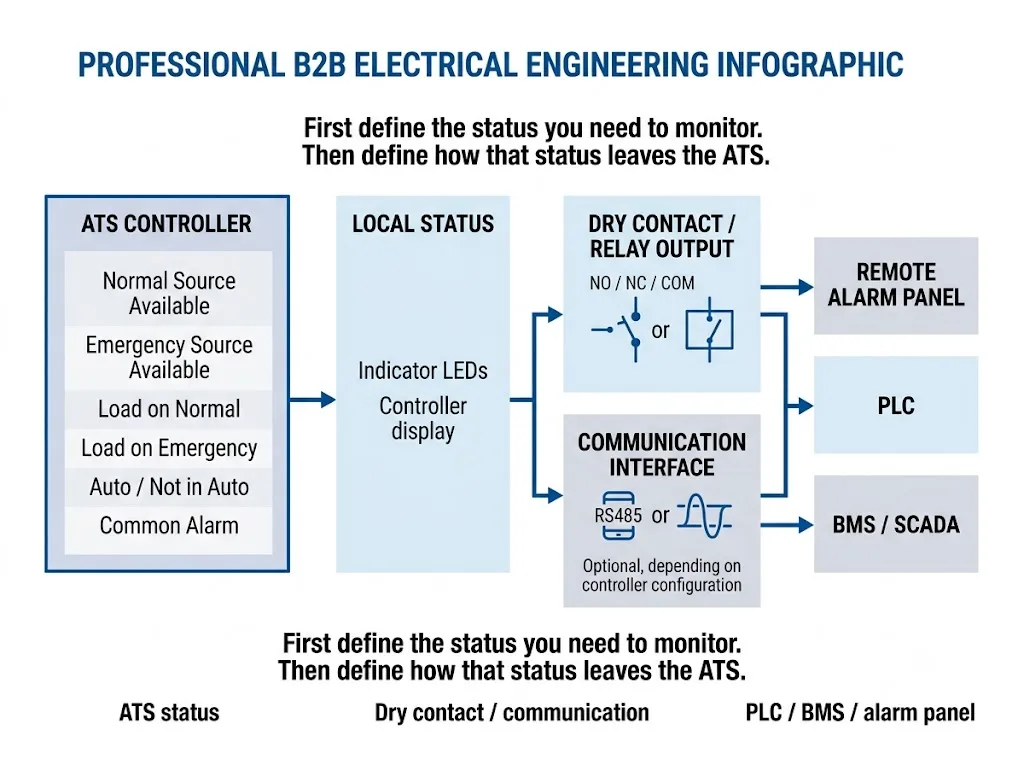
In the wider ATS market, status information can be exported through auxiliary contacts, programmable relay outputs or communication interfaces. Some industrial controllers also support digital communication.
This is an industry monitoring concept, not a claim that every compact ATS provides those interfaces. For the LEEYEE compact model, do not assume independent Source Available contacts, Common Alarm, BMS communication, RS485 or Modbus unless those functions are listed in the approved model documentation.
Which Status Information Should an OEM Buyer Specify?
A useful ATS enquiry should describe the information required by the panel or monitoring system rather than asking generically for “alarm contacts.”
| Required information | เหตุใดจึงสำคัญ | สิ่งที่ต้องยืนยัน |
|---|---|---|
| A-side source status | Understand the condition associated with source A | Exact AU logic and whether external output is available |
| B-side source status | Understand the condition associated with source B | Exact BU logic and whether external output is available |
| A/B transfer position | Confirm which source position is selected | Whether remote position feedback is required and supported |
| Auto / Manual status | Know the operating mode | Whether mode feedback is available externally |
| Alarm requirement | Notify a remote operator of an abnormal condition | Whether the selected model provides the required alarm output |
Do Not Confuse Generator Start with ATS Status Feedback
These are different signal directions. A project may require one, both or neither, depending on the generator controller and ATS design.
Dry Contacts and Modbus Are Interfaces, Not Status Definitions
“Source A status,” “ATS position” and “alarm” describe information. Dry contacts, relay outputs or Modbus describe ways of transporting information.
This distinction prevents a common procurement error: requesting “Modbus” without defining what the BMS must actually read, or requesting “dry contacts” without specifying which states are required.
How Do Larger ATS Controllers Use Different Status Terms?
Larger ATS controllers commonly use more detailed terminology. Schneider Electric / ASCO documentation separates Normal Source Accepted, Emergency Source Accepted, Load on Normal และ Load on Emergency. Eaton documentation similarly separates Source Available and Source Connected states on applicable controllers. [2][4]
These terms explain the engineering logic behind ATS monitoring, but they should not be copied onto the LEEYEE compact ATS unless the corresponding function actually exists on the selected model.
What Does IEC 60947-6-1:2026 Cover?
IEC 60947-6-1:2026 covers transfer switching equipment and includes automatic transfer switching equipment and ATS controllers. [1]
The standard provides the overall transfer-switching equipment framework. It does not mean all ATS products must use identical indicator names, front-panel layouts, auxiliary contacts or communication interfaces. Those details remain product-specific.
Before Ordering: Compact ATS Status Checklist
- แรงดันไฟฟ้าและความถี่ของระบบ
- กระแสไฟฟ้าที่ระบุ
- 2P or 4P configuration
- Which source is connected to A
- Which source is connected to B
- Grid / generator or other two-source application
- Required Auto / Manual operation
- Required source-status indication
- Required transfer-position feedback
- Required load-related indication
- Required fault or common alarm output, if any
- Required NO / NC / COM contacts, if any
- PLC / BMS interface requirement, if any
- RS485 / Modbus requirement, if any
- OEM front-panel or terminal-label requirement
Need to Confirm ATS Status or Interface Requirements?
Send your system voltage, current, 2P/4P requirement, A/B source arrangement and any external status signals required by the project. LEEYEE can confirm the suitable compact ATS configuration and the available interface before model approval.
Compact ATS Status Indicator FAQ
What do A and B mean on the LEEYEE ATS?
A and B identify the two source or transfer positions. The project wiring diagram should define which actual power source is assigned to each side.
What do AU and BU mean?
AU and BU are source-related indicator labels associated with the A and B sides. Their exact electrical switching logic should be confirmed from the model-specific documentation rather than inferred only from the product photograph.
Is a source indicator the same as the A/B transfer position?
No. A source-related indication describes the condition associated with a source. The physical A/B position describes where the switching mechanism is actually positioned.
Can both sources be available at the same time?
Yes. Both incoming sources can be available while an open-transition ATS remains connected to only one source.
Does Manual mean there is an ATS fault?
No. Manual is an operating mode. It should not be treated as a fault unless the model-specific product documentation states otherwise.
Does this compact ATS have a dedicated common alarm?
A dedicated Common Alarm is not visible on the front panel shown here. If a project requires a separate alarm output, confirm that requirement with LEEYEE before ordering.
Does this compact ATS support Modbus or BMS monitoring?
Do not assume RS485, Modbus, BMS communication or independent remote status outputs are standard. These functions must be confirmed for the specific ATS configuration before project approval.
เอกสารอ้างอิง
- IEC, IEC 60947-6-1:2026 — อุปกรณ์สวิตช์และควบคุมแรงดันต่ำ — ส่วน 6-1: อุปกรณ์หลายฟังก์ชัน — อุปกรณ์สวิตช์โอนถ่าย. สิ่งพิมพ์อย่างเป็นทางการของ IEC.
- Schneider Electric / ASCO Power Technologies, Series 300 Automatic Transfer Switch functional-test guidance, including separate source-accepted and load-position indications. คำถามที่พบบ่อยอย่างเป็นทางการจาก Schneider Electric.
- ABB, Automatic Transfer Switch ATS022 — Installation and Operating Instructions, including operating modes, alarms and controller I/O. Official ABB document.
- อีตัน, ATS Controllers and Remote Annunciators Design Guide, including separate source-availability and source-connected states on applicable controllers. Official Eaton design guide.
- หลี่อี้, ATS-63 Automatic Transfer Switch Product Page. LEEYEE ATS product information.