Is It Normal for a Surge Protector Light to Flicker? An Expert Guide from LEEYEE Electrics
Discovering a flickering indicator light on your surge protector (also known as an SPD) can certainly raise concerns. Is this subtle change in illumination a sign of normal device function, or a warning of a potential risk? As a professional manufacturer with over a decade of expertise in electrical protection, LEEYEE Electrics frequently receives inquiries regarding this very issue. In this comprehensive article, we will delve into the various possibilities behind a flickering surge protector light, offering you a clear and actionable set of solutions to accurately assess your device’s status and ensure the uninterrupted safety of your home and office electronics.
Understanding Surge Protectors and Their Operational Principles
To grasp the significance of a flickering indicator light, it’s crucial to first comprehend the fundamental role of a surge protector. A surge protector acts as a critical defense line, shielding sensitive electronic equipment from transient voltage spikes (known as “surges”). These surges can originate from lightning strikes, utility grid switching operations, or even the cycling on and off of large household appliances. The primary function of a surge protector is to absorb and divert this destructive excess energy away from your connected valuable devices such as computers, televisions, and audio systems.
40kA
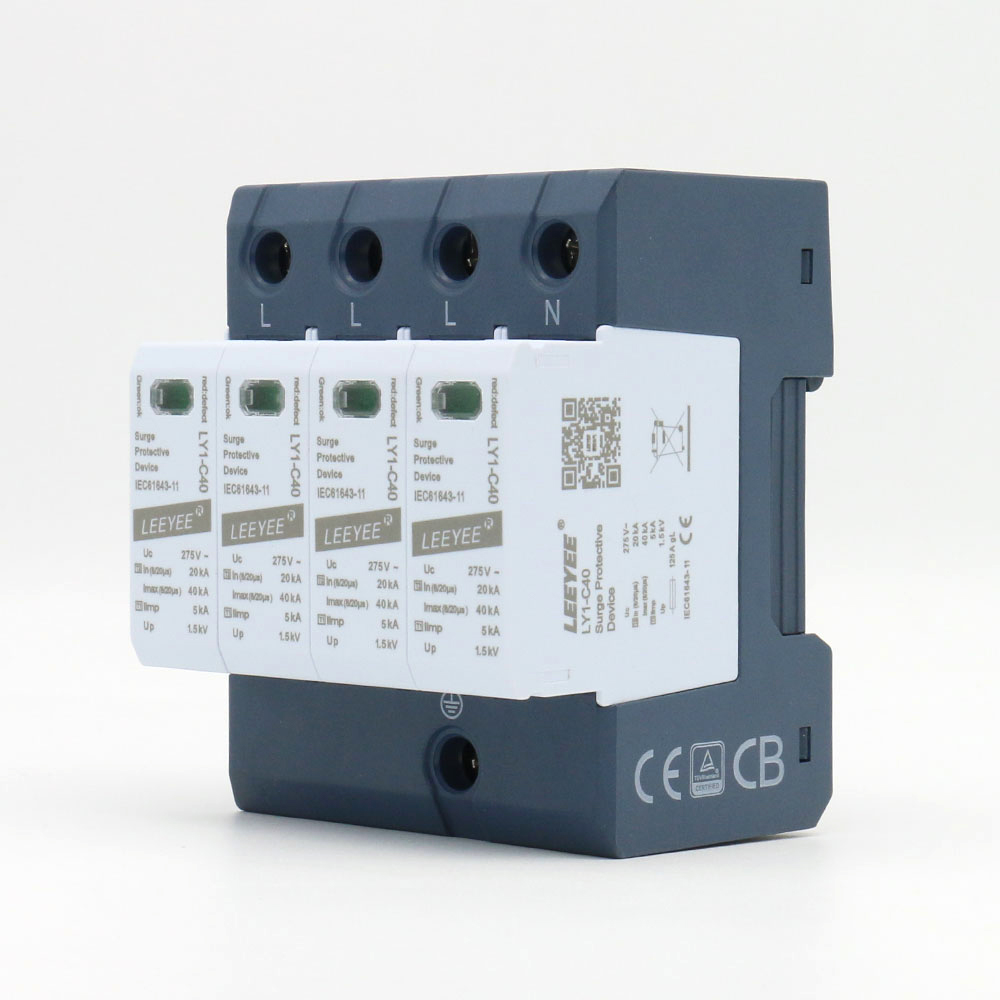
Most modern surge protectors are equipped with status indicator lights to display their operational condition. A steady green light typically signifies “protection active,” while an extinguished, discolored, or flickering light can indicate various scenarios. For instance, some of LEEYEE‘s advanced surge protectors incorporate more intelligent indication systems, capable of more precisely reflecting the health status and real-time operational state of their protection modules.
Four Potential Reasons for a Flickering Surge Protector Light
A flickering indicator light can stem from multiple factors, ranging from harmless normal phenomena to serious issues requiring immediate attention. The table below clearly summarizes these possibilities:
| Potential Reason | Detailed Explanation | Recommended Action |
|---|---|---|
| Normal Operation Mode | Some surge protector models are designed to flicker briefly when actively absorbing or “clamping” minor voltage fluctuations. This indicates the device is diligently working to filter out electrical noise from the power grid. | No action required. Consult your product manual to confirm if this is a normal characteristic for your specific model. |
| Unstable Grid Voltage | If your local power supply experiences frequent voltage fluctuations, the surge protector will respond repeatedly, causing the indicator light to flicker. While this demonstrates the protector is performing its duty, it also highlights an underlying issue with your power supply environment. | Observe if the flickering correlates with the startup of high-power appliances like air conditioners or refrigerators. If the problem is frequent, consider consulting a professional electrician to inspect your home’s wiring. |
| Degradation or Failure of Protection | This is the most critical scenario. The core components of a surge protector (typically Metal Oxide Varistors, MOVs) experience minor degradation each time they absorb a surge. When the total energy absorbed approaches or exceeds its designed lifespan (measured in Joules), its protective capacity significantly diminishes, eventually leading to failure. Persistent flickering or a light changing from green to red/orange often signals the end of the device’s effective life. | Immediately discontinue use and replace the surge protector. Choosing products like those from LEEYEE that provide clear Joule ratings and status indicators can offer greater peace of mind. |
| Loose Connections | A seemingly simple yet often overlooked issue is physical connectivity. Any loose connection, whether between the surge protector’s plug and the wall outlet, or between your device’s plug and the protector’s receptacles, can lead to unstable current and consequently, a flickering indicator light. | Power off, unplug all connections, and carefully inspect and re-secure them. Ensure there are no signs of deformation or scorching on the plugs or outlets. |
Flickering Light Detected? Follow These Troubleshooting Steps
If you are unsure about the cause of the flickering, follow these systematic steps for diagnosis:
- Safety First: Disconnect Power : Before undertaking any inspection, always unplug the surge protector from the wall outlet to ensure safety.
- Perform a Visual Inspection : Carefully examine the surge protector’s casing for cracks, melting, burn marks, or unusual odors. Any physical damage necessitates immediate replacement.
- Check All Connection Points : Re-insert the surge protector into a confirmed working wall outlet, ensuring a secure fit. Then, plug your electronic devices back into the protector one by one, again ensuring tight connections.
- Isolate Variables for Testing : If the flickering persists, try plugging the surge protector into an outlet in another room. If the flickering stops in the new environment, the issue might be with the original circuit or outlet. If the flickering continues, the problem is likely with the surge protector itself.
- Replace Decisively : If, after following the above steps, the flickering issue remains unresolved, or if your surge protector has been in service for more than 3-5 years (the recommended replacement cycle for most consumer-grade products), the safest option is to replace it. Do not risk your valuable electronic equipment.
Best Practices for Extending Surge Protector Life and Effectiveness
To maximize your investment and ensure device safety, we recommend adhering to these best practices:
- Invest in Quality Products : Choose surge protectors from reputable brands like LEEYEE, which hold international certifications such as CE, CB, TUV, and ISO9001. A high-quality surge protector not only boasts a higher Joule rating and faster response time but also features superior manufacturing and materials that guarantee long-term stable operation.
- Avoid Overloading : Every surge protector has a maximum power capacity (typically measured in Watts). Never connect devices that exceed its rated power, and especially avoid plugging multiple high-power appliances (e.g., space heaters, microwaves) into the same protector.
- Regularly Check Status Indicators : Make it a habit to regularly (e.g., monthly) check the status indicator lights on your surge protector. This simple practice can help you detect potential issues early.
- Proactive Replacement : Do not wait for clear signs of complete failure. If your area experiences frequent lightning, or if you know the device has endured a significant power surge (e.g., after a nearby lightning strike), even if the indicator light appears normal, consider proactive replacement, as its protective capacity may have significantly diminished.
Frequently Asked Questions (FAQ)
Q1: Do all surge protectors have indicator lights?
A1: Not all, but the vast majority of modern home and commercial surge protectors are equipped with at least one indicator light to display their protection status. We strongly recommend choosing products with clear status indication features, such as LEEYEE‘s product line, which provides immediate insight into the protection status.
Q2: Is a higher Joule rating better for surge protectors?
A2: Yes. The Joule rating represents the total energy a surge protector can absorb before failing. A higher value signifies a longer lifespan and stronger resistance to single, powerful surges. For protecting expensive or critical equipment, you should select products with at least 1000 Joules or more.
Q3: Can surge protectors protect against lightning strikes?
A3: Surge protectors can defend against conductive surges caused by distant lightning strikes but cannot withstand direct lightning strikes. A complete lightning protection system requires professional external lightning arresters and an internal multi-stage surge protection network. LEEYEE offers a full range of SPD products from Type I to Type III, enabling professional lightning protection solutions for various scenarios.
Q4: How often should I replace my surge protector?
A4: A general recommendation is every 3 to 5 years. However, if your device is located in a high-surge area, or if its indicator light shows abnormalities, it should be replaced immediately. Proactive replacement is the most cost-effective way to protect your equipment.
Q5: Does a flickering light consume a lot of electricity?
A5: No. The power consumption of an LED indicator light is extremely low. Even if it flickers continuously, its energy consumption is negligible and can be virtually ignored. Your primary concern should be the device status information that the flickering represents.
Conclusion: Listening to Your Protector’s “Heartbeat”
In summary, a flickering indicator light on your surge protector is a signal that warrants your attention. It could be a sign of normal device operation, an unstable power grid, or a warning that the device is nearing the end of its protective life. By utilizing the knowledge and troubleshooting steps provided in this article, you can confidently interpret these signals and take appropriate action.
Protecting your electronic devices is an investment that should not be overlooked. Choosing a trustworthy brand like LEEYEE Electrics and regularly inspecting your protective equipment are the most effective strategies to ensure the safety and longevity of this investment. Do not wait until a power surge causes irreparable damage.
About LEEYEE Electrics
Established in 2009, LEEYEE Electrics has emerged as a leading manufacturer in the field of low-voltage electrical protection, specializing in the research and development, and production of Surge Protective Devices (SPDs), fuses, isolator switches, and more. We proudly boast that our entire product line has passed stringent international certifications including CE, CB, ISO9001, and TUV. Furthermore, we offer flexible customization services, catering to your specific needs for product appearance, technical parameters, and brand logos. Feel free to contact us anytime via email at max@cnspd.com to obtain our latest product catalogs and professional consultation.