
Network cabinet surge protection should evaluate both the AC power input and every exposed copper Ethernet or PoE line entering the cabinet.
This guide is written for weak-current contractors, network cabinet integrators, security system suppliers, facility maintenance teams and OEM buyers. It focuses on one network or weak-current cabinet rather than an entire data center.
An AC SPD protects the cabinet power path. An RJ45 SPD protects exposed Ethernet or compatible PoE conductors. A rack PDU or UPS does not automatically provide both functions.
Table of Contents
Network Cabinet Protection Is More Than a Rack PDU
These devices may appear in the same cabinet, but they perform different functions.
Rack PDU
Distributes AC power to switches, routers, NVRs and other equipment.
Confirm whether it includes a tested surge-protection function. Do not assume from the product name.
UPS
Supports backup power and other functions according to its design.
It does not automatically confirm coordinated AC or Ethernet surge protection.
AC Power SPD
Limits transient overvoltage entering through the cabinet AC supply.
Select it according to the electrical system and upstream protection.
RJ45 SPD
Limits transient overvoltage on exposed Ethernet or compatible PoE conductors.
Select it according to speed, pairs, PoE and installation.
Identify every AC power and copper data line entering or leaving the cabinet. Then select the required protection devices.
When Should a Network Cabinet Use SPD Protection?
The requirement depends on cable exposure, connected equipment, the electrical design and the operational cost of downtime.
Evaluate both paths when the cabinet has exposed power or copper data connections.
The data-line risk is higher when Ethernet connects an outdoor camera, access point, gate controller, rooftop device or equipment in another building.
The AC supply requires a separate review. Protecting only one path leaves the other path exposed.
Two protection checks. AC power and exposed copper Ethernet or PoE
Outdoor copper cable
Evaluate RJ45 protection for exposed cameras, APs, intercoms and other field equipment.
Cabinet AC supply
Review voltage, earthing system, upstream protection and cable distance.
Downtime consequence
Give greater attention to cabinets supporting security, communications or building systems.
Coordinate AC Power, Ethernet and Equipotential Bonding
The AC SPD, RJ45 SPD, cabinet frame, DIN rail and grounding bar should be planned as one coordinated system.
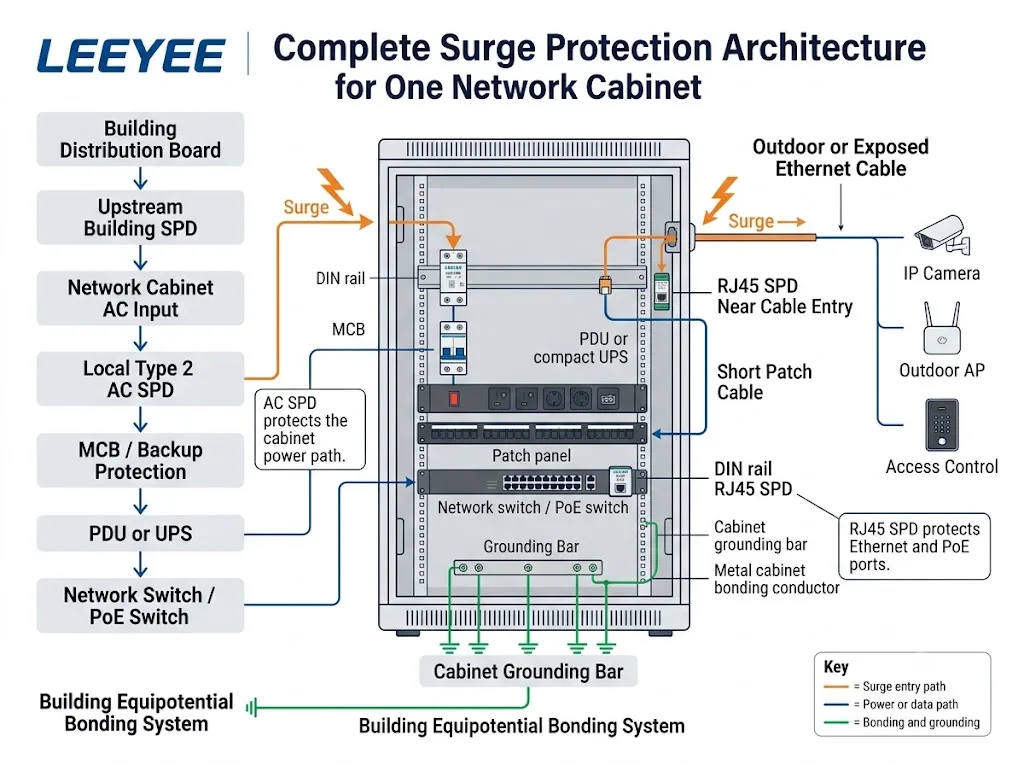
Protect the cabinet power input
The final arrangement depends on the supply system, upstream protection and cabinet wiring.
Protect the exposed copper entry
Avoid leaving a long unprotected cable loop inside the cabinet.
For UPS bypass circuits, redundant distribution, A/B paths and facility-level protection, see the Data Center Surge Protection Guide .
Confirm the Electrical System Before Selecting the AC SPD
A cabinet enclosure or equipment photo is not enough to confirm the correct AC protection device.
Why local protection may still be needed
Cable distance, residual voltage, equipment sensitivity and the upstream SPD can affect the stress reaching the cabinet.
A coordinated local Type 2 SPD may be considered in many applications, but the actual system must be reviewed first.
Standards framework
IEC 61643-11:2025 covers SPDs connected to AC low-voltage systems. IEC 61643-01:2024 provides common requirements, and IEC 61643-12:2020 addresses application and coordination.
Supply system
Voltage, phase arrangement, frequency and earthing system.
SPD ratings
Type, Uc, In, Imax, Up, pole configuration and certificates.
Coordination
Upstream SPD, conductor length and backup protection.
Cabinet space
DIN rail width, wiring route and replacement access.
An RJ45 Connector Does Not Confirm Compatibility
Confirm the network performance, PoE arrangement and cabinet installation before ordering.
Network performance
Confirm data rate, cable category, active pairs and shielding.
PoE requirement
Confirm voltage, current, powered pairs and the connected equipment.
Cabinet integration
Confirm port count, mounting, grounding and plug clearance.
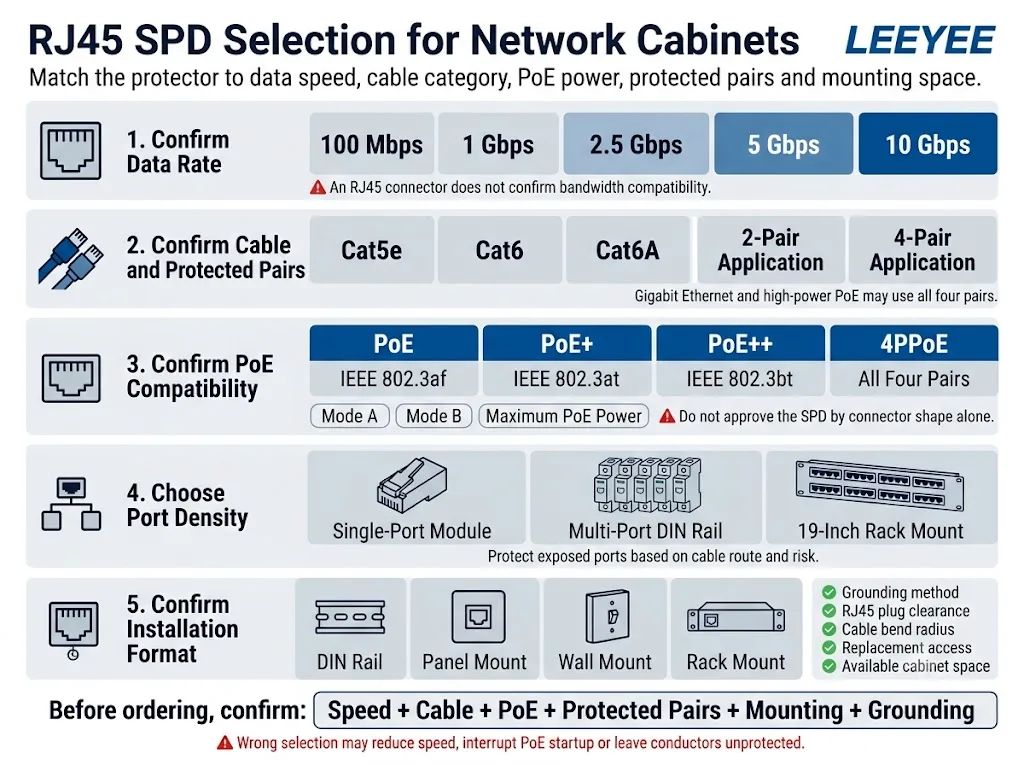
See the RJ45 Surge Protector Selection Guide for cable category, speed, pairs and transmission performance.
See the PoE Surge Protector Guide for switch-side, field-side and two-end protection.
Current LEEYEE RJ45 Product Capability
Product claims must follow the actual datasheet. A general guide must not imply unsupported data rates or PoE capabilities.
LEEYEE LY21-2 RJ45 PoE Network Surge Protector
LY21-2 is an inline protector for compatible PoE power and Ethernet data circuits. Final pin assignment and system compatibility must be confirmed before ordering.
Do not describe this documented configuration as Gigabit, 2.5G, 5G, 10G or IEEE 802.3bt compatible without separate test evidence.
View LY21-2 product data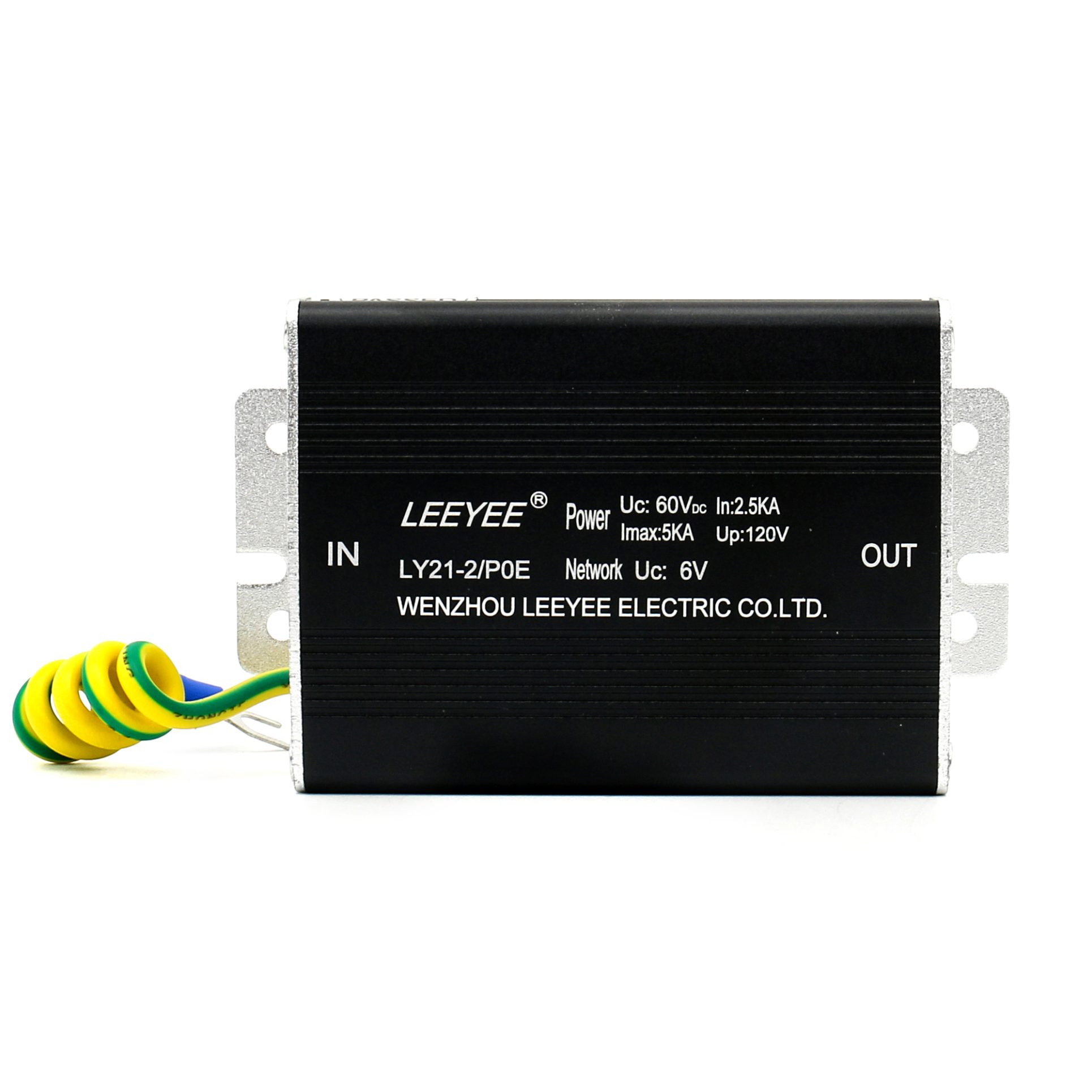
Install the SPD Near the Protection Boundary
Correct product selection can still fail when the protector is installed far from the cable entry or connected through an unsuitable bonding path.
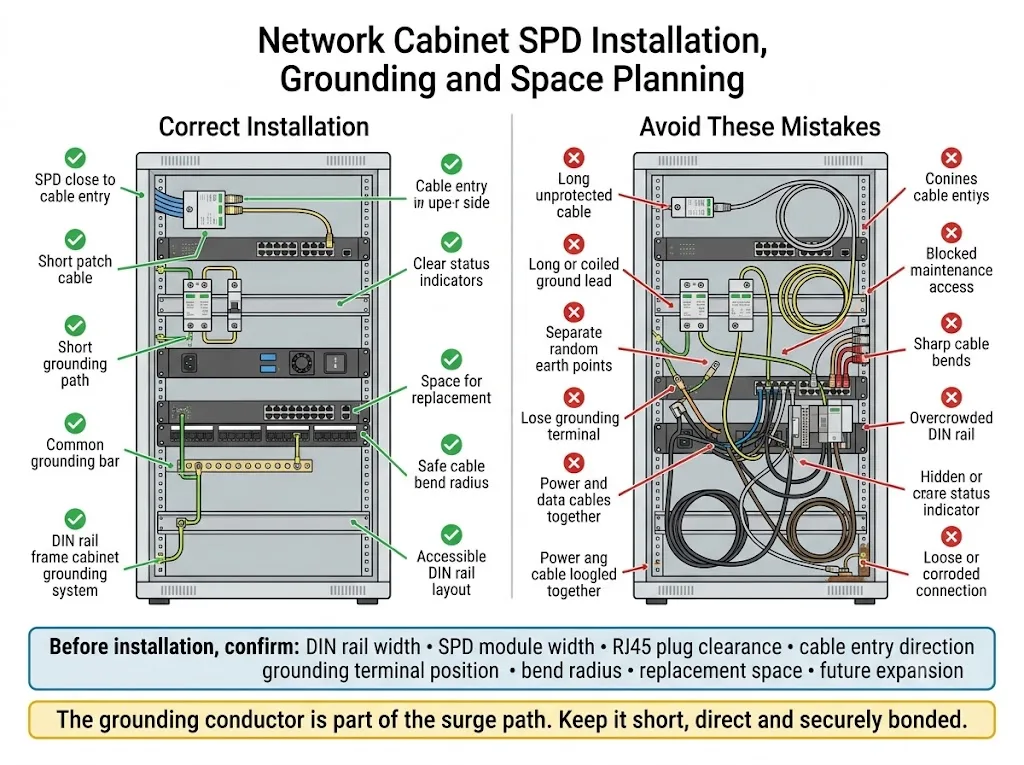
Recommended checks
- Place the RJ45 SPD close to the cable entry.
- Keep the protected patch cable short.
- Use the specified grounding method.
- Bond the cabinet and relevant metalwork.
- Keep status indicators visible.
- Allow adequate plug and bend clearance.
- Organise protected and unprotected cables.
- Allow access for replacement and inspection.
Avoid these mistakes
- Long unprotected Ethernet loops.
- Long or coiled grounding conductors.
- Loose or corroded bonding connections.
- Unrelated random grounding points.
- Sharp data-cable bends.
- Blocked status indicators.
- No room for module replacement.
- Ignoring RJ45 plug clearance.
Its length, routing and connection quality affect the practical protection result. One earth-resistance number does not describe the complete cabinet installation.
Protection Priorities by Network Cabinet Application
Use these compact application cards for the first project assessment.
Indoor Office Cabinet
CCTV or Security Cabinet
Building Entrance Cabinet
Outdoor Network Enclosure
Inter-Building Copper Link
PoE Access-Point Cabinet
Information to Send Before Requesting a Quotation
These items normally provide enough information for an initial model and sample assessment.
Send the switch datasheet, cabinet drawing, single-line diagram, internal cabinet photo, outdoor-device model or cable schedule.
1. Engineering review
- Electrical-system confirmation
- RJ45 interface review
- PoE and pair-map review
- Mounting and grounding review
2. Sample approval
- Mechanical fit
- Network-link operation
- PoE startup and load
- Label and packaging approval
3. Bulk-order confirmation
- Final model and quantity
- Approved technical documents
- OEM artwork
- Inspection and delivery terms
Network Cabinet SPD Inspection Checklist
Inspection should form part of the cabinet’s normal maintenance process.
Routine checks
- Check the AC SPD status indicator.
- Inspect RJ45 SPD connections.
- Check grounding and bonding terminals.
- Look for corrosion or condensation.
- Check for overheating or damage.
- Confirm replacement units are available.
Additional inspection triggers
- A known lightning or surge event
- An SPD status change
- Unexplained switch-port failure
- Outdoor equipment damage
- Cabinet water ingress
- A changed cable route or connected device
Network Cabinet Surge Protection FAQ
Does every network cabinet need surge protection?
No. The requirement depends on the AC supply, exposed cable routes, connected equipment, upstream protection and acceptable downtime.
Is a surge-protected rack PDU enough?
Not necessarily. Confirm the PDU’s actual protection standard and ratings. It also does not automatically protect exposed Ethernet or PoE lines.
Does a UPS replace the AC SPD?
Do not assume so. Review the UPS specification and the coordinated protection design.
Does every switch port need an RJ45 SPD?
No. Focus on ports connected to outdoor, long, inter-building or otherwise exposed copper lines.
Where should the RJ45 SPD be installed?
Install it close to the point where the exposed copper cable enters the protected cabinet area.
Is LEEYEE LY21-2 suitable for Gigabit Ethernet?
The currently documented LY21-2 configuration supports transmission up to 100Mbps. It must not be presented as Gigabit compatible without separate test evidence.
What information should I send for selection?
Send the cabinet voltage, switch model, data rate, PoE requirement, exposed port count, cable route, mounting space and quantity.
References
- International Electrotechnical Commission. IEC 61643-11:2025 — Surge protective devices connected to AC low-voltage power systems .
- International Electrotechnical Commission. IEC 61643-01:2024 — General requirements and test methods for low-voltage SPDs .
- International Electrotechnical Commission. IEC 61643-12:2020 — Selection and application principles for AC power-system SPDs .
- International Electrotechnical Commission. IEC 61643-21:2025 — SPDs connected to telecommunications and signalling networks, including PoE .
- International Electrotechnical Commission. IEC 61643-22:2015 — Selection, location and coordination of telecommunications and signalling SPDs .
- International Electrotechnical Commission. IEC 62305-4:2024 — Electrical and electronic systems within structures .
- LEEYEE. LY21-2 RJ45 PoE Network Surge Protector — official product information .
- IEEE Standards Association. IEEE 802.3bt-2018 — Power over Ethernet over four pairs .