
Vous ne savez pas si le parafoudre d'un tableau de distribution, d'un panneau OEM ou d'un boîtier de raccordement solaire est défectueux ? Ce guide présente une procédure d'inspection pratique destinée aux équipes de maintenance, aux services après-vente des maîtres d'œuvre (EPC), aux fabricants de panneaux et aux distributeurs de parafoudres.
L'objectif ne se limite pas à la simple lecture d'un voyant rouge. Un contrôle correct des défaillances du SPD doit inclure la vérification du voyant visuel, du contact de signal à distance, de l'état du boîtier, des bornes, des récents événements de foudre, des différences entre les applications CA et CC, ainsi que la confirmation des paramètres de remplacement.
Consigne de sécurité : l'inspection et le remplacement des parasurtenseurs doivent être effectués par du personnel électricien qualifié. Ne retirez pas une cartouche de parasurtenseur enfichable, n'ouvrez pas un boîtier de regroupement et ne touchez pas les bornes lorsque le circuit est sous tension.
Commencez par vérifier la fenêtre d'état du SPD. Si le voyant est rouge, s'il s'est déclenché, s'il est éteint ou s'il présente un état anormal par rapport aux indications figurant sur l'étiquette du produit, le module SPD doit être inspecté et, en règle générale, remplacé. Vérifiez ensuite le contact du signal à distance, la présence éventuelle de dommages visibles, l'état des bornes, le fusible ou le disjoncteur en amont, et si le site a récemment subi des coups de foudre ou des surtensions de commutation.
| Point de contrôle | Ce qu'il faut rechercher | Ce que cela signifie généralement | Mesures recommandées |
|---|---|---|---|
| Fenêtre d'indicateurs | État « rouge », « déclenché », « vide » ou « anormal » | Le sectionneur interne s'est peut-être déclenché | Planifier le remplacement du module et confirmer le modèle |
| Signal à distance | Le contact d'alarme change d'état ou une alarme BMS/PLC est active | Le SPD peut être hors tension avant même que quelqu'un ne vérifie le tableau électrique. | Ouvrez le panneau en toute sécurité et vérifiez l'état du SPD |
| Boîtiers et bornes | Traces de brûlure, fissures, traces de fusion, décoloration, odeur, fils dénudés | Risque de dommages dus à une surtension, de surchauffe ou de mauvaise connexion | Couper l'alimentation et effectuer les vérifications nécessaires avant de remettre le courant sous tension |
| Après un orage | Plusieurs SPD signalent des alarmes au sein d'un même site ou d'un même groupe de boîtiers de regroupement | Le site pourrait nécessiter une inspection par lots, et non le remplacement de modules individuels. | Inspecter tous les panneaux apparents et consigner l'historique des remplacements |
| Paramètres de remplacement | Uc, Ucpv, Type, pôles, In, Imax, signal à distance, taille du module | Un remplacement inadapté peut entraîner une défaillance prématurée ou laisser le système insuffisamment protégé. | Vérifiez la puissance nominale avant de commander des modules de rechange ou de nouveaux SPD. |
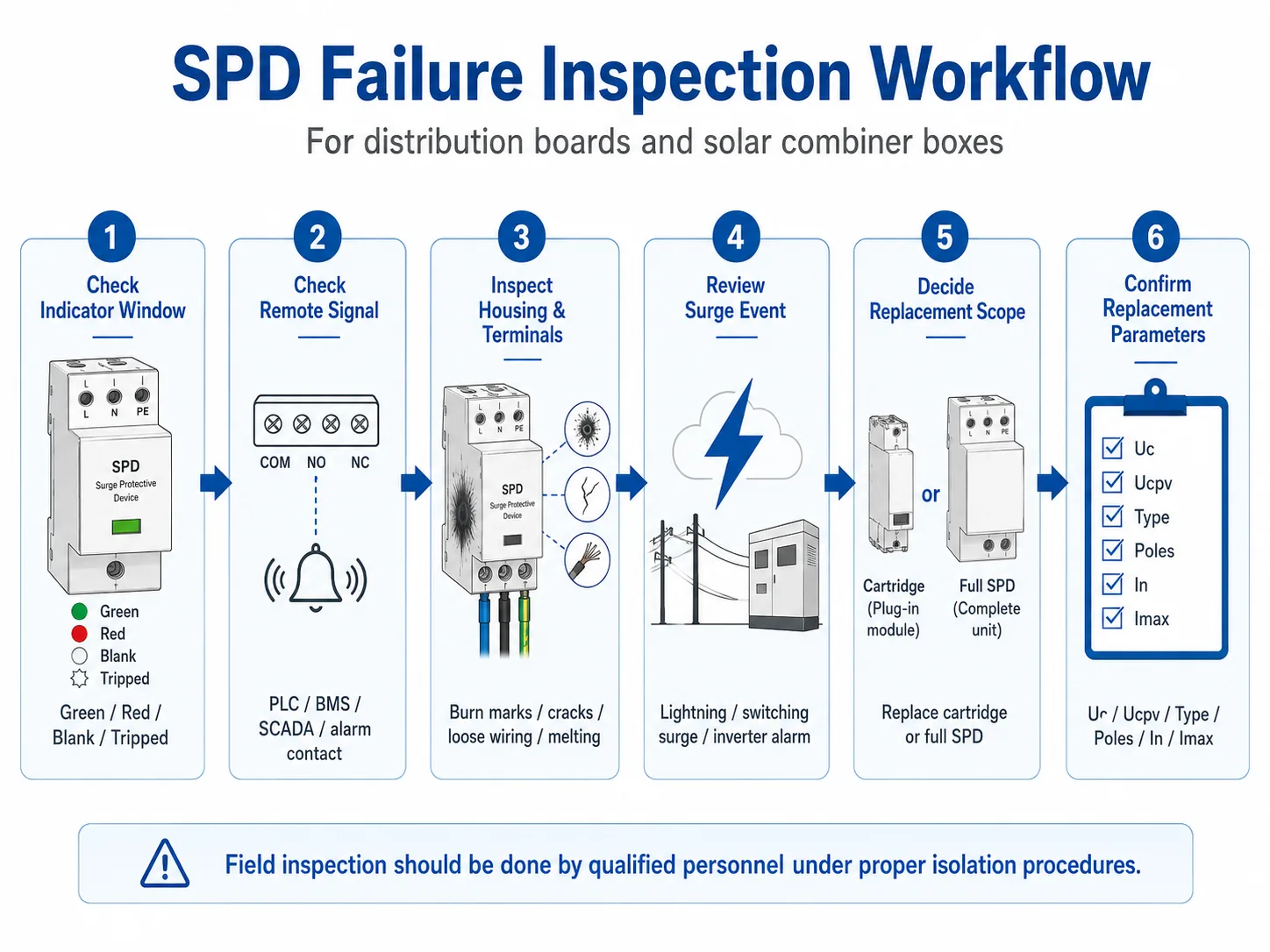
Table des matières
La vérification du bon fonctionnement du SPD ne se limite pas à observer la présence d'une fenêtre rouge
Un voyant rouge est le signe le plus évident d'une défaillance du SPD. Mais cela ne constitue pas l'intégralité de l'inspection.
Dans un tableau de distribution industriel, le problème peut être dû à une surtension prolongée, à un mauvais choix de la tension Uc, à des bornes mal fixées ou à des pics de tension répétés liés aux commutations. Dans un boîtier de raccordement solaire, le problème peut être dû à une exposition à la foudre, à une valeur Ucpv incorrecte, à une mauvaise mise à la terre côté courant continu, à une infiltration d'humidité ou au vieillissement des modules suite à des pics de tension répétés.
C'est pourquoi cette page se concentre sur l'ensemble du processus de vérification des défaillances. Si vous souhaitez simplement comprendre ce que signifie un voyant SPD rouge, consultez notre guide consacré à ce sujet : Indication de l'état du SPD.
Procédure détaillée d'inspection des défaillances du SPD
Suivez cette procédure lors de l'entretien de routine, après un épisode d'activité orageuse, après le déclenchement d'une alarme à distance ou avant de commander des modules SPD de remplacement.
- Vérifiez d'abord la fenêtre d'indication SPD. La couleur verte indique généralement que le module fonctionne normalement. La couleur rouge ou un déclenchement signifie généralement que le sectionneur interne s'est ouvert et que le module n'assure plus la protection de ce circuit. Vérifiez toujours la signification en vous référant à l'étiquette du produit ou à la fiche technique, car la conception des voyants peut varier d'un fabricant à l'autre.
- Vérifiez le signal de la télécommande ou le contact sec. De nombreux parasurtenseurs industriels et photovoltaïques sont équipés d'un contact de signal à distance. Ce contact peut être relié à un automate programmable (PLC), à un système de gestion de batterie (BMS), à un système SCADA, à un voyant d'alarme ou à une unité de surveillance. Si l'alarme à distance se déclenche, inspectez le parasurtenseur même si personne n'a encore procédé à une vérification visuelle du tableau.
- Inspectez le boîtier et l'enceinte qui l'entoure. Vérifiez la présence de traces noires, de plastique fondu, de fissures, de décoloration, d'odeurs inhabituelles, d'humidité, de corrosion ou d'étiquettes endommagées. Ces signes peuvent indiquer une surtension, une surchauffe, une étanchéité insuffisante du boîtier ou un défaut grave.
- Vérifiez les bornes, le câblage et la protection en amont. Des bornes mal fixées et des connexions défectueuses peuvent générer de la chaleur et donner l'impression que le parasurtenseur tombe en panne prématurément. Vérifiez également si le fusible en amont, le disjoncteur différentiel (MCB) ou la protection de secours du parasurtenseur s'est déclenché. Ne réenclenchez pas simplement le disjoncteur sans en avoir déterminé la cause.
- Passez en revue les récents épisodes de surtension ou de foudre. Si le site a subi un orage, un incident de commutation du réseau, une alarme d'onduleur ou des réinitialisations répétées des équipements, inspectez tous les SPD concernés dans le tableau ou le groupe de boîtiers de regroupement affecté. Un module défectueux peut ne constituer qu'une partie du problème.
- Déterminez s'il faut remplacer uniquement la cartouche ou l'ensemble du SPD. Pour les SPD enfichables, la cartouche défectueuse peut souvent être remplacée sans retirer le socle de raccordement. Pour les SPD fixes, il faut généralement démonter l'ensemble de l'appareil et refaire le câblage. Dans les deux cas, il est impératif de couper l'alimentation et de respecter les procédures de sécurité sur site.
- Vérifiez les paramètres de remplacement avant de passer commande. Vérifiez s'il s'agit d'une application CA ou CC, Uc ou Ucpv, Type 1 / Type 2 / Type 1+2, la configuration des pôles, In, Imax, les exigences en matière de signal à distance et la compatibilité des modules. Ne passez pas commande en vous basant uniquement sur l'apparence.
Liste de contrôle pour l'inspection des défaillances des SPD sur site
Utilisez cette liste de contrôle pour vérifier les SPD dans les tableaux de distribution, les boîtiers de raccordement solaires, les armoires industrielles ou les panneaux OEM. Elle aide les équipes de maintenance à distinguer les conditions normales des signes avant-coureurs d'une défaillance.
| Élément d'inspection | Condition normale | Avertissement d'échec | Que faire ensuite ? |
|---|---|---|---|
| Fenêtre d'indicateurs | Indicateur d'état vert ou normal | Affichage rouge, vide, déclenché ou anormal | Enregistrer l'état et préparer le chèque de remplacement |
| Contact de signal à distance | État normal du contact, aucune alarme | Le contact d'alarme a changé ou le BMS/PLC signale un défaut du SPD | Ouvrez le panneau en toute sécurité et vérifiez l'état du SPD. |
| Boîtier SPD | Boîtier propre, sans fissures ni déformations | Traces de brûlure, traces de fusion, fissures, taches sombres, odeur inhabituelle | Coupez l’alimentation et vérifiez l’installation avant de procéder au remplacement |
| Bornes et câblage | Bornes bien serrées, aucune décoloration, acheminement correct des fils | Fils dénudés, bornes noircies, surchauffe, isolation endommagée | Vérifiez le couple, la section du câble, la source de chaleur et la protection de secours |
| Mise à la terre / Raccordement au conducteur de protection (PE) | Connexion PE sécurisée et chemin de mise à la terre propre | PE mal fixé, corrosion, absence de mise à la terre, fil de terre endommagé | Mise à la terre correcte avant l’installation d’un nouveau dispositif de protection contre les surtensions (SPD) |
| Après un coup de foudre ou une surtension | Aucune alarme et aucun dommage visible après l'inspection du site | Plusieurs alarmes SPD sur une même carte ou dans une même zone du site | Vérifier les SPD par lots plutôt que de remplacer un seul module à la fois |
| Étiquette du modèle | Le modèle, la tension, le type, In/Imax et la norme sont lisibles | Étiquette endommagée, illisible ou différente de celle indiquée dans le dossier du projet | Prenez des photos et vérifiez que le modèle de remplacement est bien le bon |
Important : Un SPD d'apparence normale n'est pas toujours un SPD en parfait état de fonctionnement. Après un violent orage ou une forte surtension, le MOV interne peut s'être détérioré, même si l'indicateur n'a pas encore changé d'état. Pour les sites critiques, l'inspection après un tel événement ne doit pas attendre la prochaine date de maintenance de routine.
Contrôle des défaillances des parafoudres (SPD) du tableau de distribution CA par rapport à ceux du boîtier de raccordement solaire CC
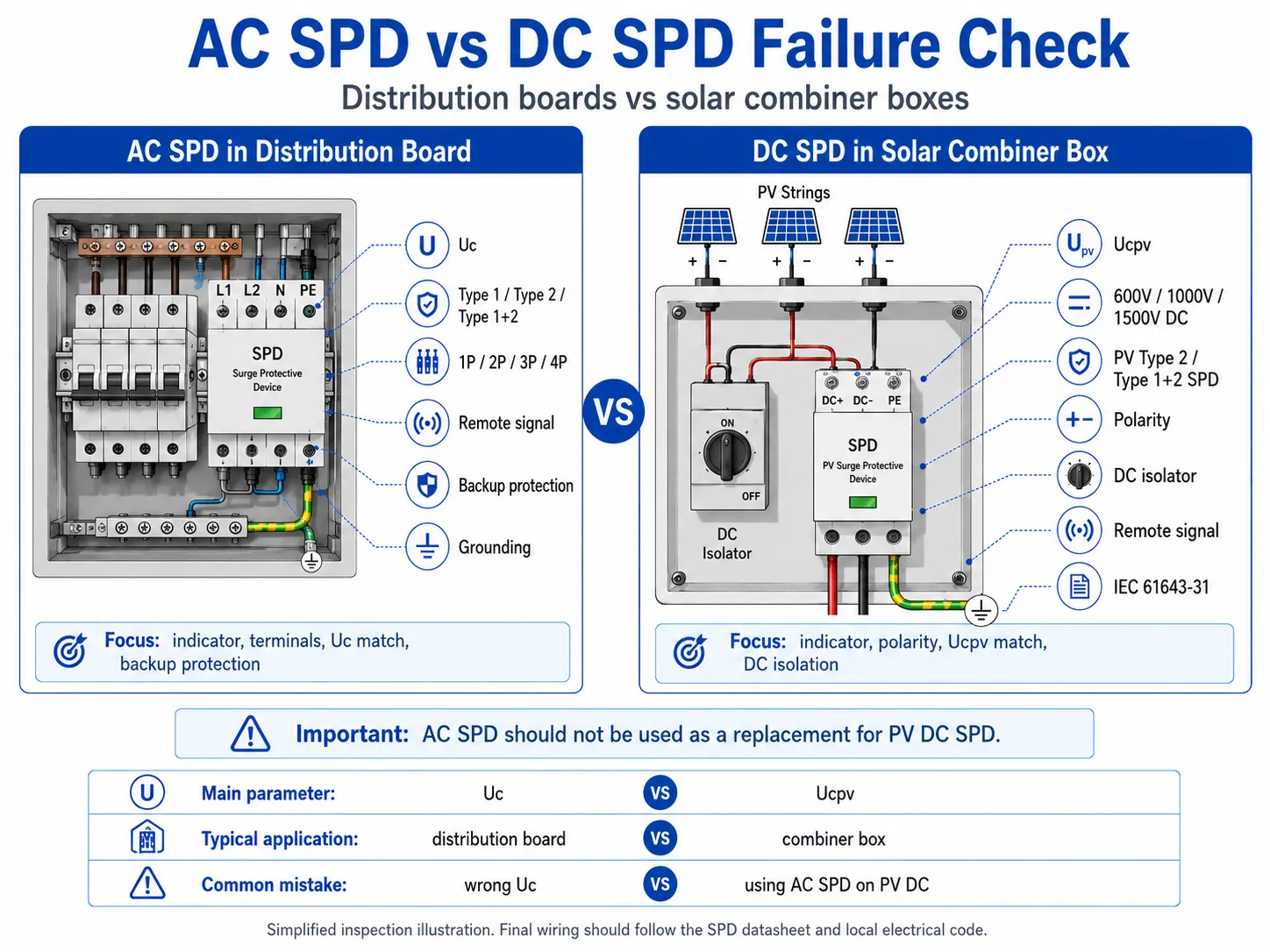
Les SPD CA et CC ne sont pas contrôlés exactement de la même manière. Le processus visuel peut sembler similaire, mais la logique de classement est différente.
| Article | Protection contre les surtensions (SPD) CA dans le tableau de distribution | SPD CC dans le boîtier de raccordement solaire |
|---|---|---|
| Application courante | Tableau de distribution principal, sous-tableau, tableau électrique OEM, armoire de commande industrielle | Boîtier de raccordement photovoltaïque, entrée CC de l'onduleur, protection des chaînes du champ solaire |
| Paramètre de tension principale | Uc, adaptée à la tension du système CA et aux fluctuations du réseau | Ucpv, adaptée à la tension maximale en circuit ouvert des modules photovoltaïques et à la puissance nominale du système en courant continu |
| Tension typique du système | Systèmes à courant alternatif 230/400 V, 400/415 V | Systèmes photovoltaïques à courant continu de 600 V, 1 000 V et 1 500 V |
| Référence standard | Norme CEI 61643-11 relative aux dispositifs de protection contre les surtensions (SPD) pour les réseaux électriques à courant alternatif basse tension | Norme CEI 61643-31 relative aux dispositifs de protection contre les surtensions (SPD) utilisés du côté courant continu des installations photovoltaïques |
| Axes prioritaires de l'inspection | Indicateur, signal à distance, adaptation Uc, bornes, protection de secours, mise à la terre | Indicateur, signal à distance, compatibilité UCPV, polarité, isolation CC, humidité, exposition des chaînes photovoltaïques |
| Erreur courante lors du remplacement | Version avec une valeur Uc incorrecte, une configuration des pôles incorrecte ou l'absence de signal à distance | Utilisation d'un SPD CA à la place d'un SPD CC photovoltaïque, ou choix d'une valeur Ucpv incorrecte pour la tension de chaîne |
À quel moment les équipes de maintenance doivent-elles vérifier les SPD en masse ?
Pour les sites B2B et les chantiers, le contrôle des SPD ne doit pas se limiter systématiquement à une vérification un par un après la survenue d'une défaillance visible. Certaines situations nécessitent un contrôle par lots.
Peut-on vérifier si un SPD est défectueux à l'aide d'un multimètre ?
Un multimètre peut permettre de détecter certaines anomalies évidentes, telles qu'un composant court-circuité ou un problème de continuité. Cependant, il ne permet pas de vérifier si un SPD dispose toujours de toute sa capacité de protection contre les surtensions.
Les parafoudres sont conçus pour réagir aux surtensions transitoires de forte énergie. Un multimètre portable classique ne permet pas de simuler un courant d'impulsion de foudre, des pics de commutation ni le comportement complet d'un parafoudre en matière de protection.
| Méthode ou outil | Peut aider à vérifier | Impossible de confirmer | Utilisation optimale dans le cadre de la maintenance sur site |
|---|---|---|---|
| Inspection visuelle | État des voyants, traces de brûlure, fissures, décoloration, bornes desserrées | Durée de vie restante du MOV ou capacité totale de protection contre les surtensions | Première vérification lors d'une inspection de routine ou après le déclenchement d'une alarme |
| Signal à distance / contact sec | Si le contact d'alarme SPD a changé d'état | Le niveau exact de dégradation électrique à l'intérieur du SPD | Sites sans personnel, surveillance des systèmes de gestion technique des bâtiments (BMS) et des automates programmables (PLC), exploitation et maintenance des installations solaires |
| Multimètre | Certains cas évidents de court-circuit, de circuit ouvert ou de continuité anormale | Performances face aux impulsions, niveau de protection résiduel ou réponse réelle face à la foudre | Uniquement à titre de contrôle complémentaire effectué par du personnel qualifié |
| Testeur SPD spécial | Un certain comportement en matière de fuite ou de seuil selon le type de testeur | Performances complètes face aux impulsions de foudre dans des conditions réelles d'énergie de surtension | Des interventions de maintenance plus complexes, qui ne sont pas toujours réalisables sur place |
| Test de laboratoire | État technique plus détaillé dans le cadre d’un essai en conditions contrôlées | Prise de décision rapide sur place lors d'une intervention de maintenance de routine sur le terrain | Analyse des défaillances, enquête sur la qualité ou revue technique |
Ne vous fiez pas uniquement aux résultats d'un multimètre pour prendre une décision concernant des installations critiques. Qu'il s'agisse de tableaux de distribution, de boîtiers de raccordement solaires, de sites de télécommunications ou de tableaux de commande industriels, l'état visuel, les alarmes à distance, l'état de l'installation, l'historique des surtensions et les registres de remplacement revêtent une importance capitale pour la prise de décisions en matière de maintenance sur site.
Faut-il remplacer un SPD défectueux avant de remettre l'installation sous tension ?
Si l'indicateur du SPD signale une défaillance, si le signal à distance déclenche une alarme ou s'il y a des signes visibles de brûlure, de fusion, de fissuration ou de surchauffe des bornes, le SPD concerné doit être considéré comme dangereux ou hors service jusqu'à ce qu'il ait été contrôlé par du personnel qualifié.
Dans le cas des SPD enfichables, la cartouche peut être remplacée sans qu'il soit nécessaire de modifier le câblage de la base. Cela s'avère utile pour les équipes de maintenance et les distributeurs qui disposent de modules de rechange. Toutefois, le circuit doit tout de même être correctement isolé, conformément aux règles de sécurité en vigueur sur le site, avant de retirer le module.
Pour les SPD non enfichables, le remplacement implique généralement de démonter l'ensemble du dispositif, de débrancher les câbles, d'installer un nouveau SPD et de vérifier à nouveau le serrage des bornes.
Liste de contrôle pour la commande de SPD de remplacement
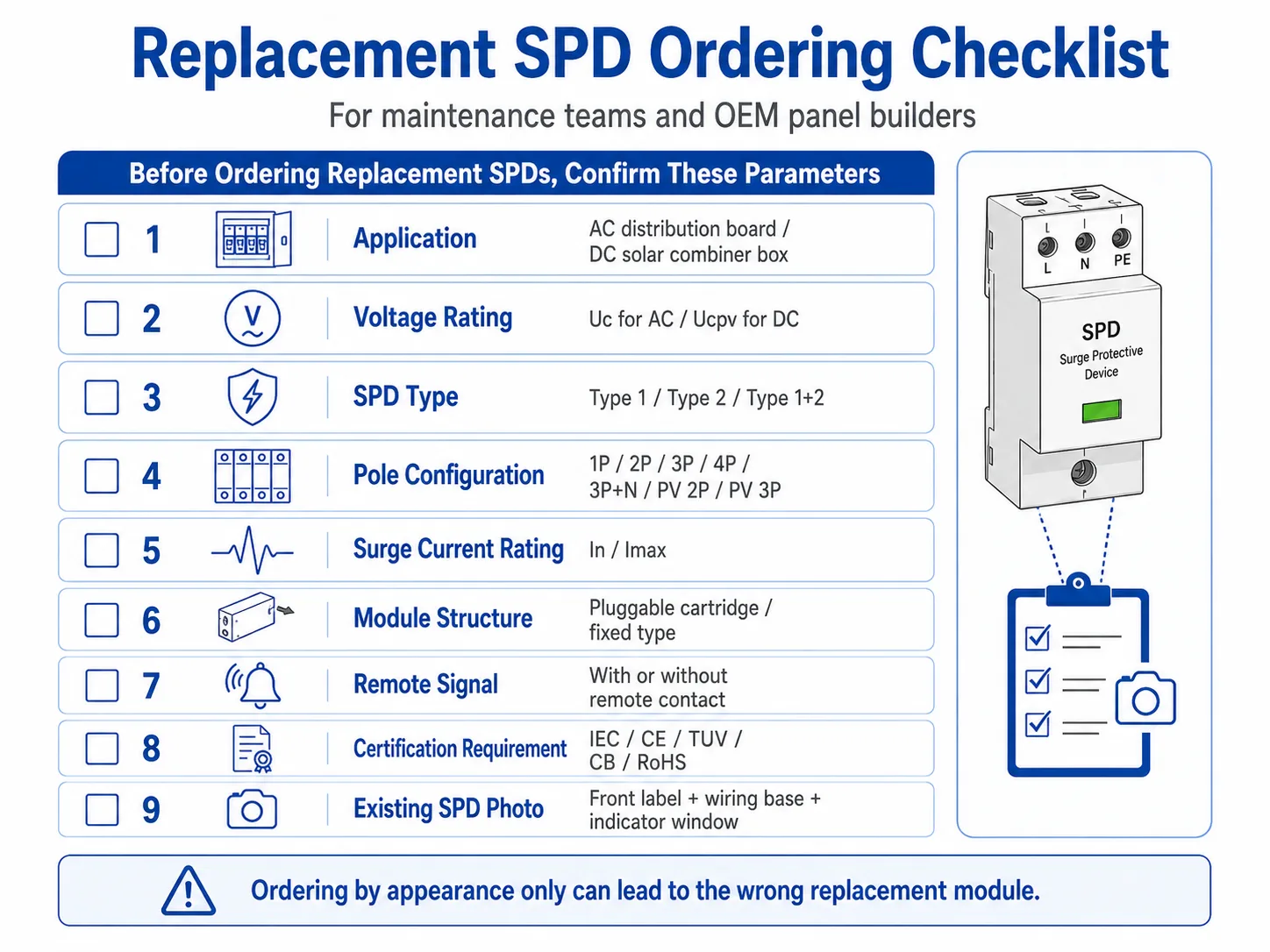
De nombreux problèmes liés au remplacement précoce sont dus à la commande d'un module SPD inadapté. Avant de commander une pièce de rechange, vérifiez les informations ci-dessous.
| Informations à confirmer | Pourquoi c'est important | Exemple |
|---|---|---|
| Application AC ou DC | Les SPD CA et les SPD CC photovoltaïques suivent des logiques de classification différentes | Tableau de distribution SPD CA / boîtier de raccordement solaire SPD CC |
| Uc ou Ucpv | Une tension nominale incorrecte peut entraîner une défaillance prématurée ou une protection insuffisante. | 275V, 320V, 385V AC / 600V, 1000V, 1500V DC |
| Type de SPD | Le point d'installation détermine s'il s'agit d'un type 1, d'un type 2 ou d'un type 1+2 | Tableau électrique principal / sous-tableau / boîtier de regroupement photovoltaïque |
| Configuration des pôles | La pièce de rechange doit être compatible avec le système et la base de câblage. | 1P, 2P, 3P, 4P, 3P+N, PV 2P, PV 3P |
| En et Imax | L'intensité nominale de courant de surtension doit correspondre aux conditions d'exposition sur site et aux spécifications du projet | 20 kA, Imax 40 kA par pôle |
| Compatibilité des modules enfichables | Une cartouche d'apparence similaire peut ne pas s'adapter ou ne pas correspondre au socle. | Même série, même tension, même structure de pôles/modules |
| Exigence de signal à distance | Certains sites nécessitent une sortie d'alarme vers un automate programmable (PLC), un système de gestion technique du bâtiment (BMS) ou un système SCADA. | Avec contact de signal à distance / sans signal à distance |
| Exigence liée à la certification ou au projet | Le remplacement doit être conforme aux documents du projet et aux règles de passation des marchés | Norme CEI, marquage CE, certifications TÜV, CB et RoHS, ou exigences spécifiques de l'acheteur |
Vous avez besoin d'aide pour vérifier les paramètres de remplacement du SPD ?
Envoyez-nous la photo du SPD, l'état des voyants, la tension du système, le type de panneau et l'étiquette du modèle actuel. LEEYEE peut vous aider à déterminer si vous avez besoin d'un SPD CA, d'un SPD CC photovoltaïque, d'un module de remplacement enfichable ou d'un appareil entièrement neuf pour les tableaux de distribution, les boîtiers de raccordement solaires et les panneaux OEM.
Erreurs courantes lors du contrôle d'un dysfonctionnement du SPD
Vérification de la fenêtre rouge uniquement
Cet indicateur est important, mais il n'explique pas la cause profonde du problème. Si le même SPD tombe en panne à plusieurs reprises, vérifiez la tension, la mise à la terre, la température, le câblage et l'exposition aux surtensions.
Ignorer les signaux d'alarme à distance
Un contact de signal à distance peut signaler un dysfonctionnement avant la prochaine visite sur site. Pour les armoires et les sites solaires sans personnel, le signal à distance doit faire partie intégrante du processus de maintenance.
Utilisation d'un SPD CA pour les installations photovoltaïques en courant continu
Les boîtiers de raccordement solaires nécessitent des parasurtenseurs photovoltaïques (SPD) en courant continu (CC) dotés d'une tension Ucpv adaptée. Ne remplacez pas un parasurtenseur photovoltaïque en courant continu (CC) par un parasurtenseur standard en courant alternatif (CA).
Classement uniquement en fonction de l'apparence
De nombreuses cartouches SPD se ressemblent. Vérifiez toujours la tension nominale, la configuration des pôles, la compatibilité en série et la version du signal à distance avant de passer commande.
Que faut-il consigner à l'issue d'une inspection SPD ?
Pour les usines, les équipes de services EPC, les fabricants de tableaux électriques OEM et les distributeurs, un registre d'inspection des SPD permet d'éviter les pannes récurrentes et les commandes erronées de pièces de rechange.
- Date de l'inspection et emplacement du site
- Nom du panneau ou numéro du boîtier de raccordement
- Modèle SPD et paramètres nominaux
- État de l'indicateur avant le remplacement
- État du signal à distance, le cas échéant
- Photos des dommages visibles
- Événements récents liés à la foudre, aux commutateurs ou aux alarmes
- Modèle et quantité du module de remplacement
- Remarque du technicien et date de la prochaine inspection
Quelles photos et quels paramètres devez-vous envoyer avant le remplacement ?
Pour accélérer la confirmation du remplacement, n'envoyez pas uniquement une photo générale du tableau. Un ensemble de photos nettes et les paramètres électriques de base aideront le fournisseur à déterminer si vous avez besoin de la même cartouche, d'un SPD complet ou d'un modèle différent.
FAQ
Comment savoir si un SPD a échoué ?
Vérifiez d'abord la fenêtre de l'indicateur. Un statut rouge, déclenché, vide ou anormal signifie généralement que le SPD doit être inspecté ou remplacé. Vérifiez également l'état du signal à distance, les marques de brûlure, les fissures, l'état des bornes et les événements récents d'éclairs.
Un indicateur SPD rouge signifie-t-il toujours des dégâts de foudre ?
Non. Un indicateur rouge signifie que le module SPD n'est plus en service normal, mais la cause peut être des surtensions répétées, le vieillissement, une sélection de tension incorrecte, un stress thermique, des vibrations ou un événement de surtension important.
Puis-je remplacer uniquement la cartouche SPD amovible ?
Oui, si le SPD est de type modulaire enfichable et que la cartouche de remplacement correspond à la même série, à la même tension, à la même structure de pôles et à la même version de signal à distance. L'isolement électrique et les procédures de sécurité sur site sont toujours requis.
Comment devrais-je vérifier un SPS CC dans une boîte de combinaison solaire ?
Vérifiez l'indicateur de statut, le signal à distance, l'état de l'isolateur DC, les bornes, l'humidité, la polarité, la tension nominale PV et si le SPD Ucpv correspond à la tension maximale de la chaîne PV. Ne pas utiliser un SPD AC standard comme remplacement DC.
Un multimètre peut-il prouver qu’un parafoudre est toujours en bon état ?
Non. Un multimètre peut uniquement révéler certaines anomalies évidentes. Il ne peut pas simuler les performances face aux surtensions impulsionnelles ni confirmer la durée de vie restante de la varistance MOV. Pour la maintenance sur site, combinez l’inspection visuelle, le signal à distance, l’historique des événements et les dossiers de remplacement.
Quelles informations dois-je envoyer avant de commander un parafoudre de remplacement ?
Veuillez nous envoyer une photo de l'ancienne étiquette avant du SPD, une photo de la fenêtre d'indication, une photo de la configuration du socle de câblage ou du poteau, la tension du système, s'il s'agit d'une application CA ou CC, les valeurs Uc ou Ucpv, les valeurs nominales In/Imax, les exigences en matière de signal à distance, la quantité, ainsi que l'application (panneau ou boîte de raccordement).
Envoyez des photos pour obtenir plus rapidement un chèque de remplacement
Pour les équipes de maintenance et les distributeurs, le moyen le plus rapide de confirmer la nécessité d'un remplacement consiste à envoyer des photos nettes de l'étiquette avant du SPD, de la base de câblage, de la fenêtre d'indication et de l'installation sur le panneau.