
Tem dúvidas sobre se o SPD num quadro de distribuição, painel OEM ou caixa combinadora solar falhou? Este guia apresenta um processo de inspeção prático para equipas de manutenção, equipas pós-venda de EPC, fabricantes de painéis e distribuidores de SPD.
O objetivo não é apenas ler uma janela indicadora vermelha. Uma verificação adequada de falha de SPD deve incluir o indicador visual, contacto de sinal remoto, condição do invólucro, terminais, eventos de relâmpago recentes, diferenças de aplicação AC/DC e confirmação dos parâmetros de substituição.
Nota de segurança: A inspeção e substituição do SPD devem ser efetuadas por pessoal eletricista qualificado. Não remova um cartucho de SPD de encaixe, não abra uma caixa combinadora nem toque nos terminais enquanto o circuito estiver sob tensão.
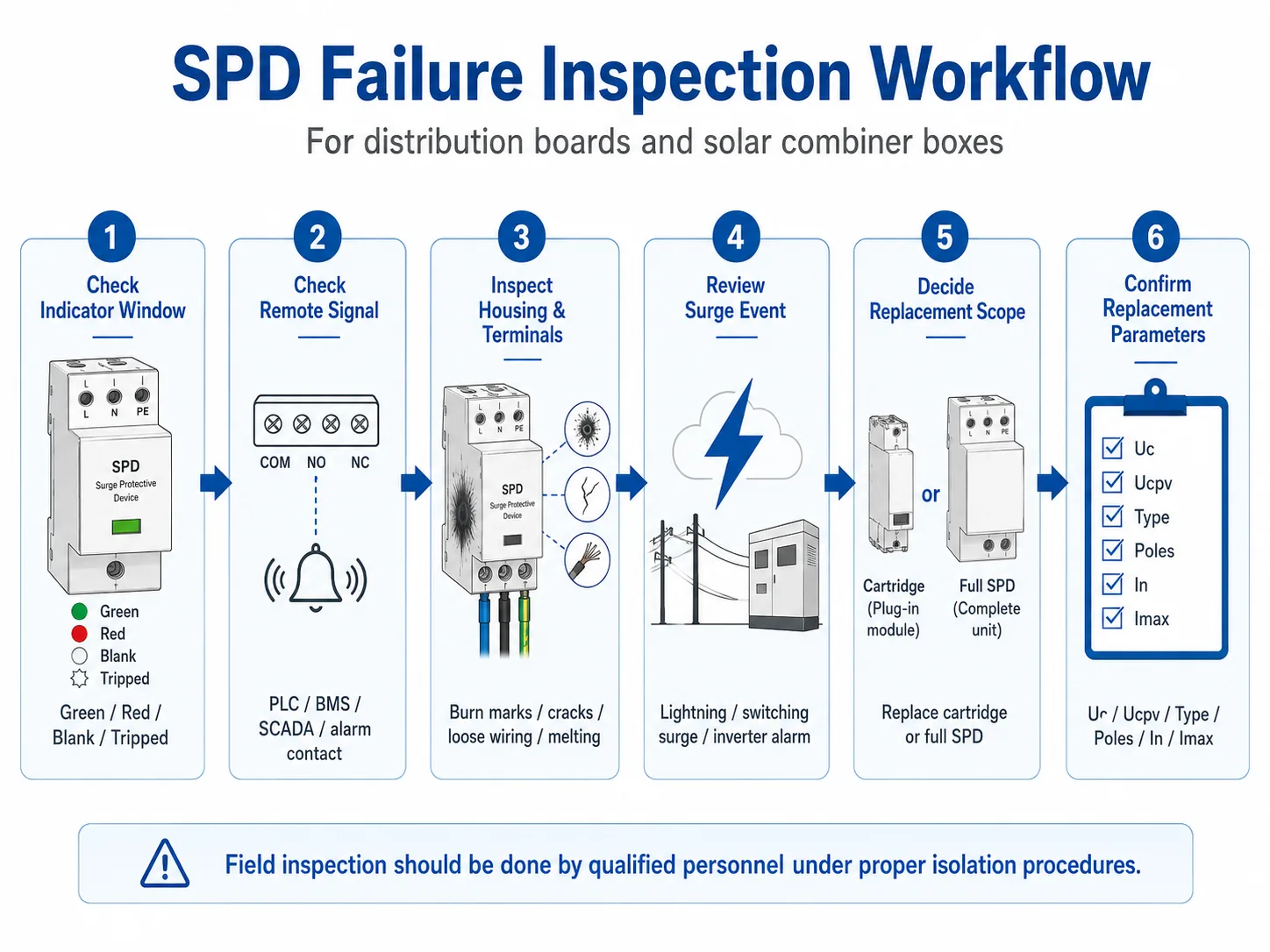
Primeiro, verifique a janela de estado do SPD. Se o indicador estiver vermelho, disparado, em branco ou anormal de acordo com a etiqueta do produto, o módulo SPD deve ser inspecionado e, geralmente, substituído. Depois, verifique o contacto de sinal remoto, danos visíveis, estado dos terminais, fusível ou disjuntor a montante e se o local foi recentemente sujeito a quedas de raios ou picos de comutação.
| Ponto de verificação | O que procurar | O que significa normalmente | Ação recomendada |
|---|---|---|---|
| Janela indicadora | Estado vermelho, disparado, em branco ou anormal | O seccionador interno pode ter aberto | Planeie a substituição do módulo e confirme o modelo |
| Sinal remoto | O contacto de alarme muda de estado ou o alarme do BMS/PLC está ativo | O SPD pode estar offline mesmo antes de alguém verificar o painel | Abra o painel em segurança e verifique o estado do SPD |
| Invólucro e terminais | Marcas de queimadura, fissuras, derretimento, descoloração, cheiro, fios soltos | Possíveis danos por sobretensão, sobreaquecimento ou má ligação | Isole a alimentação e investigue antes de voltar a ligar |
| Após um evento de queda de raios | Vários SPD apresentam alarmes no mesmo local ou grupo de caixas combinadoras | O local pode necessitar de uma inspeção em lote, não de uma substituição de módulo único | Inspecione todos os painéis expostos e registe o histórico de substituições |
| Parâmetros de substituição | Uc, Ucpv, Tipo, polos, In, Imax, sinal remoto, tamanho do módulo | Uma substituição incorreta pode falhar prematuramente ou deixar o sistema sem a proteção adequada | Confirme a classificação antes de encomendar módulos sobresselentes ou novos SPD |
Índice
A verificação de falha do SPD vai além da leitura de uma janela vermelha
Uma janela indicadora vermelha é o sinal mais visível de falha num SPD. Mas não é a inspeção completa.
Num quadro de distribuição industrial, o problema pode surgir de sobretensão a longo prazo, seleção incorreta de Uc, terminais soltos ou picos de comutação repetidos. Numa caixa combinadora solar, o problema pode surgir da exposição a relâmpagos, classificação Ucpv incorreta, má ligação à terra no lado CC, entrada de humidade, ou envelhecimento do módulo após picos repetidos.
É por isso que esta página se foca no processo completo de verificação de falhas. Se apenas deseja compreender o que significa um indicador SPD vermelho, leia o nosso guia relacionado sobre Indicação de estado do SPD.
Processo passo a passo de inspeção de falha do SPD
Utilize este processo durante a manutenção de rotina, após atividade de relâmpagos, após um alarme remoto, ou antes de encomendar módulos SPD de substituição.
- Verifique primeiro a janela indicadora do SPD. Verde significa geralmente que o módulo ainda está em serviço normal. Vermelho ou disparado significa geralmente que o disjuntor interno abriu e o módulo já não está a proteger esse circuito. Confirme sempre o significado de acordo com a etiqueta do produto ou a ficha técnica, uma vez que os designs dos indicadores podem variar consoante o fabricante.
- Verifique o sinal remoto ou o contacto seco. Muitos SPD industriais e SPD fotovoltaicos incluem um contacto de sinal remoto. Este contacto pode ser ligado a um PLC, BMS, sistema SCADA, lâmpada de alarme ou unidade de monitorização. Se o alarme remoto estiver ativo, inspecione o SPD mesmo que ninguém tenha verificado visualmente o painel ainda.
- Inspecione a caixa e o invólucro envolvente. Procure marcas pretas, plástico derretido, fissuras, descoloração, cheiro anormal, humidade, corrosão ou etiquetas danificadas. Estes sinais podem indicar stress por picos de tensão, sobreaquecimento, má vedação do invólucro ou uma falha grave.
- Verifique os terminais, a cablagem e a proteção a montante. Terminais soltos e ligações deficientes podem gerar calor e fazer com que o SPD pareça falhar prematuramente. Verifique também se o fusível a montante, o disjuntor (MCB) ou a proteção de reserva do SPD disparou. Não reinicie o disjuntor sem encontrar a causa.
- Analise eventos recentes de picos de tensão ou relâmpagos. Se o local sofreu uma trovoada, um evento de comutação na rede, um alarme no inversor ou reinícios repetidos de equipamento, inspecione todos os SPD relacionados no quadro afetado ou no grupo de caixas combinadoras. Um módulo falhado pode ser apenas parte do problema.
- Decida se deve substituir apenas o cartucho ou o SPD completo. Para SPD de encaixe, o cartucho falhado pode muitas vezes ser substituído enquanto a base de cablagem permanece no lugar. Para SPD fixos, a unidade completa necessita geralmente de ser removida e recablada. Em ambos os casos, são necessários procedimentos de isolamento de energia e segurança no local.
- Confirme os parâmetros de substituição antes de encomendar. Verifique a aplicação CA ou CC, Uc ou Ucpv, Tipo 1 / Tipo 2 / Tipo 1+2, configuração de polos, In, Imax, requisito de sinal remoto e compatibilidade do módulo. Não encomende apenas pela aparência.
Lista de verificação de inspeção de falhas de SPD em campo
Utilize esta lista de verificação ao verificar SPD em quadros de distribuição, caixas combinadoras solares, armários industriais ou painéis OEM. Ajuda as equipas de manutenção a separar condições normais de sinais de aviso de falha.
| Item de inspeção | Estado normal | Aviso de falha | O que fazer a seguir |
|---|---|---|---|
| Janela indicadora | Marca de estado verde ou normal | Visor vermelho, vazio, disparado ou anormal | Registe o estado e prepare a verificação de substituição |
| Contato de sinal remoto | Estado de contacto normal, sem alarme | Contacto de alarme alterado ou BMS/PLC reporta falha no SPD | Abra o painel em segurança e verifique o estado do SPD |
| Invólucro do SPD | Invólucro limpo, sem fissuras ou deformações | Marcas de queimadura, fusão, fissuras, manchas escuras, odor anormal | Isole a energia e inspecione a instalação antes de substituir |
| Terminais e cablagem | Terminais apertados, sem descoloração, encaminhamento de cabos adequado | Cabos soltos, terminais enegrecidos, sobreaquecimento, isolamento danificado | Verifique o binário, a secção do cabo, a fonte de calor e a proteção de reserva |
| Ligação à terra / PE | Ligação PE segura e caminho de terra limpo | PE solto, corrosão, terra em falta, cabo de terra danificado | Corrija a ligação à terra antes de instalar um novo SPD |
| Após um evento de queda de raio ou sobretensão | Sem alarme e sem danos visíveis após verificação no local | Alarmes de múltiplos SPD no mesmo quadro ou zona do local | Inspecione os SPD em lote em vez de substituir apenas um módulo |
| Etiqueta do modelo | Modelo, tensão, tipo, In/Imax e norma legíveis | Etiqueta danificada, ilegível ou diferente da do documento do projeto | Tire fotografias e confirme o modelo de substituição correto |
Importante: Um descarregador de sobretensões (SPD) com aspeto normal nem sempre é um SPD totalmente funcional. Após um forte evento de queda de raios ou pico de tensão, o MOV interno pode ter sofrido degradação, mesmo que o indicador ainda não tenha mudado. Em locais críticos, a inspeção pós-evento não deve aguardar até à próxima data de manutenção de rotina.
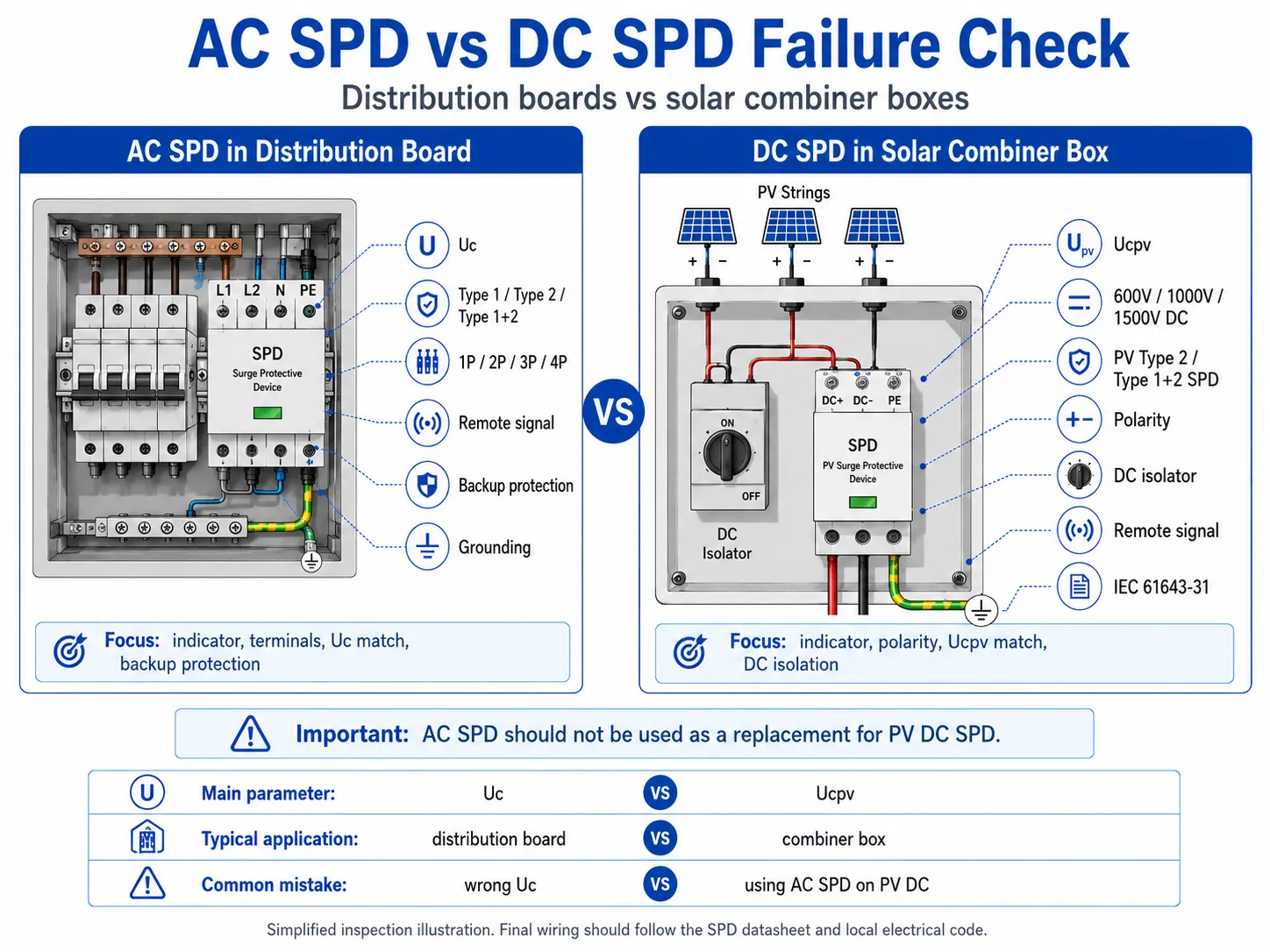
Verificação de falhas em SPD de quadro de distribuição AC vs. SPD de caixa combinadora solar DC
Os SPDs de CA e CC não são verificados exatamente da mesma forma. O processo visual pode parecer semelhante, mas a lógica de classificação é diferente.
| Item | SPD de CA em Quadro de Distribuição | SPD de CC em Caixa Combinadora Solar |
|---|---|---|
| Aplicação comum | Quadro de distribuição principal, quadro secundário, painel elétrico OEM, armário de controlo industrial | Caixa combinadora fotovoltaica, entrada de CC do inversor, proteção de strings de campo solar |
| Parâmetro de tensão principal | Uc, adaptado à tensão do sistema de CA e à flutuação da rede | Ucpv, adaptado à tensão máxima de circuito aberto fotovoltaico e à classificação do sistema de CC |
| Tensão típica do sistema | Sistemas de CA 230/400V, 400/415V | Sistemas fotovoltaicos de CC 600V, 1000V, 1500V |
| Referência normativa | IEC 61643-11 para SPDs de potência de baixa tensão de CA | IEC 61643-31 para SPDs utilizados no lado de CC de sistemas fotovoltaicos |
| Foco da inspeção | Indicador, sinal remoto, correspondência de Uc, terminais, proteção de reserva, ligação à terra | Indicador, sinal remoto, correspondência de Ucpv, polaridade, isolamento de CC, humidade, exposição da string fotovoltaica |
| Erro de substituição comum | Substituição por Uc incorreto, configuração de polos incorreta ou versão sem sinal remoto | Utilizar um SPD de CA em vez de um SPD de CC fotovoltaico, ou selecionar um Ucpv incorreto para a tensão da string |
Quando devem as equipas de manutenção verificar os SPD em massa?
Para locais B2B e de projeto, a verificação do SPD não deve ser sempre efetuada individualmente apenas após uma falha visível. Algumas situações requerem uma inspeção por lote.
É possível testar a falha de um SPD com um multímetro?
Um multímetro pode ajudar a detetar algumas condições anómalas óbvias, tais como um componente em curto-circuito ou um problema de continuidade. Contudo, não pode provar que um SPD ainda possui capacidade total de proteção contra picos de tensão.
Os SPDs são concebidos para reagir a sobretensões transitórias de alta energia. Um multímetro portátil normal não consegue simular correntes de impulso de relâmpago, picos de comutação ou o comportamento total de proteção de um SPD.
| Método ou Ferramenta | Pode ajudar a verificar | Não pode confirmar | Melhor utilização na manutenção de campo |
|---|---|---|---|
| Inspeção visual | Estado do indicador, marcas de queimadura, fissuras, descoloração, terminais soltos | Vida útil restante do MOV ou capacidade total de proteção contra picos | Primeira verificação durante a inspeção de rotina ou após um alarme |
| Sinal remoto / contacto seco | Se o contacto de alarme do SPD mudou de estado | O nível exato de degradação elétrica no interior do SPD | Locais não tripulados, monitorização BMS/PLC, operação e manutenção solar |
| Multímetro | Algumas condições óbvias de curto-circuito, circuito aberto ou continuidade anómala | Desempenho de impulso, nível de proteção restante ou resposta real a relâmpagos | Apenas como verificação de apoio por pessoal qualificado |
| Testador de SPD especial | Alguma fuga ou comportamento de limiar dependendo do tipo de testador | Desempenho total de impulso de relâmpago sob energia de pico real | Manutenção mais avançada, nem sempre disponível no local |
| Teste de laboratório | Condição técnica mais detalhada sob configuração de teste controlada | Decisão rápida no local durante a manutenção de rotina | Análise de falhas, investigação de qualidade ou revisão de engenharia |
Não utilize o teste do multímetro como a única decisão para instalações críticas. Para quadros de distribuição, caixas de junção solar, locais de telecomunicações ou painéis de controlo industrial, o estado visual, o alarme remoto, a condição de instalação, o histórico de sobretensões e os registos de substituição são mais importantes para as decisões de manutenção em campo.
Um SPD com falha deve ser substituído antes de ser reenergizado?
Se o indicador do SPD apresentar uma falha, o sinal remoto reportar um alarme ou se existirem sinais visíveis de queimadura, fusão, fissuras ou sobreaquecimento dos terminais, o SPD afetado deve ser considerado inseguro ou fora de serviço até ser verificado por pessoal qualificado.
Para SPDs conectáveis, o cartucho pode ser substituível sem necessidade de religar a base. Isto é útil para equipas de manutenção e distribuidores que mantêm módulos de reserva. No entanto, o circuito ainda necessita de um isolamento adequado de acordo com as regras de segurança do local antes de o módulo ser removido.
Para SPDs não conectáveis, a substituição significa normalmente remover a unidade completa, desligar os fios, instalar um novo SPD e voltar a verificar o aperto dos terminais.
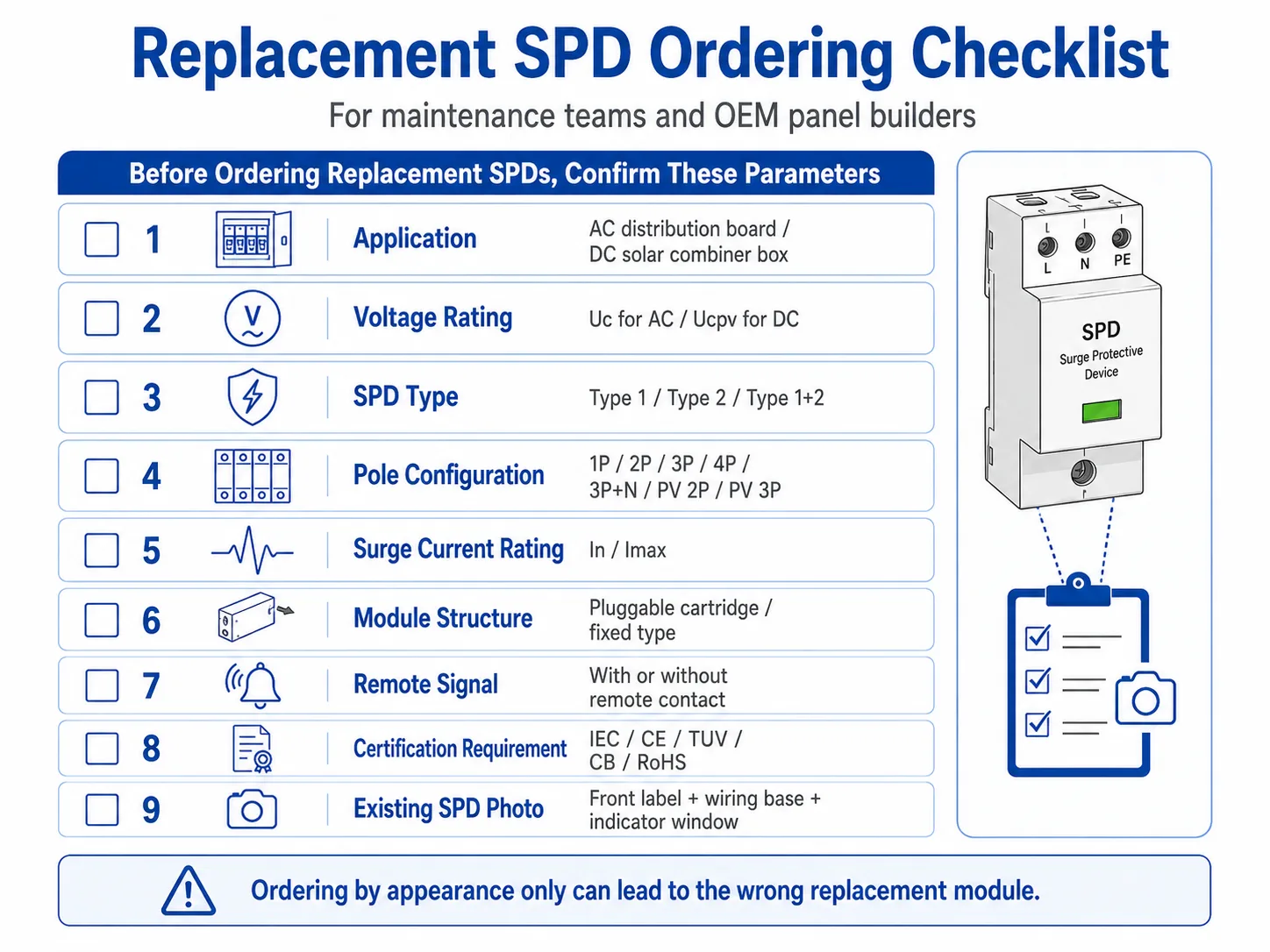
Lista de verificação para encomenda de SPD de substituição
Muitos problemas de substituição prematura resultam da encomenda do módulo SPD errado. Antes de encomendar uma substituição, confirme as informações abaixo.
| Informação para Confirmar | Por que Isso Importa | Exemplo |
|---|---|---|
| Aplicação AC ou DC | Os SPD CA e os SPD CC fotovoltaicos seguem lógicas de classificação diferentes | SPD CA de quadro de distribuição / SPD CC de caixa de junção solar |
| Uc ou Ucpv | Uma classificação de tensão errada pode causar falhas prematuras ou uma proteção deficiente | 275V, 320V, 385V AC / 600V, 1000V, 1500V DC |
| Tipo de SPD | O ponto de instalação determina o Tipo 1, Tipo 2 ou Tipo 1+2 | Quadro de entrada principal / subquadro / caixa de junção FV |
| Configuração de polos | A substituição deve corresponder ao sistema e à base de cablagem | 1P, 2P, 3P, 4P, 3P+N, PV 2P, PV 3P |
| In e Imax | A classificação da corrente de descarga deve corresponder à exposição do local e à especificação do projeto | Em 20kA, Imax 40kA por polo |
| Compatibilidade do módulo conectável | Um cartucho com aspeto semelhante pode não encaixar ou não corresponder à base | Mesma série, mesma tensão, mesma estrutura de polo/módulo |
| Requisito de sinal remoto | Alguns locais necessitam de saída de alarme para PLC, BMS ou SCADA | Com contacto de sinal remoto / sem sinal remoto |
| Certificação ou requisito do projeto | A substituição deve estar em conformidade com os documentos do projeto e as regras de aprovisionamento | Norma IEC, CE, TUV, CB, RoHS ou requisito específico do comprador |
Precisa de ajuda para verificar os parâmetros de substituição do SPD?
Envie-nos a fotografia do SPD, o estado do indicador, a tensão do sistema, o tipo de painel e a etiqueta do modelo existente. A LEEYEE pode ajudar a confirmar se necessita de um SPD CA, SPD CC fotovoltaico, módulo de substituição conectável ou uma unidade nova completa para quadros de distribuição, caixas de junção solar e painéis OEM.
Erros comuns ao verificar a falha de um SPD
Apenas verificar a janela vermelha
O indicador é importante, mas não explica a causa raiz. Se o mesmo SPD falhar repetidamente, verifique a tensão, a ligação à terra, a temperatura, a cablagem e a exposição a sobretensões.
Ignorar sinais de alarme remoto
Um contacto de sinal remoto pode reportar uma falha antes da próxima visita ao local. Para armários não tripulados e locais solares, o sinal remoto deve fazer parte do processo de manutenção.
Utilizar SPD CA para sistemas CC fotovoltaicos
As caixas de junção solar necessitam de SPDs fotovoltaicos com classificação CC e Ucpv adequada. Não substitua um SPD CC fotovoltaico por um SPD CA padrão.
Encomendar apenas pela aparência
Muitos cartuchos de DPS parecem idênticos. Confirme sempre a tensão nominal, a configuração dos polos, a compatibilidade de série e a versão de sinalização remota antes de encomendar.
O que deve ser registado após a inspeção do SPD?
Para fábricas, equipas de assistência EPC, fabricantes de quadros OEM e distribuidores, um registo de inspeção de DPS ajuda a evitar falhas repetidas e encomendas erradas de peças sobressalentes.
- Data da inspeção e localização do local
- Nome do quadro ou número da caixa de junção
- Modelo de DPS e parâmetros nominais
- Estado do indicador antes da substituição
- Estado do sinal remoto, se disponível
- Fotos de danos visíveis
- Eventos recentes de relâmpagos, comutação ou alarme
- Modelo e quantidade do módulo de substituição
- Nota do técnico e data da próxima inspeção
Que fotografias e parâmetros deve enviar antes da substituição?
Para uma confirmação de substituição mais rápida, não envie apenas uma foto geral do quadro. Um conjunto de fotos nítidas e parâmetros elétricos básicos ajuda o fornecedor a confirmar se necessita do mesmo cartucho, de um DPS completo ou de um modelo diferente.
FAQ
Como posso saber se um SPD falhou?
Verifique primeiro a janela do indicador. Um status vermelho, desligado, em branco ou anormal geralmente significa que o SPD precisa de inspeção ou substituição. Também verifique o status do sinal remoto, marcas de queimadura, rachaduras, a condição dos terminais e eventos recentes de raios.
Um indicador SPD vermelho sempre significa dano elétrico?
Não. Um indicador vermelho significa que o módulo SPD não está mais em serviço normal, mas a causa pode ser surtos repetidos, envelhecimento, seleção incorreta de tensão, estresse térmico, vibração ou um forte evento de surto.
Posso substituir apenas o cartucho de SPD plugável?
Sim, se o SPD for do tipo modular plugável e o cartucho de reposição corresponder à mesma série, à mesma classificação de tensão, à mesma estrutura de polos e à mesma versão de sinal remoto. A isolação de energia e os procedimentos de segurança do local ainda são आवश्यक?.
Como devo verificar um DPS CC em uma caixa combinadora solar?
Verifique o indicador de status, o sinal remoto, a condição do seccionador CC, os terminais, a umidade, a polaridade, a classificação de tensão fotovoltaica e se o Ucpv do DPS corresponde à tensão máxima da string fotovoltaica. Não utilize um DPS CA padrão como substituto para CC.
Um multímetro pode comprovar que um DPS ainda está em boas condições?
Não. Um multímetro só pode indicar algumas condições anormais óbvias. Ele não consegue simular o desempenho contra surtos de impulso nem confirmar a vida útil restante do MOV. Para a manutenção em campo, combine a inspeção visual, o sinal remoto, o histórico de eventos e os registros de substituição.
Quais informações devo enviar antes de solicitar um DPS de substituição?
Envie a foto da etiqueta frontal do DPS antigo, a foto da janela indicadora, a foto da base de cabeamento ou da configuração dos polos, a tensão do sistema, a aplicação em CA ou CC, o Uc ou Ucpv, a classificação In/Imax, o requisito de sinal remoto, a quantidade e a aplicação no painel ou na caixa de junção.
Envie fotografias para uma verificação de substituição mais rápida
Para equipas de manutenção e distribuidores, a forma mais rápida de confirmar uma substituição é enviar fotos nítidas da etiqueta frontal do DPS, da base de cablagem, da janela do indicador e da aplicação no quadro.