Dua pelindung lonjakan dapat menggunakan soket RJ45 dan masih tidak kompatibel secara elektrik. Sebelum memesan, konfirmasikan kecepatan Ethernet yang sebenarnya, kategori kabel, persyaratan PoE, pasangan yang dilindungi, pelindung, kondisi uji lonjakan, dan lingkungan instalasi.
Daftar Isi
Jawaban cepat
Untuk jaringan non-PoE 100Mbps, pilih SPD garis data RJ45 tahan kapasitansi rendah yang sesuai dengan tegangan operasi dan pasangan konduktor aktif. Untuk Ethernet Gigabit 1000BASE-T, SPD harus mempertahankan semua empat pasang yang diputar dan diuji untuk kecepatan data yang diperlukan. Untuk PoE, ia juga harus membawa tegangan DC dan arus kontinu yang benar tanpa mengganggu transmisi data atau menyebabkan penurunan tegangan yang berlebihan.
Apa itu pelindung lonjakan RJ45?
Sebuah Pelindung lonjakan RJ45 dipasang secara seri dengan kabel Ethernet untuk membatasi lonjakan transien sebelum mencapai switch, router, server, pengontrol industri, titik akses, terminal jaringan, atau port RJ45 lainnya.
Tidak seperti SPD distribusi daya, SPD Ethernet harus melindungi konduktor sinyal sensitif sambil mempertahankan lebar pita jaringan, keseimbangan pasangan dan impedansi yang dibutuhkan untuk komunikasi. Versi PoE juga harus membawa daya DC berkelanjutan pada tegangan dan arus yang benar.
Konektor RJ45 hanya menggambarkan antarmuka fisik. Itu tidak membuktikan bahwa pelindung mendukung Gigabit Ethernet, Cat6A, PoE atau keempat pasangan yang terpilin.
Pelindung lonjakan RJ45 mana yang harus Anda pilih?
Mulailah dengan kebutuhan jaringan. Jangan mulai dengan penampilan rumah RJ45 atau headline arus lonjakan terbesar dari pemasok.
| Kebutuhan jaringan | Konfigurasi SPD minimum | Parameter untuk diverifikasi | Tolak model ketika |
|---|---|---|---|
| 10/100 Mbps, non-PoE Ethernet Cepat | RJ45 data-line SPD yang disesuaikan dengan tegangan sinyal dan konfigurasi pasangan aktif. | Kecepatan data maksimum, Uc, pin yang terlindungi, kehilangan inserisi, grounding dan gelombang uji lonjakan. | Pemasok tidak dapat mengidentifikasi pin yang terlindungi atau hanya menjelaskannya sebagai pelindung sinyal telepon atau umum. |
| 1000BASE-T, non-PoE Gigabit | Semua empat pasangan RJ45 SPD dengan kinerja terkonfirmasi 1000Mbps. | Kecepatan data yang diuji, rentang frekuensi, kehilangan inserisi, kehilangan kembali, keseimbangan pasangan dan kontinuitas semua delapan konduktor. | Ini hanya melindungi pin 1–2 dan 3–6, atau laju transmisi maksimum yang didokumentasikan adalah 100Mbps. |
| Cat6A / 10GBASE-T Bandwidth tinggi | Sebuah model yang secara khusus divalidasi untuk kinerja saluran Cat6A atau 10G yang diperlukan. | Frekuensi yang diuji, kehilangan inserisi, kehilangan kembali, crosstalk, impedansi dan sertifikasi saluran lengkap. | Satu-satunya bukti adalah konektor Cat6A, rumah logam atau label “kompatibel 10G” yang tidak didukung. |
| PoE atau PoE+ 802.3af / 802.3at | SPD yang kompatibel dengan PoE yang disesuaikan dengan kecepatan data, tegangan DC, arus dan pasangan yang diberdayakan. | Standar PoE, dukungan Mode A/B, peta pasangan, arus beban, resistensi DC, penurunan tegangan dan kenaikan suhu. | Ini hanya dinilai untuk sinyal data tegangan rendah atau pemasok tidak dapat mengonfirmasi arus PoE yang kontinu. |
| PoE++ / 4PPoE 802.3bt | SPD empat pasangan yang secara khusus divalidasi untuk level daya Tipe 3 atau Tipe 4 yang diperlukan. | Daya maksimum sumber, arus per pasangan, suhu konektor, penurunan tegangan, kontinuitas empat pasangan, dan bandwidth. | Model hanya menyatakan “kompatibel dengan PoE” tanpa mengidentifikasi 802.3bt, daya empat pasangan, atau kemampuan arus. |
| Kabin jaringan dengan banyak saluran Multi-port | Perlindungan rak atau multi-port dengan grounding yang dirancang dan jalur pengikatan pelindung. | Jumlah port, koneksi tanah, kontinuitas pelindung, manajemen kabel dan data transmisi per saluran. | Satu spesifikasi umum digunakan untuk setiap port tetapi tidak ada informasi listrik atau transmisi per saluran yang tersedia. |
Apakah Cat5e, Cat6, atau Cat6A memengaruhi pemilihan SPD RJ45?
Ya, tetapi label kabel hanyalah titik awal. Setelah SPD dan kabel sambungannya dimasukkan, mereka menjadi bagian dari saluran transmisi yang lengkap.
| kategori kabel | frekuensi referensi | aplikasi umum | Apa yang harus dipertahankan oleh SPD |
|---|---|---|---|
| Cat5e | Hingga 100MHz | 100Mbps dan 1000BASE-T | Diperlukan jalur data dua pasangan atau empat pasangan, keseimbangan impedansi, kehilangan penyisipan dan kehilangan kembali. |
| Cat6 | Hingga 250MHz | Gigabit Ethernet dan beberapa aplikasi kecepatan lebih tinggi dalam batas sistem | Semua empat pasangan untuk Gigabit, bandwidth yang cukup, crosstalk yang terkontrol, dan kinerja saluran yang terverifikasi. |
| Cat6A | Hingga 500MHz | pengkabelan terstruktur 10GBASE-T | Kinerja saluran tingkat Cat6A—bukan sekadar soket gaya Cat6A atau penutup terlindung. |
Cocokkan performa yang diuji
- Konfirmasi tarif aktual yang diperlukan oleh switch dan perangkat.
- Tanyakan frekuensi transmisi yang diuji dari SPD.
- Verifikasi kehilangan penyisipan pada frekuensi yang relevan.
- Periksa kontinuitas delapan konduktor untuk Gigabit.
- Uji tautan yang telah selesai setelah memasang SPD.
Bergantung pada nama produk
- “RJ45” tidak otomatis berarti Gigabit.
- “Rumah Cat6” tidak membuktikan hasil saluran Cat6.
- Kasus logam tidak membuktikan kontinuitas pelindung.
- Kerugian rendah pada 100MHz tidak membuktikan performa 500MHz.
- Klaim 10G tanpa syarat pengujian bukan bukti proyek.
Mengapa pelindung lonjakan RJ45 yang salah dapat mengurangi tautan Gigabit menjadi 100Mbps?
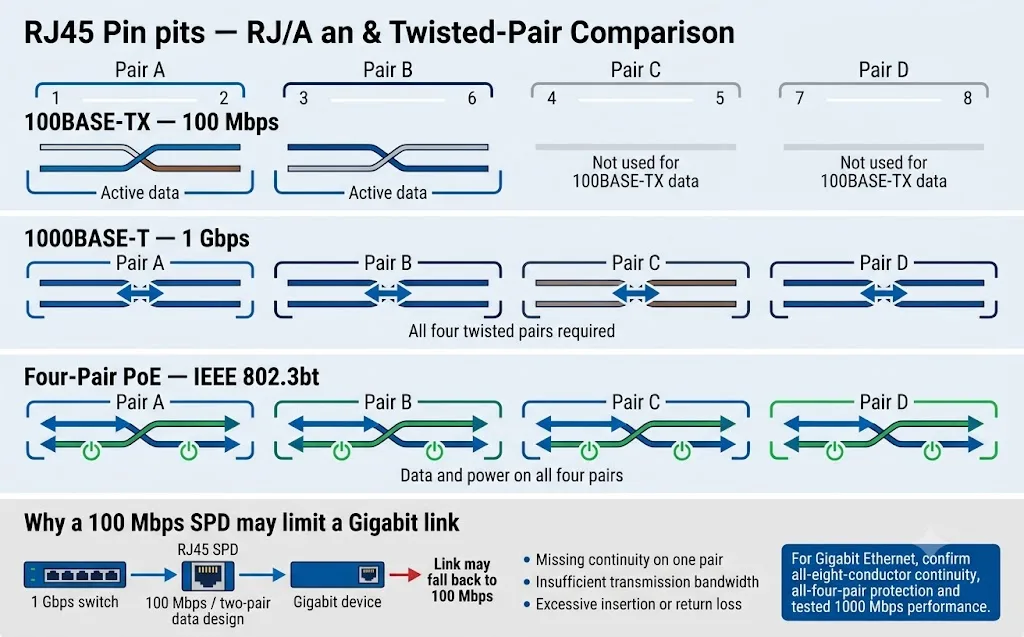
100BASE-TX biasanya menggunakan dua pasang berpintal untuk data. 1000BASE-T menggunakan semua empat pasang. Pelindung yang tidak mempertahankan setiap pasang yang diperlukan dapat mencegah operasi Gigabit atau menyebabkan tautan bernegosiasi pada kecepatan lebih rendah.
Dua pasang data
100BASE-TX biasanya mentransmisikan data melalui pasangan pada pin 1–2 dan 3–6. Sebuah pelindung yang dirancang hanya di sekitar pengaturan ini tidak boleh diasumsikan mampu mendukung Gigabit Ethernet.
Semua empat pasangan
1000BASE-T menggunakan semua empat pasangan terpilin. Pasangan yang hilang, terhubung tidak benar, atau tidak seimbang dapat mencegah tautan Gigabit atau menciptakan operasi yang tidak stabil.
Tuntutan integritas sinyal yang lebih tinggi
Pada frekuensi yang lebih tinggi, kapasitansi parasit, diskontinuitas impedansi, kehilangan kembali dan crosstalk menjadi lebih kritis. Gunakan hanya SPD yang telah divalidasi secara spesifik.
Pelindung lonjakan RJ45 PoE dan non-PoE tidak dapat dipertukarkan
Model non-PoE hanya dapat melindungi sirkuit data bertegangan rendah. Model PoE harus mempertahankan transmisi Ethernet sambil membawa daya DC kontinu melalui pasangan konduktor yang diperlukan.
| Jenis PoE | Penetapan IEEE | Daya sumber maksimum | Penggunaan pasangan tipikal | Apa yang harus dikonfirmasi oleh pembeli SPD |
|---|---|---|---|---|
| PoE Tipe 1 | IEEE 802.3af | Hingga 15.4W | Biasanya dua pasangan bertenaga | Mode PoE, tegangan, arus, penetapan pasangan, dan laju data. |
| PoE+ Tipe 2 | IEEE 802.3at | Hingga 30W | Biasanya dua pasangan bertenaga | Arus kontinu, pemanasan konektor, resistansi, dan penurunan tegangan. |
| PoE++ Tipe 3 | IEEE 802.3bt | Hingga 60W | Dua atau empat pasang berdaya, tergantung implementasinya | Dukungan eksplisit Tipe 3 dan susunan pasangan berdaya yang sebenarnya. |
| PoE++ Tipe 4 | IEEE 802.3bt | Hingga 90W | Empat pasang berdaya | Daya empat pasangan, arus per pasangan, kenaikan suhu, dan penurunan tegangan. |
| PoE pasif | Spesifik pemasok | Bergantung pada sistem | Polaritas dan penetapan pin tetap | Tegangan DC yang tepat, polaritas, peta pin, arus, dan kompatibilitas perangkat. |
Untuk sistem PoE IEEE
- Konfirmasikan 802.3af, 802.3at, atau 802.3bt.
- Konfirmasikan kompatibilitas Mode A, Mode B, dan empat pasangan.
- Periksa tegangan dan arus kontinu maksimum.
- Periksa resistansi DC dan penurunan tegangan yang diharapkan.
- Verifikasi kecepatan data secara terpisah dari klaim PoE.
Untuk sistem PoE pasif
- Catat tegangan injeksi yang tepat.
- Catat penetapan pin positif dan negatif.
- Konfirmasikan arus beban maksimum.
- Jangan mengasumsikan negosiasi PoE otomatis.
- Minta persetujuan tertulis untuk pengkabelan yang tepat.
Kabel RJ45 yang terlindung tidak menggantikan sambungan tanah SPD
Pelindung kabel (cable shield), cangkang RJ45 logam, dan terminal PE SPD memiliki fungsi yang terkait namun berbeda. Fungsi-fungsi tersebut harus dikoordinasikan dengan sistem ikatan ekipotensial lokal di lokasi.
Mengontrol kopling elektromagnetik
Pelindung membantu mengelola interferensi elektromagnetik saat diakhiri dan diikat dengan benar sesuai dengan desain pengkabelan terstruktur dan EMC.
Mempertahankan kontinuitas pelindung (shield)
Soket berperisai (shielded) mungkin dapat menyalurkan pelindung kabel melalui pelindung lonjakan (protector), namun kontinuitas pelindung harus dipastikan, bukan diasumsikan.
Mengalihkan arus lonjakan
SPD memerlukan koneksi yang pendek dan berimpedansi rendah ke sistem ekipotensial lokal. Konduktor PE yang panjang akan menambah tegangan induktif.
Direkomendasikan
- Sambungkan (bond) SPD ke sistem PE lokal yang sama dengan peralatan yang dilindungi.
- Jaga agar koneksi arde tetap pendek dan langsung.
- Pastikan kontinuitas pelindung saat kabel berperisai digunakan.
- Pisahkan kabel yang terlindungi dari kabel terpapar yang masuk.
- Ikuti desain EMC dan pengikatan (bonding) proyek.
Hindari
- Memperlakukan pelindung kabel sebagai satu-satunya jalur pembuangan.
- Menyambungkan SPD ke batang arde terisolasi jarak jauh yang tidak terkait dengan sistem PE lokal.
- Menggunakan konduktor arde yang tidak perlu panjang atau tidak langsung.
- Merutekan kabel yang terlindungi dan tidak terlindungi secara bersamaan.
- Mengasumsikan setiap penutup logam memiliki pengikatan internal yang sama.
Haruskah SPD RJ45 dipasang di perangkat, switch, atau kabinet?
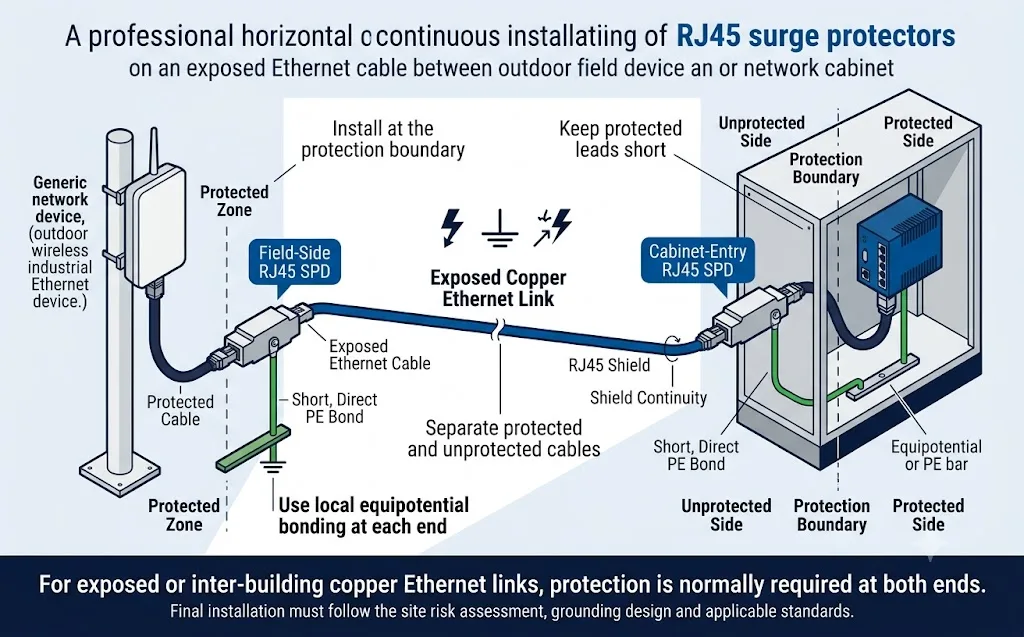
Pasang di tempat kabel terpapar melintasi zona terlindungi dan sedekat mungkin dengan peralatan atau pintu masuk kabinet yang dilindungi.
| Skenario pemasangan | Posisi perlindungan yang direkomendasikan | Alasan |
|---|---|---|
| Kabel luar ruangan yang memasuki gedung | Di batas pintu masuk kabel sebelum kabel dirutekan melalui zona gedung yang terlindungi. | Mengurangi energi lonjakan yang terbawa ke dalam pengkabelan jaringan internal. |
| Ethernet tembaga antar-gedung | Di kedua titik masuk gedung, disambungkan ke sistem ekipotensial lokal masing-masing gedung. | Kedua ujung mungkin mengalami kondisi lonjakan dan potensial arde yang berbeda. |
| Perangkat jaringan luar ruangan atau atap | Di dekat perangkat lapangan dan kembali di pintu masuk gedung atau kabinet. | Melindungi peralatan sensitif di kedua ujung rute yang terpapar. |
| Kabin kontrol industri | Di pintu masuk kabel kabinet sebelum jalur mencapai switch, PLC, HMI, atau kontroler. | Menjaga sisi lonjakan yang masuk terpisah dari elektronik sensitif. |
| Rak jaringan multi-port | Di dekat patch panel atau switch menggunakan perlindungan rak terorganisir atau multi-saluran. | Menyediakan perlindungan terpusat dan jalur pengardean yang terencana. |
| Tautan jaringan internal yang pendek | Gunakan penilaian risiko proyek daripada memasang perlindungan secara otomatis. | Risiko mungkin lebih rendah ketika keseluruhan tautan tetap berada di dalam satu zona perlindungan yang terikat. |
Cara menghindari kehilangan kecepatan jaringan dan interferensi sinyal
Tautan yang aktif tidak membuktikan kompatibilitas penuh. Tautan tersebut mungkin tersambung pada kecepatan lebih rendah, mengakumulasi kesalahan CRC, atau menjadi tidak stabil selama lalu lintas nyata dan pemuatan PoE.
| Gejala yang diamati | Kemungkinan penyebab terkait SPD | Pemeriksaan yang direkomendasikan |
|---|---|---|
| Tautan 1Gbps turun ke 100Mbps | Hanya dua pasang yang kontinu atau pelindung dirancang untuk 100Mbps. | Periksa kedelapan konduktor, peta pasangan, dan kecepatan data maksimum yang didokumentasikan. |
| Tautan terputus berulang kali | Kerugian berlebihan, diskontinuitas impedansi, kontak buruk, atau gangguan pengardean. | Inspeksi konektor, kabel patch, log switch, dan hasil pengujian saluran. |
| Kesalahan CRC atau paket meningkat | Return loss, crosstalk, ketidakseimbangan pasangan, atau atenuasi frekuensi tinggi. | Bandingkan penghitung kesalahan sebelum dan sesudah pemasangan serta sertifikasi saluran lengkap. |
| Perangkat PoE melakukan reboot di bawah beban | Resistansi DC yang berlebihan, penurunan tegangan, panas, atau arus beban yang tidak memadai. | Ukur tegangan pada perangkat bertenaga dan verifikasi peringkat arus kontinu SPD. |
| Hanya beberapa perangkat PoE yang beroperasi | Dukungan Mode A/B yang salah, pengkabelan PoE pasif, atau kontinuitas pasangan berdaya yang tidak lengkap. | Konfirmasikan PSE, PD, penugasan pin, dan diagram pasangan pelindung. |
| Kebisingan muncul setelah pemasangan | Terminasi pelindung (shield) yang buruk, masalah bonding, atau kopling antara kabel yang dilindungi dan tidak dilindungi. | Tinjau kontinuitas pelindung, jalur PE, dan pemisahan fisik kabel. |
Catat garis dasar (baseline)
- Kecepatan tautan yang dinegosiasikan.
- Status tegangan dan daya PoE.
- CRC port switch dan penghitung kesalahan.
- Hasil sertifikasi kabel yang ada.
Ulangi pemeriksaan yang sama
- Konfirmasikan kecepatan yang dinegosiasikan sama.
- Periksa paket baru atau kesalahan CRC.
- Uji perangkat di bawah beban PoE maksimum.
- Sertifikasi saluran yang telah selesai jika diperlukan.
Jangan hanya menguji kontinuitas
- Kontinuitas tidak membuktikan bandwidth.
- Ping yang sukses tidak membuktikan margin sinyal.
- Kecepatan tautan saja tidak mengungkapkan kesalahan intermiten.
- Gunakan peralatan uji jaringan dan pengkabelan yang sesuai.
Jangan membandingkan SPD RJ45 hanya berdasarkan headline “5kV” atau “10kV”
Angka tegangan lonjakan tanpa bentuk gelombang, kondisi sumber, arus, kombinasi konduktor, dan tegangan pembatas terukur tidak cukup untuk perbandingan teknis.
| Parameter | Apa yang diberitahukannya kepada pembeli | Apa yang harus dikonfirmasi |
|---|---|---|
| Tidak | Tegangan operasi nominal dari sirkuit yang dilindungi. | Apakah nilai tersebut berlaku untuk konduktor data, daya PoE, atau keduanya. |
| Uc \/ MCOV | Tegangan operasi kontinu maksimum yang dapat ditoleransi oleh SPD. | Nilai line-to-line, pair-to-pair, dan line-to-ground jika berlaku. |
| Tegangan atas / pembatas | Tegangan yang tersisa pada sisi yang dilindungi selama pengujian lonjakan arus yang ditentukan. | Bentuk gelombang uji, tingkat arus, kombinasi konduktor, dan mode perlindungan. |
| In / arus impuls | Performa arus lonjakan di bawah bentuk gelombang arus yang dinyatakan. | Apakah nilai tersebut berlaku per konduktor, pasangan, saluran, atau perangkat lengkap. |
| D1 / uji impuls petir | Performa impuls energi tinggi saat dinyatakan untuk SPD jalur sinyal. | Kategori pengujian, bentuk gelombang, jalur konduktor, dan model tepat yang diuji. |
| Kerugian penyisipan | Atenuasi sinyal yang disebabkan oleh pelindung. | Rentang frekuensi di mana nilai diukur. |
| Kerugian pantulan | Seberapa baik jalur sinyal mempertahankan impedansi karakteristik yang diperlukan. | Frekuensi pengujian, kategori saluran, dan batas pengujian yang berlaku. |
| Pasangan dan mode yang dilindungi | Konduktor dan kombinasi konduktor mana yang menerima perlindungan. | Antar-pasangan, konduktor-ke-ground, pelindung-ke-ground, dan semua pin yang diperlukan. |
| Standar yang berlaku | Kerangka kerja pengujian dan klasifikasi yang digunakan untuk produk tersebut. | Edisi standar, nomor laporan, model yang diuji, dan cakupan laporan. |
Kerangka kerja IEC yang relevan
IEC 61643-21 mencakup SPD yang terhubung ke jaringan telekomunikasi dan persinyalan, termasuk jaringan yang menyediakan daya pada jalur yang sama, seperti PoE.
IEC 61643-22 menyediakan prinsip pemilihan, lokasi, operasi, dan koordinasi untuk SPD telekomunikasi dan persinyalan.
Dokumen yang perlu diminta
- Lembar data (datasheet) untuk model yang tepat.
- Laporan pengujian IEC atau proyek yang berlaku.
- Diagram pin RJ45 dan saluran perlindungan.
- Data transmisi atau data pengujian saluran lengkap.
- Data arus, resistansi, dan suhu PoE.
- Instruksi pemasangan dan grounding.
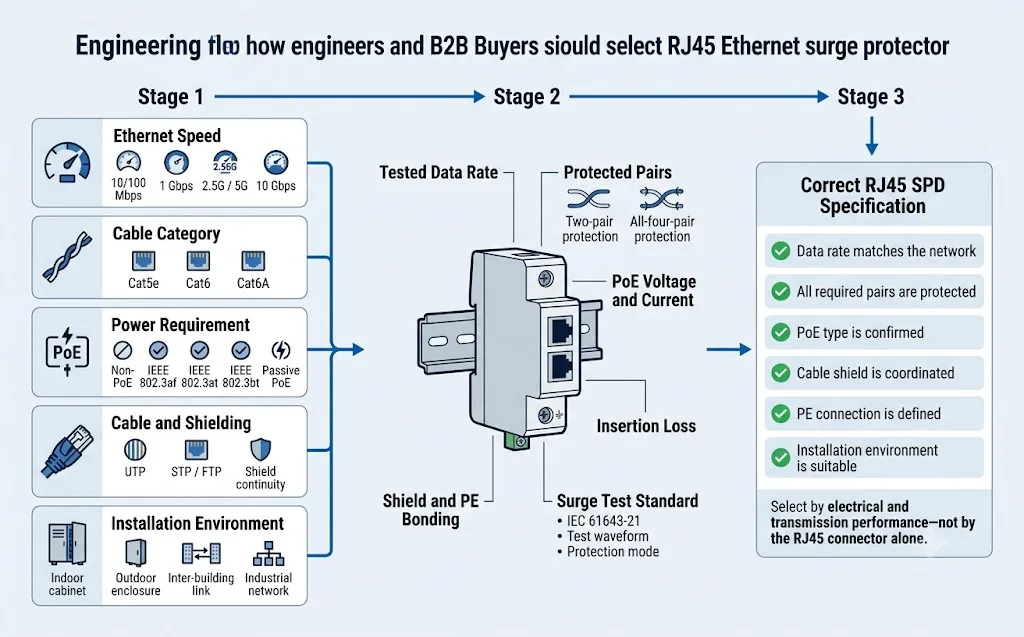
Alur pemilihan pelindung lonjakan RJ45 untuk insinyur dan pembeli
Selesaikan enam pemeriksaan ini sebelum meminta sampel, menyetujui model pengganti, atau membandingkan penawaran OEM.
Identifikasi kecepatan tautan yang sebenarnya
Baca spesifikasi switch dan perangkat yang terhubung. Jangan menyimpulkan kecepatan yang diperlukan hanya dari label kabel.
Konfirmasi PoE atau non-PoE
Catat tipe IEEE PoE atau tegangan PoE pasif yang tepat, polaritas, dan arus beban.
Petakan pasangan konduktor
Konfirmasi pasangan mana yang membawa data dan daya, serta konduktor mana yang dilindungi oleh SPD.
Tentukan lingkungan
Tentukan apakah untuk kabinet dalam ruangan, penutup luar ruangan, perangkat di atap, jalur antar gedung, atau jaringan industri.
Tentukan grounding dan pemasangan
Konfirmasi pemasangan inline, dinding, rak, atau kabinet serta metode PE lokal atau bonding.
Tinjau kinerja yang terdokumentasi
Bandingkan data transmisi, Uc, tegangan pembatas, bentuk gelombang lonjakan, dan laporan pengujian model tersebut secara tepat.
Konfigurasi RJ45 LEEYEE mana yang sesuai dengan aplikasi?
Matriks berikut terbatas pada konfigurasi yang didokumentasikan dalam informasi produk publik dan data katalog LEEYEE saat ini. Hal ini tidak menyiratkan kemampuan Gigabit, 10G, atau PoE++.
LY21-2 CAT1 / CAT4 / CAT8
Perlindungan sinyal jaringan RJ45 untuk jalur data Ethernet non-PoE.
- Tipe jaringan
- Ethernet non-PoE
- Kecepatan maksimum
- 100Mbps
- Tegangan operasi
- 5V DC
- Uc maksimum
- 6V DC
- Icurrent beban
- 500mA
- Kerugian penyisipan
- ≤0.2dB
- Tingkat perlindungan
- IP20
CAT1, CAT4, dan CAT8 adalah label konfigurasi produk. Label tersebut tidak boleh diartikan sebagai kinerja pemasangan kabel Cat1, Cat4, atau Cat8 Ethernet.
Lihat Produk Non-PoELY21-2 PoE
Perlindungan gabungan untuk daya PoE dan sirkuit data Ethernet.
- Tipe jaringan
- Daya PoE + data Ethernet
- Kecepatan maksimum
- 100Mbps
- Uc daya PoE
- Hingga 60V DC
- Icurrent beban
- 500mA
- Tegangan operasi data
- 5V DC
- Kerugian penyisipan
- ≤0.2dB
- Tingkat perlindungan
- IP20
Konfirmasi tegangan PoE, mode pasangan berdaya, arus kontinu, dan konfigurasi pin yang tepat sebelum memesan. Jangan sebut model ini kompatibel dengan Gigabit atau PoE++.
Konfirmasi Konfigurasi PoELY21-2 CAT16 / CAT24
Perlindungan RJ45 multi-port untuk kabinet jaringan non-PoE terpusat.
- Opsi port
- 16 port / 24 port
- Tipe jaringan
- Ethernet non-PoE
- Kecepatan maksimum
- 100Mbps
- Tegangan operasi
- 5V DC
- Uc maksimum
- 6V DC
- Kerugian penyisipan
- ≤0.2dB
- Tingkat perlindungan
- IP20
CAT16 dan CAT24 menunjukkan jumlah port yang dilindungi. Kode tersebut tidak menjelaskan performa kabel Cat6, Cat6A, atau Cat8.
Minta Detail Multi-PortBatasan aplikasi saat ini
Konfigurasi LEEYEE publik yang ditunjukkan di atas memiliki tingkat transmisi maksimum terdokumentasi sebesar 100Mbps. Produk tersebut tidak boleh dipromosikan untuk aplikasi berikut kecuali model yang telah diuji secara terpisah dan laporan teknis pendukung telah dikonfirmasi:
- 1000BASE-T Gigabit Ethernet.
- 2.5GBASE-T or 5GBASE-T.
- Saluran Cat6A atau 10GBASE-T.
- IEEE 802.3bt PoE++ atau PoE daya tinggi empat pasang.
Halaman ini menjelaskan bagaimana pembeli harus mengevaluasi persyaratan performa yang lebih tinggi tersebut, namun tidak mengklaim bahwa jajaran LY21-2 saat ini mendukungnya.
Informasi untuk dikonfirmasi sebelum sampel atau pesanan massal SPD RJ45
Permintaan informasi yang lengkap membantu pemasok memilih sirkuit perlindungan yang tepat, alih-alih menawarkan model yang terlihat serupa tetapi tidak kompatibel secara elektrik.
Detail transmisi
- 10/100Mbps, 1Gbps, 2.5G, 5G atau 10G.
- Pengkabelan Cat5e, Cat6, atau Cat6A.
- Kabel berpelindung (shielded) atau tanpa pelindung (unshielded).
- Panjang kabel maksimum.
- Jumlah port yang diperlukan.
Persyaratan daya
- Standar Non-PoE atau PoE.
- Tegangan PoE dan arus maksimum.
- Mode A, Mode B, atau daya empat pasang.
- Polaritas PoE pasif jika berlaku.
- Batas penurunan tegangan yang diizinkan.
Mekanikal dan lingkungan
- Pemasangan inline, dinding, kabinet, atau rak.
- Penutup dalam ruangan atau lokasi luar ruangan.
- Peringkat IP yang diperlukan.
- Suhu pengoperasian.
- PE, pelindung, dan metode bonding kabinet.
Performa lonjakan arus (surge)
- Standar IEC atau proyek yang berlaku.
- Bentuk gelombang dan kategori pengujian yang diperlukan.
- Mode perlindungan dan pin yang dilindungi.
- Persyaratan tegangan Uc dan tegangan pembatas.
- Laporan pengujian yang diperlukan.
Informasi pemesanan
- Sampel dan volume tahunan.
- Target pasar dan kebutuhan sertifikasi.
- Label pribadi atau branding LEEYEE.
- Bahasa kemasan dan label.
- Jadwal pengiriman yang diperlukan.
Persyaratan validasi
- Persetujuan sampel pra-produksi.
- Verifikasi kecepatan jaringan.
- Uji beban PoE.
- Tinjauan laporan uji lonjakan arus (surge).
- Ketertelusuran batch dan rencana inspeksi.
Templat pertanyaan RJ45 SPD yang dapat disalin
Kirimkan informasi ini bersama dengan diagram jaringan atau spesifikasi proyek.
Aplikasi:
Peralatan yang dilindungi:
Kecepatan jaringan:
Kategori kabel:
Kabel berpelindung atau tidak berpelindung:
PoE atau non-PoE:
Standar PoE atau tegangan passive PoE:
Daya dan arus PoE maksimum:
Pasangan kabel bertenaga dan penetapan pin:
Pasangan pelindung yang diperlukan:
Jumlah port:
Panjang kabel maksimum:
Pemasangan dalam ruangan atau luar ruangan:
Metode pemasangan:
Rating IP yang diperlukan:
Metode pentanahan dan pengikatan:
Standar lonjakan listrik yang diperlukan:
Uc yang diperlukan, tegangan pembatas, dan tingkat uji lonjakan listrik:
Sertifikat atau laporan uji yang diperlukan:
Jumlah sampel:
Estimasi jumlah tahunan:
Logo OEM, label, dan persyaratan pengemasan:
Target pasar:
Enam kesalahan yang mengarah pada pesanan SPD RJ45 yang salah
Memesan hanya berdasarkan konektor
Konektor RJ45 memang pas, tetapi sirkuit pelindung internal mungkin mendukung tegangan, peta pasangan, atau kecepatan data yang salah.
Menggunakan Cat6 sebagai bukti Gigabit
Label kategori kabel atau soket logam bukanlah pengganti untuk data transmisi yang teruji.
Mengabaikan arus PoE
Pelindung mungkin melewatkan data namun menjadi terlalu panas, menyebabkan penurunan tegangan, atau membuat perangkat bertenaga melakukan reboot saat berada di bawah beban.
Hanya membandingkan kV lonjakan listrik
Angka tersebut tidak lengkap tanpa bentuk gelombang, arus, mode uji, dan tegangan pembatas yang terukur.
Memasang tanpa pengikatan
SPD yang dipilih dengan benar tidak dapat berfungsi sebagaimana mestinya tanpa jalur pembuangan lokal yang pendek.
Melewatkan validasi tautan
Jaringan mungkin tampak terhubung saat beroperasi pada kecepatan yang lebih rendah atau mengakumulasi kesalahan komunikasi.
Lanjutkan jalur pemilihan SPD jaringan dan sinyal
FAQ pelindung lonjakan RJ45
Dapatkah pelindung lonjakan RJ45 yang sama digunakan untuk Cat5e dan Cat6?
Hanya jika SPD telah diuji untuk kecepatan jaringan dan frekuensi transmisi yang diperlukan. Antarmuka RJ45 mungkin secara fisik pas dengan kedua sistem kabel sementara sirkuit internal tetap membatasi saluran yang telah selesai.
Apakah pelindung lonjakan RJ45 mengurangi kecepatan jaringan?
SPD yang dipilih dan dipasang dengan benar harus menjaga kinerja transmisi yang telah dideklarasikan. Produk yang tidak cocok dapat menyebabkan tautan melakukan negosiasi dari 1Gbps turun menjadi 100Mbps, meningkatkan kesalahan paket, atau membuat pemutusan koneksi yang terputus-putus.
Dapatkah SPD RJ45 100Mbps digunakan di jaringan Gigabit?
Tidak. Produk dengan kecepatan maksimum terdokumentasi 100Mbps tidak boleh ditentukan untuk 1000BASE-T. Gigabit Ethernet memerlukan keempat pasangan terpilin dan kinerja transmisi frekuensi tinggi yang sesuai.
Dapatkah pelindung lonjakan RJ45 non-PoE dipasang pada kabel PoE?
Tidak, kecuali produsen secara eksplisit mengonfirmasi tegangan PoE, arus beban, dan konfigurasi pasangan bertenaga. Pelindung jalur data non-PoE mungkin tidak dapat membawa daya PoE berkelanjutan dengan aman.
Apakah kabel Ethernet yang dilindungi menghilangkan kebutuhan untuk grounding?
Tidak. Perisai kabel membantu mengelola interferensi elektromagnetik, namun tidak secara otomatis menggantikan sambungan pendek SPD ke sistem PE lokal atau sistem pengikatan ekipotensial.
Apakah pelindung lonjakan Ethernet harus dipasang di kedua ujung?
Perlindungan di kedua ujung biasanya tepat untuk tautan Ethernet tembaga luar ruangan, di atas atap, atau antar gedung. Setiap SPD harus dipasang di batas perlindungan lokal dan diikat ke sistem ekipotensial lokal.
Mana yang lebih penting: rugi penyisipan atau peringkat arus lonjakan?
Keduanya penting. Parameter transmisi menentukan apakah jaringan tetap stabil, sementara parameter lonjakan menentukan kemampuan perlindungan. Produk yang berkinerja baik hanya di satu area bukanlah solusi lengkap.
Bagaimana pembeli dapat memverifikasi klaim 10kV pemasok?
Minta laporan pengujian dan konfirmasikan bentuk gelombang tegangan, arus terkait, kondisi sumber, kombinasi konduktor yang dilindungi, mode perlindungan, dan tegangan pembatas yang terukur.
Apakah LEEYEE LY21-2 saat ini mendukung Gigabit Ethernet?
Konfigurasi LY21-2 yang diterbitkan saat ini mencantumkan tingkat transmisi maksimum 100Mbps. Mereka tidak boleh digambarkan sebagai kompatibel dengan Gigabit kecuali jika model Gigabit teruji terpisah telah dikonfirmasi secara resmi.
Informasi apa yang harus dikirim ke LEEYEE untuk pemilihan model?
Kirimkan kecepatan Ethernet, kategori kabel, jenis PoE, tegangan, arus, penetapan pasangan, jumlah port, panjang kabel, lingkungan pemasangan, metode pentanahan, standar yang diperlukan, dan jumlah pesanan.
Standar dan sumber teknis
Pemilihan proyek akhir harus diperiksa terhadap spesifikasi peralatan yang tepat, standar saat ini, aturan pemasangan lokal, dan dokumen teknis khusus model dari pemasok.
- IEC 61643-21:2025, Perangkat pelindung lonjakan listrik yang terhubung ke jaringan telekomunikasi dan persinyalan—persyaratan kinerja dan metode pengujian. Halaman publikasi IEC .
- IEC 61643-22:2015, Perangkat pelindung lonjakan listrik yang terhubung ke jaringan telekomunikasi dan persinyalan—prinsip pemilihan dan penerapan. Halaman publikasi IEC .
- Fluke Networks, Penjelasan Kategori Kabel Ethernet, termasuk frekuensi referensi untuk kabel Cat5e, Cat6, dan Cat6A. Artikel Fluke Networks .
- Fluke Networks, Rugi Balik: Penyebab dan Prosedur Pengujian. Artikel Fluke Networks .
- Cisco, Dasar-dasar Pengkabelan Ethernet dalam Jaringan Data Perusahaan, termasuk perbedaan antara penggunaan konduktor 100BASE-TX dan 1000BASE-T. Jaringan Pembelajaran Cisco .
- Cisco, Apa itu Power over Ethernet, mencakup pengembangan PoE IEEE 802.3af, 802.3at, dan 802.3bt. Ikhtisar PoE Cisco .
- Data produk terbitan LEEYEE LY21-2 RJ45 100Mbps Network Signal Surge Protector. Halaman produk LEEYEE .
- Manual Pemilihan Perangkat Pelindung Lonjakan LEEYEE, termasuk konfigurasi LY21-2 PoE, CAT16/CAT24, dan CAT1/CAT4/CAT8 yang terdokumentasi. Katalog LEEYEE .
Membutuhkan SPD RJ45 yang cocok dengan jaringan Anda yang tepat?
Kirimkan kecepatan Ethernet, kategori kabel, standar PoE, voltase, arus, pair map, posisi pemasangan, metode pembumian (grounding), dan standar pengujian yang diperlukan. LEEYEE dapat meninjau aplikasi sebelum konfirmasi sampel atau pesanan OEM.