
Peristiwa sambaran petir tidak secara otomatis berarti bahwa setiap perangkat proteksi lonjakan harus diganti. Namun, hal itu berarti bahwa titik proteksi yang terdampak harus diperiksa dan hasilnya didokumentasikan. Keputusan penggantian bergantung pada indikator status, alarm jarak jauh, kondisi fisik, proteksi cadangan, serta konsekuensi jika SPD yang statusnya tidak pasti tetap digunakan.
Halaman ini merupakan panduan pengambilan keputusan pasca-peristiwa dan penggantian. Halaman ini bukan prosedur pengujian sirkuit langsung. Inspeksi, isolasi, dan penggantian kabinet harus dilakukan oleh personel yang berkualifikasi sesuai dengan aturan keselamatan kelistrikan di lokasi tersebut.
Daftar Isi
Jawaban Singkat: Haruskah SPD Diganti?
Tidak secara otomatis. Ganti SPD segera ketika indikator kegagalannya telah berubah status, alarm jarak jauh melaporkan gangguan, rumah atau terminal menunjukkan kerusakan, atau metode inspeksi yang diizinkan oleh produsen mengonfirmasi kondisi abnormal.
Jika indikasi visual tetap normal dan inspeksi pascakejadian yang lebih luas tidak menemukan kondisi abnormal, SPD dapat tetap digunakan. Namun, jendela hijau konvensional hanyalah indikasi status, bukan pengukuran pasti tentang sisa kapasitas lonjakan. [1] [2]
Gunakan Tiga Keputusan, Bukan Hanya “Hijau atau Merah”
Kegagalan atau kerusakan terkonfirmasi
Ganti kartrid yang terdampak atau SPD lengkap sebelum titik proteksi dikembalikan ke layanan normal.
Sebuah kejadian abnormal belum terselesaikan
Tetap biarkan titik tersebut dalam penyelidikan ketika proteksi cadangan telah bekerja, peralatan rusak, atau jalur kejadian tidak pasti.
Tidak ditemukan kondisi abnormal
Pertahankan SPD dalam layanan setelah status visual, alarm, pengawatan, pembumian, dan proteksi cadangan telah diperiksa dan dicatat.
Kapan SPD Harus Diganti Setelah Sambaran Petir?
| Kondisi setelah kejadian | Artinya bagi keputusan | Tindakan yang diperlukan |
|---|---|---|
| Indikator menunjukkan kegagalan produsen atau status akhir masa pakai | Modul proteksi yang dipantau tidak lagi berada dalam status layanan normal. | Ganti modul atau perangkat yang terdampak. |
| Kontak gangguan jarak jauh telah berubah status | Satu atau beberapa modul yang dipantau mungkin terputus setelah beban lebih atau kegagalan. | Temukan SPD yang terdampak dan periksa secara fisik. Jangan hanya menghapus alarm BMS atau PLC. |
| Retak, meleleh, bekas terbakar, deformasi, jelaga, terminal yang rusak, atau bau terbakar | Kerusakan termal, listrik, atau mekanis mungkin telah terjadi. | Jaga agar tetap terisolasi dan ganti komponen yang rusak atau seluruh SPD. |
| Sekring cadangan SPD, MCB, atau pelindung cadangan spesifik lainnya telah beroperasi | Penyebabnya mungkin melibatkan SPD, pengkabelan, tegangan sistem, atau koordinasi perangkat pelindung. | Lakukan investigasi sebelum mengganti sekring atau mengatur ulang pemutus sirkuit (breaker). |
| Indikator dan kontak jarak jauh dalam kondisi normal, tanpa ketidaknormalan yang terlihat atau pada sistem | Tidak ada status akhir masa pakai terpantau yang teridentifikasi. | Selesaikan inspeksi, catat hasilnya, dan lanjutkan pemantauan. |
| SPD tampak normal, tetapi inverter, PLC, catu daya, atau peralatan komunikasi mengalami kerusakan | Lonjakan arus mungkin masuk melalui jalur lain atau melewati sebagian konsep perlindungan. | Periksa semua jalur daya, sinyal, data, dan pembumian yang relevan. |
| Dikonfirmasi terjadi sambaran langsung di lokasi yang kritis, terpencil, atau sulit diakses | Ketidakpastian dan biaya dari peristiwa lain mungkin lebih penting daripada harga penggantian terencana. | Terapkan kebijakan risiko produsen dan lokasi; pertimbangkan penggantian preventif. |

Jangan hanya mengatur ulang pemutus sirkuit cadangan
Memberikan energi kembali tanpa memeriksa SPD, sirkuit, dan tegangan sistem dapat memulihkan daya namun membiarkan mode perlindungan tidak tersedia—atau memaparkan modul pengganti baru pada kesalahan yang sama yang belum terselesaikan.
Apa yang Harus Diperiksa Sebelum Keputusan Penggantian?
Ini adalah daftar periksa keputusan, bukan metode pengujian SPD terperinci. Untuk prosedur pengujian kelistrikan dan diagnosis kegagalan, gunakan panduan inspeksi kegagalan SPD. Inspeksi SPD secara berkala dan pemeliharaan perlindungan petir yang terdokumentasi adalah bagian dari program perlindungan yang lengkap. [1]
Isolasi dengan aman
Ikuti prosedur penguncian (lockout), verifikasi, dan keselamatan kelistrikan di lokasi sebelum membuka kabinet.
Catat setiap indikator
Periksa setiap fase, kutub DC, dan modul N-PE alih-alih hanya mencatat keseluruhan rakitan.
Tinjau alarm jarak jauh
Konfirmasi waktu alarm, kabinet, status kontak, dan titik perlindungan yang terpengaruh.
Periksa perangkat dan pengkabelan
Cari kerusakan, perubahan warna, terminal longgar, isolasi yang rusak, dan pemanasan yang tidak normal.
Periksa perlindungan cadangan
Catat apakah sekring, pemutus sirkuit, atau pelindung cadangan lonjakan arus yang ditentukan telah beroperasi.
Periksa pembumian dan penyambungan
Periksa konduktor bumi SPD, koneksi ekipotensial, dan kerusakan sistem pembumian yang terlihat.
Periksa jalur masuk lainnya
Sertakan AC, PV DC, sensor, RS485, Ethernet, PoE, koaksial, dan jalur eksternal lainnya.
Foto sebelum pelepasan
Ambil gambar indikator, pelat nama, kartrid, dasar, pengkabelan, perlindungan cadangan, dan posisi kabinet.
Batas halaman: Halaman ini menjawab apa yang harus diganti setelah pemeriksaan. Halaman kegagalan terpisah menjelaskan cara menguji dan mendiagnosis SPD secara lebih rinci.
Indikator SPD Masih Hijau. Apakah Masih Bisa Digunakan?
Pada SPD konvensional, indikator visual normal umumnya menunjukkan bahwa pemutus arus yang dipantau belum melaporkan status kegagalan perangkat yang ditentukan. Indikasi status dan pensinyalan jarak jauh digunakan untuk mengidentifikasi modul perlindungan yang kelebihan beban atau terputus sehingga dapat diganti. [1] [3]

Apa yang didukung oleh indikator normal
- Tidak ada status akhir masa pakai terpantau yang saat ini ditampilkan.
- Modul tersebut mungkin tetap tersedia untuk perlindungan.
- Petir saja bukan bukti yang cukup bahwa modul ini telah gagal.
- Perangkat dapat tetap beroperasi jika pemeriksaan yang lebih luas juga normal.
Apa yang tidak dapat dibuktikan oleh jendela hijau
- Ini tidak menunjukkan seberapa banyak energi lonjakan arus yang diserap.
- Ini tidak menghitung sisa masa pakai yang tepat.
- Ini tidak memverifikasi setiap sambungan kabel dan pembumian.
- Ini tidak mengonfirmasi kondisi SPD lain atau jalur masuk lonjakan arus.
- Ini tidak menggantikan penilaian risiko spesifik lokasi setelah peristiwa parah.
Untuk konfirmasi penggantian, warna indikator saja tidak cukup
Untuk mengonfirmasi kartrid pengganti LEEYEE atau SPD yang setara, berikan pelat nama lengkap, setiap jendela indikator, model kartrid dan basis, tegangan sistem, konfigurasi pengkabelan, perlindungan cadangan, dan foto kabinet secara lengkap.
Hal ini memungkinkan keputusan penggantian dipilah menjadi tiga kemungkinan: penggantian kartrid yang tepat, penggantian SPD secara menyeluruh, atau koreksi spesifikasi sebelum masalah yang sama terulang kembali.
Multimeter standar bukanlah alat penguji sisa masa pakai
Pemeriksaan resistansi atau kontinuitas dasar mungkin dapat mengidentifikasi beberapa kondisi sirkuit terbuka atau hubung singkat yang parah, namun tidak dapat mereproduksi pengujian impuls yang digunakan untuk memverifikasi kinerja SPD yang telah dipublikasikan. Standar produk IEC mendefinisikan persyaratan kinerja dan pengujian untuk SPD. [4]
Apa Arti Alarm Jarak Jauh SPD Setelah Sambaran Petir?
Kontak jarak jauh konvensional biasanya melaporkan status pengoperasian atau kegagalan SPD yang dipantau. Hal ini tidak boleh dianggap secara otomatis sebagai penghitung sambaran petir atau pengukuran energi yang dilepaskan. Sinyal jarak jauh memungkinkan modul yang rusak atau terputus dideteksi dari ruang kontrol, yang sangat berguna di instalasi besar atau instalasi yang sulit diakses. [1] [2]
Periksa setelah alarm
- Apakah kontaknya biasanya terbuka (normally open) atau biasanya tertutup (normally closed).
- Kabinet dan SPD mana yang menghasilkan alarm.
- Apakah satu modul atau beberapa kutub yang berubah status.
- Apakah kontak kembali normal setelah penggantian yang benar.
- Apakah pengkabelan pemantauan serta input PLC atau BMS beroperasi dengan benar.
Hindari kesalahan berikut
- Jangan hanya mengakui alarm perangkat lunak saja.
- Jangan berasumsi bahwa setiap alarm membuktikan satu sambaran petir tertentu menyebabkan kesalahan.
- Jangan mengganti modul tanpa memeriksa kondisi sistem.
- Jangan abaikan alarm berulang setelah memasang spesifikasi yang sama.
Untuk logika terminal PLC dan pengkabelan kontak, lihat Panduan alarm jarak jauh SPD dan koneksi PLC.
Apakah Setiap SPD di Kabinet yang Sama Harus Diganti?
Tidak—tidak secara otomatis. Namun, setiap modul yang relevan harus diperiksa. Satu kartrid yang rusak tidak membuktikan bahwa setiap modul lainnya rusak. Demikian pula, satu indikator normal tidak membuktikan bahwa seluruh kabinet atau rantai perlindungan tidak terpengaruh.
| Situasi | Cakupan minimum | Kapan penggantian yang lebih luas mungkin dibenarkan |
|---|---|---|
| Satu kartrid yang rusak | Periksa semua kutub, modul N-PE, basis, terminal, dan perlindungan cadangan. | Kartrid lain memiliki masa pakai dan riwayat lonjakan yang sama lamanya, atau gangguan lain berbiaya tinggi. |
| Satu papan distribusi yang terdampak | Periksa SPD hulu dan hilir dalam pengaturan perlindungan yang terkoordinasi. | Beberapa beban atau beberapa tahap perlindungan terdampak. |
| Pembangkit listrik tenaga surya (PV) | Periksa kotak penggabung (combiner box), input DC inverter, output AC, dan perlindungan komunikasi. | Beberapa string, inverter, atau perangkat pemantauan rusak. |
| Lokasi telekomunikasi atau luar ruangan | Periksa AC, DC, antena, data, PoE, dan jalur pembumian. | Lokasi tidak berawak, sulit diakses, atau berulang kali terpapar. |
| Pabrik atau instalasi proses | Periksa distribusi daya, daya PLC, sinyal, sensor, dan jaringan. | Penggantian terkendali memakan biaya lebih rendah daripada penghentian produksi yang tidak terduga. |
Haruskah Mengganti Satu Kartrid, Seluruh Set, atau SPD Lengkap?
Ganti satu kartrid
Tepat dilakukan jika hanya satu modul pluggable yang kompatibel yang rusak dan basis, terminal, mekanisme jarak jauh, serta modul lainnya tidak rusak.
Ganti seluruh set modul
Pertimbangkan hal ini setelah kejadian umum yang parah, saat semua modul memiliki riwayat penggunaan jangka panjang yang sama, atau saat kebijakan pemeliharaan lokasi memerlukan penggantian yang seragam.
Ganti SPD lengkap
Diperlukan ketika perangkat tidak dapat dipasang/dicabut (non-pluggable), basis atau terminal rusak, sinyal jarak jauh tidak dapat diandalkan, atau kompatibilitas kartrid tidak dapat dipastikan.
Produk pluggable dapat mendukung pemeliharaan yang lebih cepat, namun kartrid pengganti harus sesuai dengan keluarga produk dan basis yang benar. Dokumentasi produk umumnya mengidentifikasi modul pengganti spesifik alih-alih menganggap semua kartrid dapat dipertukarkan. [3]
Lihat Panduan penggantian kartrid SPD dan panduan penggantian SPD yang dapat dipasang untuk tahap penggantian fisik.
Kapan Penggantian Preventif Dianggap Wajar?
Penggantian preventif berarti mengganti perangkat meskipun tidak ada indikasi kegagalan yang terlihat. Ini bukan aturan universal setelah setiap badai petir. Ini adalah keputusan risiko berdasarkan tingkat keparahan kejadian, ketidakpastian, kesulitan akses, dan konsekuensi dari lonjakan daya lainnya.
| Kondisi lokasi | Pendekatan umum |
|---|---|
| Panel dalam ruangan biasa tanpa hasil abnormal | Catat hasil inspeksi dan lanjutkan pemantauan normal. |
| Kabinet luar ruangan di area dengan sambaran petir tinggi | Tingkatkan perhatian terhadap kondisi penutup (enclosure), pembumian (earthing), kelembapan, terminal, dan ketersediaan suku cadang. |
| Pembangkit listrik tenaga surya skala besar dengan kejadian berulang | Pertahankan catatan kejadian dan sediakan modul pengganti DC, AC, dan komunikasi yang kompatibel. |
| Stasiun telekomunikasi tanpa awak | Gunakan alarm jarak jauh dan kebijakan suku cadang yang konservatif karena akses ke lokasi mungkin tertunda. |
| Pabrik dengan proses berkelanjutan atau fasilitas kritis | Bandingkan biaya penggantian terkontrol dengan potensi biaya akibat kejadian lain yang tidak terlindungi. |
| Sambaran langsung yang terkonfirmasi dengan kegagalan peralatan multipel | Nilai seluruh sistem proteksi petir dan surja yang terkoordinasi, bukan hanya satu SPD saja. |
Panduan aplikasi IEC membahas pemilihan, penempatan, dan koordinasi SPD untuk sistem AC dan PV, mendukung pandangan tingkat sistem alih-alih perangkat tunggal. [5] [6] [7]
Cara Memastikan SPD Pengganti yang Tepat
Jangan memesan pengganti hanya dengan mencocokkan warna rumah, lebar modul, atau satu nilai seperti “40 kA.” Pengganti harus sesuai dengan sistem, aplikasi, tipe SPD, nilai kelistrikan, dan basisnya.
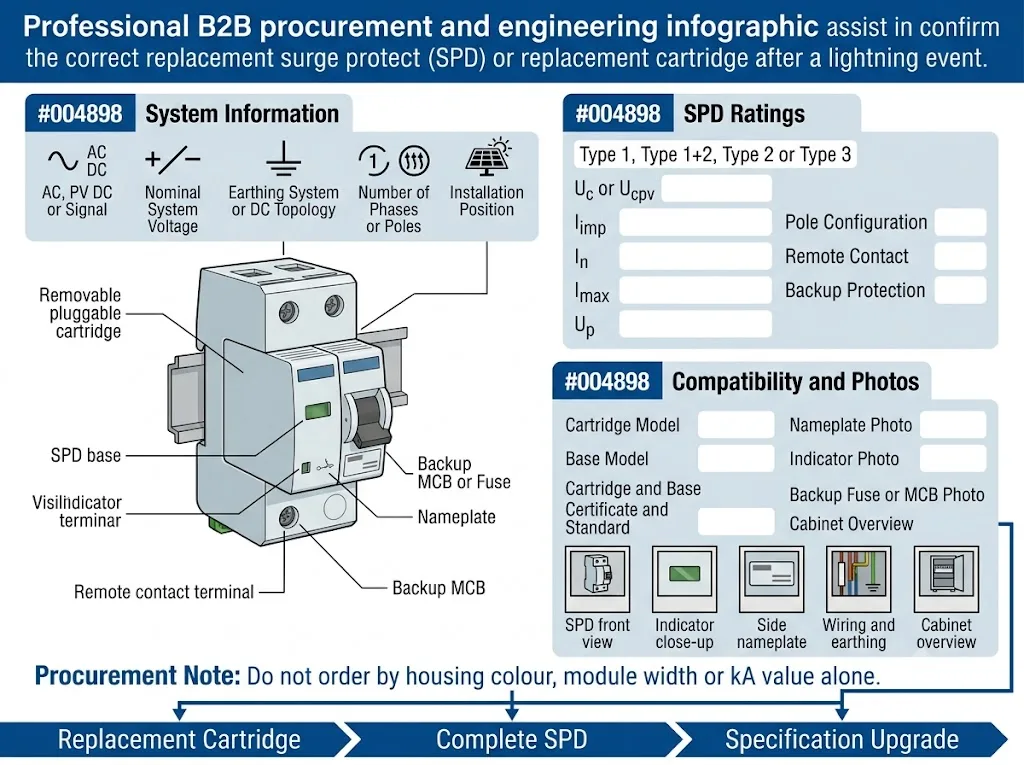
Data teknis untuk dikonfirmasi
- AC, PV DC, DC lainnya, atau sirkuit sinyal
- Tegangan nominal sistem
- Sistem pembumian atau topologi DC
- Tipe 1, Tipe 1+2, Tipe 2, atau Tipe 3
- Uc atau Ucpv
- Iimp jika berlaku
- Dalam dan Imax
- Tingkat perlindungan tegangan Up
- Jumlah kutub dan mode proteksi
- 1P+N, 2P, 3+1, 4+0, atau topologi lainnya
- Model kartrid dan basis
- Persyaratan kontak jarak jauh
- Persyaratan sekring cadangan, MCB, atau SCPD
- Standar yang berlaku dan cakupan sertifikat
- Kondisi suhu dan penutup (enclosure)
- Label OEM atau persyaratan merek privat
Foto untuk mencegah kesalahan pemesanan
- Tampilan depan penuh rakitan SPD
- Foto jarak dekat setiap jendela indikator
- Detail pelat nama samping dan atas
- Nomor model kartrid
- Model basis dan pengkodean
- Koneksi pengabelan dan pembumian
- Sekring cadangan atau pemutus arus
- Tanda terbakar, retakan, atau terminal yang rusak
- Lokasi kabinet penuh dan aplikasi
Apa Lagi yang Harus Diperiksa di Lokasi yang Berbeda?
Sistem Solar PV
Periksa kotak penggabung DC, input DC inverter, output AC inverter, papan distribusi, RS485, sensor, gerbang pemantauan, dan jalur Ethernet.
Sistem kontrol pabrik
Periksa SPD distribusi utama dan sub-distribusi, catu daya PLC, sirkuit I/O, sensor lapangan, dan kabel komunikasi yang meninggalkan area kontrol.
Stasiun telekomunikasi
Termasuk pasokan AC, penyearah, sistem DC -48 V, antena dan jalur koaksial, PoE, Ethernet, alarm, dan ikatan ekipotensial.
Pembangun panel dan tim EPC
Sebelum memasok model yang sama, konfirmasikan apakah pemilihan tegangan yang salah, koordinasi cadangan, tata letak kabel, atau tegangan lebih sistem berkontribusi pada kejadian tersebut.
Perlu Mengonfirmasi Model Pengganti SPD?
Kirim pelat nama, status indikator, tegangan sistem, model kartrid dan basis, proteksi cadangan, serta foto kabinet kepada LEEYEE. Kami dapat membantu menentukan apakah yang dibutuhkan adalah kartrid pengganti, SPD lengkap, atau spesifikasi yang diperbaiki.
Penggantian SPD Setelah Sambaran Petir: FAQ
Apakah setiap SPD perlu diganti setelah petir menyambar?
Tidak. Ganti SPD ketika indikasi statusnya, alarm jarak jauh, kondisi fisik, atau hasil inspeksi yang disetujui menunjukkan bahwa perangkat tersebut tidak lagi layak pakai. Hasil normal yang terdokumentasi dapat memungkinkan perangkat tetap beroperasi.
Dapatkah SPD tetap berfungsi jika indikasinya masih hijau?
Ya, ketika inspeksi pasca-kejadian lengkap menunjukkan hasil normal. Indikasi hijau umumnya berarti kondisi kegagalan yang dipantau belum tercapai, namun hal ini tidak menghitung kapasitas surja sisa yang tepat.
Apakah alarm jarak jauh SPD membuktikan bahwa petir merusaknya?
Tidak secara sendirinya. Kontak jarak jauh konvensional biasanya hanya melaporkan status perangkat yang dipantau. Inspeksi SPD secara lokal dan selidiki kejadiannya sebelum memutuskan penyebabnya.
Bisakah pemutus cadangan SPD hanya direset?
Tidak sebelum inspeksi. Pemutus arus mungkin telah beroperasi karena kegagalan SPD, kesalahan pengabelan, hubungan arus pendek, tegangan sistem yang tidak normal, atau koordinasi yang tidak sesuai.
Apakah semua modul dalam SPD tiga fase harus diganti bersamaan?
Tidak secara otomatis. Satu kartrid yang kompatibel dapat diganti jika hanya modul tersebut yang mengalami kegagalan, sementara basis dan modul lainnya tidak rusak. Penggantian satu set lengkap merupakan keputusan pemeliharaan dan risiko.
Apa yang diperlukan untuk memesan modul pengganti yang tepat?
Konfirmasikan aplikasi, tegangan sistem, Uc atau Ucpv, tipe SPD, Iimp, In, Imax, Up, konfigurasi kutub, kartrid, basis, kontak jarak jauh (remote contact), dan proteksi cadangan.
Lanjutkan Proses Pemecahan Masalah SPD
Referensi Teknis
- Phoenix Contact, Dasar-Dasar Proteksi Lonjakan Arus. Mencakup pemeliharaan SPD, inspeksi rutin, indikator status, persinyalan jarak jauh, dan penggantian modul proteksi yang kelebihan beban. Lihat sumber.
- Phoenix Contact, ImpulseCheck: Pemantauan Cerdas Proteksi Lonjakan Arus. Membahas pemantauan kondisi dan keterbatasan jika hanya mengandalkan indikasi status konvensional. Lihat sumber.
- ABB Furse, Panduan Produk Seri Perlindungan Lonjakan Arus ESP Tipe 1 dan Tipe 2. Menampilkan modul pengganti yang telah ditentukan, konstruksi proteksi yang dapat dilepas, dan opsi kontak jarak jauh. Lihat sumber.
- IEC 61643-11:2025, Perangkat Proteksi Lonjakan Arus Tegangan Rendah—Bagian 11: SPD yang Terhubung ke Sistem Daya Tegangan Rendah AC—Persyaratan dan Metode Pengujian. Lihat catatan IEC.
- IEC 61643-12:2020, Prinsip Pemilihan, Pengoperasian, Penempatan, dan Koordinasi untuk SPD AC. Lihat catatan IEC.
- IEC 61643-31:2018, Persyaratan dan Metode Pengujian untuk SPD pada Instalasi Fotovoltaik. Lihat catatan IEC.
- IEC 61643-32:2017, Pemilihan, Pemasangan, dan Koordinasi SPD untuk Sistem Fotovoltaik. Lihat catatan IEC.