
Daftar periksa pemeliharaan SPD ini membantu tim pemeliharaan dan pembuat panel merencanakan interval inspeksi, memeriksa kondisi SPD, menguji sinyal jarak jauh, mencatat tindakan korektif, dan mengelola stok penggantian.
Daftar ini dirancang untuk papan distribusi tegangan rendah, instalasi surya PV, lokasi telekomunikasi, panel kontrol industri, dan switchboard OEM. Tujuannya bukan hanya untuk mengidentifikasi indikator merah. Tujuannya adalah untuk memelihara sistem yang dapat dilacak yang memastikan di mana setiap SPD dipasang, apa yang diperiksa, apa yang rusak, apa yang diganti, dan apakah penyebab mendasar telah diselesaikan.
Tidak ada interval inspeksi tunggal yang berlaku untuk setiap instalasi. Jadwal pemeliharaan SPD yang praktis menggabungkan pemeriksaan visual rutin, inspeksi panel terencana, tinjauan tahunan yang terdokumentasi, dan pemeriksaan segera setelah terjadi petir, alarm lonjakan arus, pengoperasian perlindungan cadangan, atau perubahan pada sistem kelistrikan.
Interval akhir harus mengikuti persyaratan setempat, penilaian risiko lokasi, program inspeksi proteksi petir, instruksi produsen SPD yang dipasang, serta tingkat kekritisan peralatan yang dilindungi.
Cetak daftar periksa inspeksi lengkap sebagai PDF, atau unduh log pemeliharaan CSV yang dapat diedit yang berisi detail aset, hasil inspeksi, tindakan korektif, catatan penggantian, dan tanggal inspeksi berikutnya.
Daftar Isi
Jadwal Inspeksi SPD yang Direkomendasikan
Jadwal di bawah ini adalah kerangka kerja pemeliharaan preventif praktis, bukan interval hukum universal. Lokasi dengan intensitas petir tinggi, lokasi terpencil, lini produksi kritis, dan instalasi dengan kejadian lonjakan arus berulang mungkin memerlukan interval yang lebih singkat.
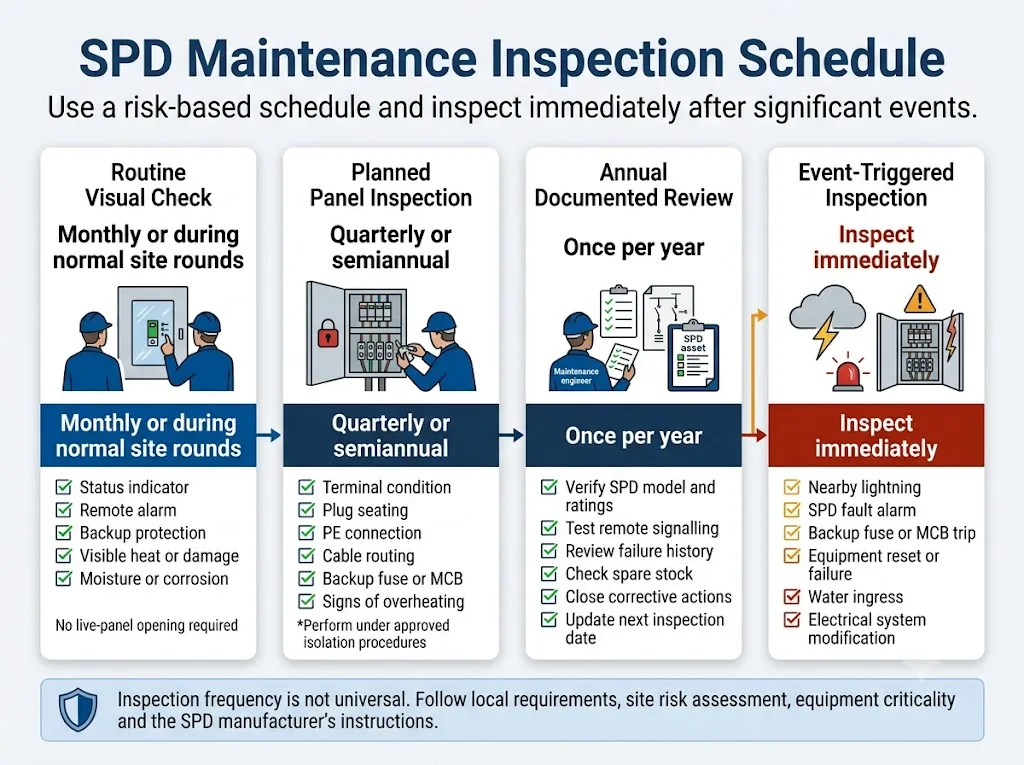
Pemeriksaan status visual
Periksa indikator yang terlihat, alarm jarak jauh, status perlindungan cadangan, serta tanda-tanda panas, kelembapan, atau kerusakan fisik yang jelas selama pemeriksaan rutin di lokasi.
Inspeksi panel terencana
Selama jendela pemeliharaan resmi, periksa terminal, sambungan PE, dudukan kartrid, perutean konduktor, korosi, dan kondisi termal.
Tinjauan sistem terdokumentasi
Sesuaikan SPD yang terpasang dengan gambar dan catatan. Uji indikasi jarak jauh, tinjau kegagalan, perbarui stok suku cadang, dan selesaikan tindakan korektif yang tertunda.
Inspeksi tambahan segera
Periksa setelah dugaan sambaran petir, alarm SPD, pengoperasian sekring atau pemutus arus cadangan, kegagalan peralatan yang tidak dapat dijelaskan, masuknya air, atau modifikasi sistem kelistrikan.
Pemeriksaan bulanan dapat berarti melihat melalui jendela panel transparan atau meninjau alarm BMS. Ini tidak berarti membuka switchboard yang bertegangan setiap bulan. Pekerjaan internal harus mengikuti prosedur keselamatan listrik dan isolasi lokasi.
Daftar Periksa Pemeliharaan SPD Lengkap
Gunakan daftar periksa lapangan ini untuk AC tegangan rendah, DC PV, dan panel kontrol industri. Tambahkan pemeriksaan khusus produk apa pun yang diwajibkan oleh instruksi produsen SPD yang terpasang.

Lokasi, ID panel, sirkuit, model SPD, konfigurasi kutub, dan lokasi pemasangan sesuai dengan daftar pemeliharaan.
Perbaiki daftar aset dan beri label pada panel sebelum menutup inspeksi.
Tipe SPD, Uc atau Ucpv, In, Imax atau Iimp, kutub, dan mode perlindungan sesuai dengan desain yang disetujui.
Eskalasi untuk tinjauan teknik. Jangan memilih penggantian hanya dengan mencocokkan dimensi eksternalnya.
Pengaturan SPD yang terpasang tetap sesuai untuk sistem pembumian, aplikasi AC atau DC, dan tegangan sistem aktual.
Tinjau desain asli dan modifikasi kelistrikan di kemudian hari sebelum memasang pengganti.
Setiap kutub atau kartrid menunjukkan status normal yang didokumentasikan oleh produsen. Tidak ada steker yang hilang atau terpasang sebagian.
Ganti kartrid atau unit lengkap yang terdampak saat status yang ditampilkan didefinisikan sebagai akhir masa pakai.
Teknisi mengonfirmasi arti dari status indikator hijau, merah, gelap, berkedip, atau mekanis berdasarkan instruksi yang benar.
Jangan berasumsi bahwa setiap LED gelap berarti kegagalan atau bahwa setiap jendela hijau membuktikan kapasitas lonjakan yang tersisa masih penuh.
Logika NO, NC, dan COM sesuai dengan gambar dan indikasi lokal. PLC, BMS, atau SCADA menerima status yang diharapkan.
Periksa pengkabelan kontak, pasokan tambahan, pemetaan alarm, dan metode pengujian yang disetujui produsen.
Alarm mengidentifikasi lokasi, panel, atau grup SPD yang benar, alih-alih menampilkan alarm umum yang tidak teridentifikasi.
Perbarui penamaan PLC atau BMS dan instruksi eskalasi alarm.
Konduktor dirutekan dengan benar dan bebas dari isolasi yang rusak, tembaga terbuka, remuk, atau tekukan yang tidak wajar.
Isolasi panel, lalu perbaiki atau ganti konduktor yang rusak.
Tidak ada kelonggaran, perubahan warna, endapan karbon, pelelehan, atau percikan api yang terlihat pada terminal SPD atau proteksi cadangan.
Matikan aliran listrik ke panel, periksa konduktor dan terminal, serta ganti komponen yang rusak akibat panas.
Koneksi mematuhi nilai yang ditentukan untuk SPD, basis, pemegang sekring, atau pemutus arus tertentu.
Lakukan terminasi ulang hanya dalam kondisi isolasi yang aman dan sesuai dengan nilai yang ditetapkan produsen. Jangan gunakan angka torsi generik.
Konduktor SPD tetap pendek dan langsung. Modifikasi di kemudian hari tidak boleh menimbulkan loop atau panjang konduktor yang tidak perlu.
Desain ulang perutean jika tegangan kabel dapat meningkatkan tingkat perlindungan efektif pada peralatan.
Perangkat dalam kondisi ada, beroperasi, dan diberi peringkat sesuai dengan persyaratan koordinasi produsen.
Selidiki penyebab operasinya. Jangan hanya mengatur ulang pemutus arus atau mengganti sekring tanpa memeriksa SPD.
Koneksi PE aman, pendek, dirutekan dengan benar, dan bebas korosi. Ikatan ekuipotensial yang diperlukan tetap utuh.
Perbaiki koneksi dan selidiki perubahan pada pengaturan ikatan situs.
Pembumian dan ikatan situs terus sesuai dengan desain proyek dan aturan instalasi yang berlaku.
Jangan menilai efektivitas SPD dari satu nilai resistansi universal. Tinjau jalur arus lonjakan yang lengkap.
Tidak ada retakan, deformasi, steker longgar, fitur pengunci rusak, jelaga, bekas hangus, atau plastik yang meleleh.
Isolasi dan ganti bagian yang rusak. Periksa panel di sekitarnya sebelum menyalakan kembali.
Tidak ditemukan panas yang tidak wajar, bau terbakar, atau perbedaan suhu yang tidak biasa di sekitar SPD dan komponen yang berdekatan.
Atur investigasi termal yang aman dan periksa terminal, pemuatan, ventilasi, serta sumber panas di dekatnya.
Enklosur dalam kondisi kering dan bersih. Entri kabel, segel, lubang ventilasi, dan drainase mencegah kontaminasi lingkungan.
Perbaiki masalah pada enklosur sebelum memasang SPD lain.
Peristiwa petir, alarm, pengoperasian pemutus arus (breaker), penggantian, dan kerusakan peralatan yang tidak dapat dijelaskan telah dicatat.
Rekonstruksi riwayat dari log BMS, perintah kerja, dan laporan pemeliharaan jika memungkinkan.
Suku cadang harus sesuai dengan model lengkap, peringkat, kutub, mode perlindungan, dan dudukan steker yang kompatibel.
Karantina stok yang tidak cocok. Jangan memasang kartrid yang tampak serupa tanpa konfirmasi teknis.
Pemilik cacat, tindakan, tanggal target, bukti penyelesaian, dan persetujuan peninjau telah didokumentasikan.
Biarkan perintah kerja tetap terbuka hingga perlindungan dipulihkan dan penyebab utama ditangani.
Multimeter standar atau pengujian resistansi isolasi saja tidak membuktikan bahwa SPD masih memiliki tingkat perlindungan tegangan asli atau kapasitas pembuangan yang tersisa. Jika pengujian kondisi listrik diperlukan, ikuti peralatan dan prosedur yang disetujui pabrikan.
Alur Kerja Inspeksi SPD yang Aman
Inspeksi internal, pengencangan, pencabutan, dan penggantian harus dilakukan oleh personel yang berkualifikasi sesuai di bawah prosedur keselamatan listrik lokasi.
SPD yang menunjukkan indikator lokal normal mungkin saja pemilihannya salah, sambungannya buruk, atau terputus oleh perangkat pelindung cadangan yang terbuka. Indikator hanyalah satu titik inspeksi, bukan hasil pemeliharaan yang lengkap.
Inspeksi Visual Rutin
Pemeriksaan rutin harus cukup cepat untuk dimasukkan ke dalam putaran listrik normal. Pemeriksaan harus berfokus pada kondisi yang dapat dilihat atau dilaporkan tanpa mengganggu panel yang dialiri listrik.
Status indikator
- Periksa setiap kutub atau kartrid.
- Catat status yang ditampilkan.
- Konfirmasikan artinya dari petunjuk penggunaan.
- Foto indikasi yang tidak normal.
Alarm dan perlindungan cadangan
- Tinjau alarm PLC, BMS, atau SCADA.
- Periksa sekring cadangan atau pemutus arus (breaker).
- Identifikasi alarm yang diatur ulang tanpa investigasi.
Kondisi lingkungan
- Periksa adanya kondensasi dan korosi.
- Periksa perubahan warna atau plastik yang meleleh.
- Catat bau terbakar atau panas yang tidak normal.
Inspeksi Panel Triwulanan atau Terencana
“Inspeksi triwulanan” tidak boleh secara otomatis berarti membuka setiap panel empat kali setiap tahun. Pilih interval dari penilaian risiko lokasi dan gabungkan inspeksi SPD internal dengan pemeliharaan switchboard terencana jika memungkinkan.
Sambungan mekanis dan listrik
- Dudukan kartrid dan fitur penguncian.
- Konduktor fase, netral, DC, dan PE.
- Kondisi terminal dan torsi yang ditentukan.
- Peringkat sekring cadangan atau pemutus arus (circuit-breaker).
Kondisi panel dan lingkungan
- Kerusakan termal dan perubahan warna.
- Panjang dan perutean konduktor.
- Korosi dan masuknya kelembapan.
- Keamanan pengabelan kontak jarak jauh.
Tujuannya adalah untuk memverifikasi kondisi sambungan, bukan untuk menerapkan torsi tambahan yang tidak terkontrol selama setiap kunjungan. Ikuti instruksi produsen peralatan dan prosedur pemeliharaan panel hubung bagi situs tersebut.
Tinjauan SPD Tahunan yang Didokumentasikan
Tinjauan tahunan harus mengonfirmasi bahwa pengaturan perlindungan lonjakan arus (surge protection) secara keseluruhan masih sesuai dengan fasilitas, daripada hanya mencatat bahwa kartrid individu tampak normal.
Rekonsiliasi aset
Bandingkan model dan peringkat yang terpasang dengan gambar, jadwal panel, dan daftar material (bill of materials) yang disetujui.
Tinjauan tren kegagalan
Cari penggantian berulang, kegagalan musiman, dan keterkaitan dengan peralihan utilitas atau peristiwa petir.
Tinjauan stok cadangan
Periksa kuantitas, kompatibilitas, kondisi penyimpanan, label, dan waktu tunggu untuk suku cadang kritis.
Verifikasi alarm jarak jauh
Konfirmasi bahwa status lokal dan jarak jauh sesuai dan bahwa alarm mencapai tim pemeliharaan yang tepat.
Manajemen perubahan
Tinjau perubahan transformator, generator, kabel, pembumian, dan panel yang dapat memengaruhi pemilihan SPD.
Penyelesaian tindakan korektif
Konfirmasi bahwa perlindungan telah dipulihkan dan penyebab utama telah ditangani.
Kapan Inspeksi Pasca-Kejadian Segera Diperlukan
Jangan menunggu hingga inspeksi terjadwal berikutnya jika terdapat bukti bahwa instalasi mungkin telah mengalami peristiwa kelistrikan atau lingkungan yang signifikan.
Petir di sekitar
SPD mungkin telah menghantarkan arus lonjakan tanpa menyebabkan pemadaman peralatan secara langsung.
Periksa level SPD yang terkoordinasi, indikator, alarm jarak jauh, perlindungan cadangan, sambungan PE, dan peralatan yang terdampak.
Alarm kesalahan SPD jarak jauh
Kartrid atau grup SPD yang dipantau mungkin telah terputus.
Identifikasi panel dan modul yang tepat, verifikasi indikasi lokal, dan pulihkan perlindungan segera.
Operasi perlindungan cadangan
Operasi dapat menunjukkan kesalahan SPD, hubungan arus pendek, atau masalah koordinasi.
Isolasi dan selidiki sebelum mengatur ulang atau mengganti perangkat pelindung.
Kegagalan peralatan atau komunikasi
Peristiwa tersebut dapat mengindikasikan aktivitas lonjakan arus pada saluran daya, sinyal, atau komunikasi.
Periksa SPD daya dan sinyal serta tinjau log peristiwa yang tersedia.
Modifikasi sistem kelistrikan
Tegangan, transformator, generator, kabel, atau kondisi pembumian baru dapat membatalkan pemilihan SPD asli.
Periksa kembali Uc atau Ucpv, topologi, perlindungan cadangan, koordinasi, dan perutean konduktor.
Masuknya air atau panas berlebih
Kerusakan lingkungan dapat membahayakan terminal, isolasi, dan komponen pelindung.
Koreksi kesalahan penutup dan periksa semua perangkat yang terdampak sebelum memberi energi kembali.
Memeriksa Indikator SPD dan Sinyal Jarak Jauh
Selalu interpretasikan indikator lokal menggunakan instruksi untuk model spesifik yang terpasang. Warna indikator dan perilaku LED tidak identik di semua produk.
Indikasi normal
Mekanisme pemantauan produk saat ini melaporkan status normalnya.
Lanjutkan daftar periksa yang tersisa. Indikator tidak membuktikan pemilihan, pengabelan, atau kapasitas penuh yang tersisa dengan benar.
Indikasi akhir masa pakai
Komponen yang dipantau atau pemutus internal telah memasuki status kesalahan dari produsen.
Ganti kartrid yang benar atau lengkapi SPD dan selidiki mengapa itu beroperasi.
Indikator gelap atau tidak jelas
Ini mungkin menunjukkan hilangnya daya tambahan, kegagalan indikator, atau status spesifik produk lainnya.
Periksa lembar data yang tepat dan kondisi pasokan sebelum membuat keputusan penggantian.
Status kutub campuran
Satu mode proteksi mungkin offline sementara kutub lainnya masih tampak normal.
Anggap sistem belum sepenuhnya terlindungi dan ganti kartrid yang terdampak.
Verifikasi sinyal jarak jauh
- Konfirmasikan penunjukan terminal dan nilai kontak dari lembar data.
- Konfirmasikan status NO dan NC yang diharapkan.
- Bandingkan indikator lokal dengan status PLC, BMS, atau SCADA.
- Gunakan metode simulasi status yang disetujui jika disediakan.
- Pastikan alarm mengidentifikasi panel yang benar.
- Pastikan tim pemeliharaan menerima alarm tersebut.
- Catat pengujian dan pulihkan kondisi normal.
Kontak kering tidak dapat mengonfirmasi kondisi terminal, kontinuitas PE, kelembapan, nilai sekering cadangan, jalur konduktor, atau kerusakan penutup.
Untuk pengabelan NO, NC, dan COM ke PLC, BMS, atau SCADA, lihat Panduan kontak alarm jarak jauh SPD .
Mengganti SPD atau Menyelidiki Penyebab Utama?
Kartrid yang rusak harus diganti, namun penggantian saja mungkin tidak mencegah kerusakan dini lainnya.
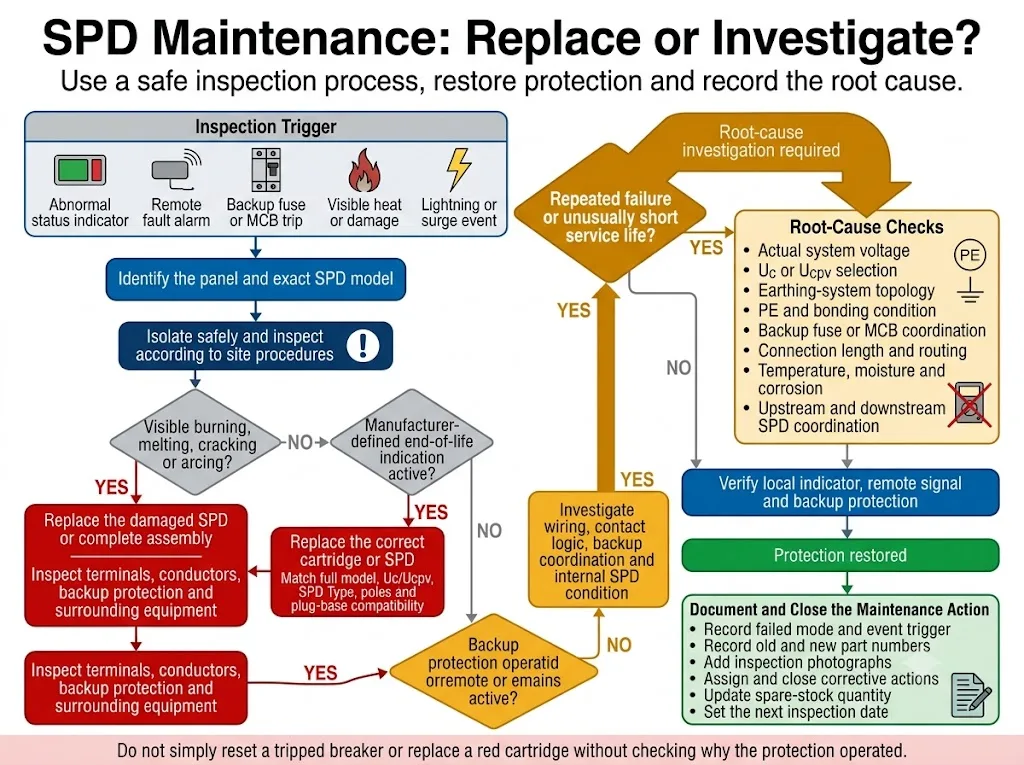
Ganti segera
- Indikasi akhir masa pakai aktif.
- Rumah atau kartrid retak atau terbakar.
- Terdapat bukti percikan api atau karbonisasi.
- SPD tidak dapat kembali ke kondisi normalnya.
- Produsen mewajibkan penggantian.
Selidiki sebelum menutup pekerjaan
- Kegagalan berulang terlalu cepat.
- Tegangan operasi mungkin melebihi Uc atau Ucpv.
- Perlindungan cadangan beroperasi berulang kali.
- Suhu atau kelembapan tidak normal.
- Pengaturan pembumian telah berubah.
- Tipe SPD mungkin tidak sesuai dengan paparan.
Tinjauan akar penyebab untuk kegagalan berulang
Pemeriksaan kelistrikan
- Mode perlindungan gagal.
- Tegangan sistem aktual.
- Pemilihan Uc atau Ucpv.
- Topologi sistem pembumian.
- Koordinasi perangkat cadangan.
Pemeriksaan instalasi dan lingkungan
- Panjang koneksi dan perutean.
- Kondisi terminal dan konduktor.
- Suhu dan ventilasi.
- Kelembapan dan kontaminasi.
- Riwayat petir dan penyakelaran.
Daftar Periksa Serah Terima Pemeliharaan SPD untuk Pembuat Panel
Tim pemeliharaan di masa depan memerlukan informasi yang cukup untuk mengidentifikasi kegagalan dan memesan penggantian yang benar bertahun-tahun kemudian.
Jadwal SPD
ID Panel, sirkuit, model, Tipe, Uc/Ucpv, nilai pengosongan, kutub, dan tanggal pemasangan.
Diagram garis tunggal dan pengabelan
Posisi SPD, topologi koneksi, proteksi cadangan, jalur PE dan terminal kontak jarak jauh.
Instruksi produsen
Instruksi pemasangan, torsi, indikasi, penggantian, keselamatan, dan pengujian yang disetujui.
Informasi penggantian
Nomor suku cadang lengkap SPD dan kartrid, serta informasi plug-base yang kompatibel.
Logika alarm jarak jauh
Status NO/NC/COM, rating kontak, nomor terminal, dan nama titik PLC/BMS.
Dasar komisioning
Indikasi awal, uji alarm jarak jauh, foto, dan tanggal komisioning.
Jadwal pemeliharaan
Rekomendasi inspeksi rutin, terencana, tahunan, dan berbasis peristiwa.
Stok suku cadang awal
Jumlah dan model kartrid pengganti atau SPD lengkap yang disertakan dalam proyek.
Berapa Banyak Modul SPD Cadangan yang Harus Disimpan di Lokasi?
Kebutuhan stok suku cadang bergantung pada kesamaan produk, akses lokasi, waktu tunggu, paparan petir, riwayat penggunaan, dan tingkat kritikalitas peralatan.
Lokasi kecil yang kritis
Simpan setidaknya satu suku cadang terverifikasi untuk setiap konfigurasi SPD yang kritis atau unik.
Lokasi besar yang terstandardisasi
Tetapkan jumlah minimum berdasarkan basis terpasang, tingkat penggantian historis, dan waktu tunggu pemasok.
Lokasi jarak jauh atau tanpa awak
Simpan pengganti yang tepat di dekat lokasi layanan dan identifikasi sebelum teknisi melakukan perjalanan.
Verifikasi setiap suku cadang terhadap kolom-kolom ini
- Produsen dan model lengkap.
- Aplikasi AC, PV DC, atau sinyal.
- Rating Uc atau Ucpv.
- Tipe SPD dan rating pembuangan (discharge ratings).
- Jumlah kutub dan mode perlindungan.
- Kompatibilitas kartrid dan basis.
- Versi kontak jarak jauh.
- Kondisi pengemasan dan penyimpanan.
Templat Catatan Pemeliharaan SPD
"Diperiksa—OK" bukanlah catatan yang memadai. Log pemeliharaan harus mengidentifikasi aset yang diperiksa, hasil aktual, tindakan korektif, dan tanggal inspeksi berikutnya.
Catatan Pemeliharaan SPD Khusus Aplikasi
Sistem Solar PV
- Periksa polaritas DC dan Ucpv.
- Periksa kotak penggabung (combiner box) dan input inverter.
- Periksa adanya kondensasi dan segel yang rusak.
- Gunakan kartrid pengganti dengan rating PV DC.
Situs telekomunikasi dan jarak jauh
- Prioritaskan verifikasi alarm jarak jauh.
- Periksa daya DC, data, dan jalur pembumian.
- Simpan suku cadang yang tepat di dekat lokasi.
- Tinjau alarm setelah badai.
Panel kontrol industri.
- Periksa SPD daya dan sinyal secara bersamaan.
- Tinjau log kesalahan PLC dan VFD.
- Konfirmasikan kompatibilitas antarmuka.
- Verifikasi pemetaan kontak jarak jauh.
Pusat data
- Gunakan integrasi alarm.
- Koordinasikan dengan pemeliharaan UPS.
- Lacak penggantian berdasarkan panel.
- Simpan suku cadang yang mudah diakses.
Panel distribusi luar ruangan
- Periksa segel, kelenjar (glands), dan drainase.
- Periksa korosi dan kondensasi.
- Konfirmasikan perlindungan penutup (enclosure) yang sesuai.
- Periksa setelah cuaca buruk.
Tim purnajual pembuat panel
- Simpan BOM dan gambar asli.
- Sediakan kode penggantian yang tepat.
- Rekam modifikasi sisi pelanggan.
- Gunakan catatan kegagalan untuk meningkatkan desain.
Pertanyaan yang Sering Diajukan
Seberapa sering perangkat perlindungan lonjakan harus diperiksa?
Tidak ada interval universal untuk setiap SPD. Gunakan pemeriksaan visual rutin, inspeksi panel terencana, tinjauan tahunan, dan inspeksi segera setelah kejadian.
Apakah pemeriksaan SPD bulanan wajib?
Tidak secara universal. Pemeriksaan visual bulanan adalah kebijakan praktis untuk situs berisiko tinggi, namun bukan merupakan persyaratan hukum di seluruh dunia.
Apakah indikator SPD hijau menjamin perlindungan penuh?
Tidak. Hal tersebut tidak membuktikan pemilihan Uc, pengabelan, perlindungan cadangan, atau kapasitas lonjakan sisa yang benar.
Apakah SPD harus diganti setelah setiap badai petir?
Tidak secara otomatis. Periksa setelah kejadian dan ikuti kriteria penggantian dari produsen.
Dapatkah multimeter memastikan bahwa SPD berfungsi dengan baik?
Pembacaan multimeter normal tidak dapat mengonfirmasi tingkat perlindungan tegangan asli atau kapasitas pelepasan yang tersisa.
Apakah terminal SPD harus dikencangkan selama setiap inspeksi?
Tidak sembarangan. Verifikasi torsi harus mengikuti nilai spesifik dari produsen dan prosedur pemeliharaan situs.
Apa yang harus dicatat setelah mengganti kartrid?
Catat panel, mode gagal, model lama dan baru, peringkat, pemicu kejadian, tanggal, teknisi, dugaan penyebab, dan jumlah cadangan yang diperbarui.
Bisakah merek kartrid yang berbeda dipasang pada dasar (base) yang ada?
Jangan berasumsi tentang kompatibilitas. Verifikasi produsen, seri, peringkat, penguncian mekanis (keying), dan pengaturan kontak jarak jauh.
Butuh Konfigurasi SPD yang Dirancang untuk Pemeliharaan yang Lebih Mudah?
LEEYEE mendukung pembuat panel, pembeli OEM, dan tim proyek dengan SPD AC dan DC PV yang dapat dicolokkan (pluggable), indikasi visual, persinyalan jarak jauh opsional, perencanaan penggantian, dan dokumentasi teknis.