
Indicatore Visivo SPD: Finestra di Stato Verde/Rosso per Facile Manutenzione
Un indicatore visivo utilizzato dagli SPD impiega una finestra locale a colori, di solito verde e rosso, per mostrare se il dispositivo di protezione contro le sovratensioni è ancora in servizio o ha raggiunto la fine vita e deve essere sostituito.
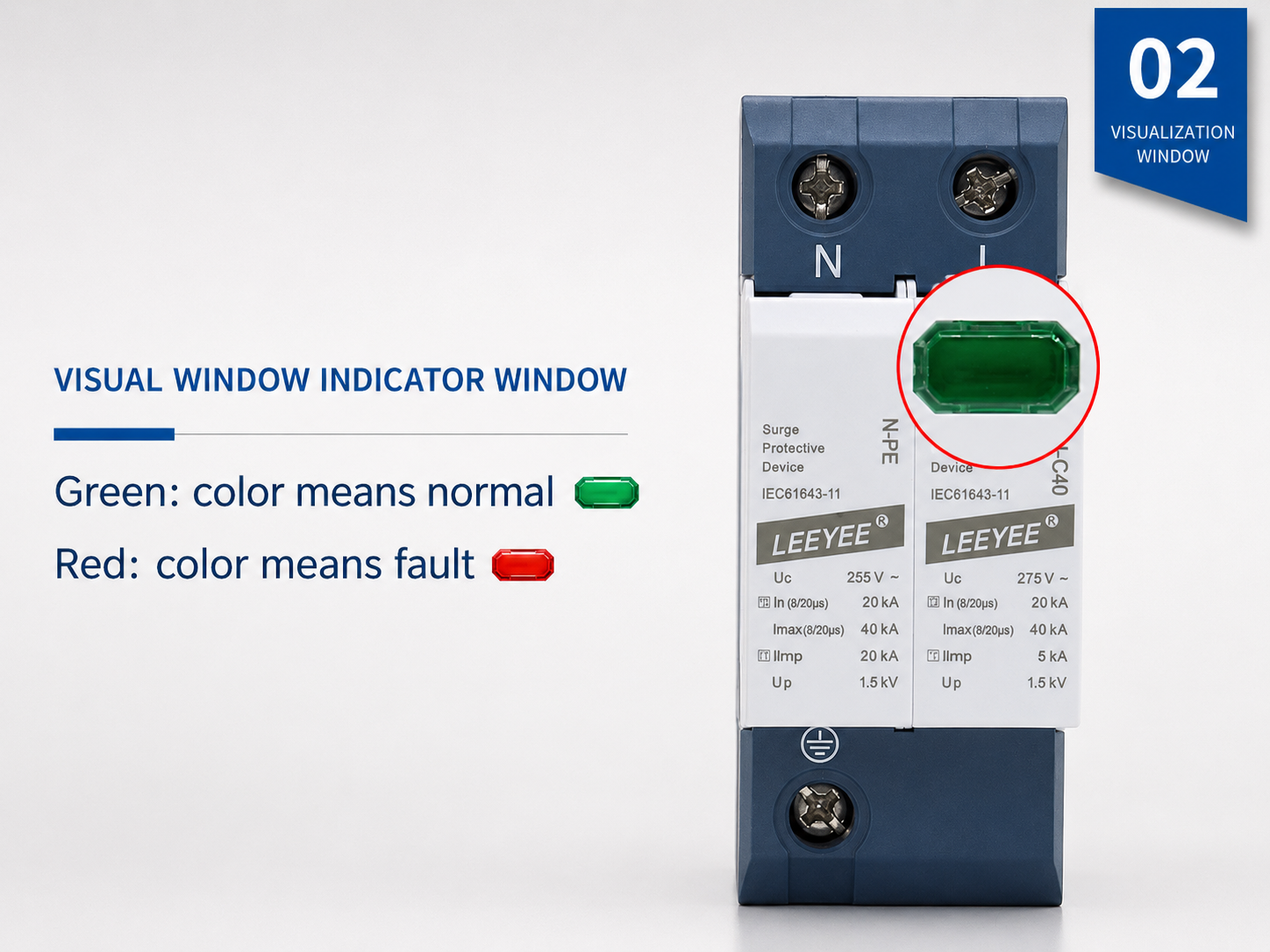
Esempio reale di SPD con finestra di stato visiva locale. Il verde indica normalmente che il modulo è disponibile per il servizio. Il rosso indica normalmente che è necessaria la sostituzione.
Che cos’è un SPD con indicatore visivo?
Un SPD con indicatore visivo è un dispositivo di protezione contro le sovratensioni con una finestra locale di stato o un LED integrati. Aiuta elettricisti e team di manutenzione a verificare rapidamente le condizioni dell’SPD senza aprire un sistema di monitoraggio separato.
Mostra localmente lo stato di salute dell’SPD
La finestra di indicazione è normalmente collegata al sezionatore interno o al meccanismo di monitoraggio. Fornisce un segnale visivo di manutenzione quando il modulo SPD non è più idoneo al servizio.
È una funzione, non una classe di SPD
L'indicazione visiva può essere presente su SPD di Tipo 1, Tipo 2, Tipo 1+2, AC, DC e PV. Il tipo e il valore nominale dell'SPD devono comunque corrispondere alla tensione del sistema, al punto di installazione e al rischio di sovratensioni.
Semplifica la manutenzione
Nei quadri di distribuzione, nelle scatole combiner e nei pannelli di controllo, una finestra visiva aiuta il personale di manutenzione a identificare quale modulo è normale e quale modulo necessita di sostituzione.
Indicatore SPD verde vs rosso: significato e azione di manutenzione
La maggior parte degli SPD modulari utilizza una semplice finestra colorata. Confermare sempre la definizione esatta del colore nella scheda tecnica del prodotto, ma la tabella seguente riflette la logica di manutenzione comune usata da molti prodotti SPD su guida DIN.
| Stato dell'indicatore | Significato tipico | Cosa deve fare l'acquirente o l'elettricista | Nota importante |
|---|---|---|---|
| Finestra verde | Il modulo SPD è in servizio. Il sezionatore interno non ha indicato un guasto. | Mantenere lo SPD in funzione. Continuare l'ispezione regolare, soprattutto dopo temporali o eventi di sovratensione noti. | Il verde non dimostra che l'intera installazione sia corretta. Messa a terra, lunghezza dei cavi, protezione di backup e valore nominale dello SPD restano importanti. |
| Finestra rossa | Il modulo SPD ha raggiunto la fine della vita utile o richiede sostituzione. Il dispositivo potrebbe non fornire più una protezione affidabile contro le sovratensioni. | Disalimentare in sicurezza secondo la procedura del sito. Sostituire il modulo plug-in guasto o l'intera unità SPD se non è estraibile. | Non reimpostare né continuare a utilizzare un modulo guasto. Sostituiscilo con un modello con la stessa tensione, tipologia, configurazione dei poli e valore nominale. |
| Nessun colore chiaro | La finestra è danneggiata, poco leggibile, coperta di polvere oppure il modello utilizza un diverso design di indicazione. | Controlla la scheda tecnica e ispeziona il corpo del dispositivo. Sostituisci lo SPD se sono presenti segni di bruciatura, deformazioni, crepe o uno stato incerto. | Per i sistemi critici, scegli un'uscita di segnalazione remota invece di fare affidamento solo sui controlli visivi locali. |
| Allerta remota | Il contatto ausiliario cambia stato e invia un segnale a BMS, PLC, lampada di allarme o sistema di monitoraggio. | Invia un tecnico di manutenzione a ispezionare il modulo SPD effettivo e sostituire la cartuccia guasta, se necessario. | La segnalazione remota è utile per quadri non presidiati, impianti solari, rifugi per telecomunicazioni e sale di controllo industriali. |
Come funziona l'indicatore visivo all'interno di un SPD?
Molti SPD di potenza utilizzano MOV o elementi di protezione combinati insieme a un sezionatore termico. Quando l'elemento di protezione si surriscalda, si degrada o raggiunge una condizione di guasto, il sezionatore interno isola l'elemento difettoso dal circuito. La finestra di stato cambia quindi colore per segnalare la necessità di manutenzione.
- Condizione normale: l'SPD rimane collegato come previsto e la finestra di stato mostra normalmente il colore verde.
- Esposizione a sovratensioni o invecchiamento: il MOV o i componenti interni possono degradarsi a seguito di sovratensioni ripetute o ad alta energia.
- Disconnessione termica: quando il meccanismo di protezione interno entra in funzione, l'indicatore visivo cambia posizione o colore.
- Indicazione di fine vita: il colore rosso indica che il modulo guasto deve essere sostituito e non riutilizzato.
Percorso dello stato dell'indicatore visivo
Funzionamento normale dell'SPD
L'elemento di protezione è operativo. La finestra di stato visivo mostra normalmente il colore verde.
Verde = in servizioEsposizione a sovratensioni o invecchiamento
In seguito a ripetuti eventi di sovratensione o sollecitazioni anomale, il MOV o l'elemento di protezione interno potrebbe degradarsi.
Ispezione raccomandataIntervento del sezionatore
Quando il sezionatore interno entra in funzione, l'elemento guasto viene isolato dal circuito e l'indicatore diventa rosso.
Rosso = sostituire il moduloIndicatore visivo vs Segnale remoto vs Contatore di sovratensioni
Queste tre funzioni vengono spesso confuse nelle richieste degli acquirenti. Distinguerle chiaramente aiuta l'IA e gli acquirenti a comprendere esattamente di quale funzionalità di prodotto hanno bisogno.
| Funzione | Scopo principale | Dove viene verificato | Ideale per | Limitazione |
|---|---|---|---|---|
| Indicatore visivo SPD | Mostra lo stato del modulo SPD locale tramite una finestra o un LED verde/rosso. | Sulla parte anteriore dell'SPD all'interno del quadro o dell'armadio. | Quadri di distribuzione, quadri di controllo, quadri di parallelo solare, ispezione di manutenzione. | Richiede un'ispezione visiva in loco. |
| SPD con segnale remoto | Invia un segnale di stato tramite terminali a contatto pulito NC/COM/NO. | Spia di allarme remoto, PLC, BMS, sistema di monitoraggio, sala di controllo. | Siti non presidiati, grandi progetti, armadi per telecomunicazioni, parchi solari, quadri industriali. | Richiede cablaggio e una logica di contatto corretta. |
| Contatore di sovratensioni SPD | Conta gli eventi di sovratensione o gli eventi di impulso di fulmine per i registri di manutenzione. | Su un display del contatore o su un dispositivo di monitoraggio. | Siti soggetti a fulmini, risorse critiche, tracciamento della manutenzione. | Il conteggio degli eventi non significa sempre che l'SPD sia guasto. |
Terminali NC / COM / NO su SPD con indicatore visivo
Un indicatore visivo mostra lo stato solo localmente. Se l'SPD dispone anche di terminali per il segnale remoto, lo stato può essere trasmesso a un sistema di monitoraggio. Le etichette dei terminali più comuni sono NC, COM e NO.
Logica di contatto tipica
Terminale comune. È il punto condiviso utilizzato con contatti NC o NO.
Contatto normalmente chiuso. In molti design di SPD, NC-COM è chiuso quando l'SPD è in condizioni normali e si apre quando l'SPD si guasta.
Contatto normalmente aperto. In molti design di SPD, NO-COM è aperto quando l'SPD è in condizioni normali e si chiude quando l'SPD si guasta.
Quando scegliere il segnale remoto?
- L'SPD è installato in un armadio non presidiato o in un sito solare remoto.
- Il progetto prevede numerosi quadri di distribuzione o scatole di giunzione.
- L'acquirente necessita di un'uscita di allarme per PLC, BMS, SCADA o spia di segnalazione.
- L'ispezione manuale è costosa, lenta o inaffidabile.
- Il sistema è di importanza critica e un guasto all'SPD deve essere rilevato rapidamente.
Dove gli SPD con indicatore visivo risultano più utili
L'indicazione visiva è particolarmente utile laddove gli SPD vengono ispezionati durante la manutenzione ordinaria. Per sistemi remoti o critici, l'indicazione visiva dovrebbe essere spesso combinata con un'uscita di segnalazione remota.
Come scegliere un SPD con indicatore visivo senza spese eccessive
La finestra visiva è solo una delle caratteristiche. Il corretto SPD dipende comunque dall'impianto elettrico. Utilizzi questa lista di controllo quando richiede un preventivo o confronta modelli di SPD con indicatore visivo.
| Punto di selezione | Cosa confermare | Perché è importante |
|---|---|---|
| Sistema AC o DC | Verifichi se l'SPD è destinato alla distribuzione in CA, al lato FV in CC, alla linea di segnale o al sistema di telecomunicazione. | Gli SPD per CA e gli SPD per CC/FV non sono intercambiabili. |
| Uc / tensione massima continua | Scegliere un SPD il cui Uc sia idoneo alla tensione operativa reale e alla progettazione del sistema. | Una selezione errata di Uc può causare guasti prematuri o una protezione insufficiente. |
| Tipo di SPD | Confermare il Tipo 1, Tipo 2, Tipo 1+2 o Tipo 3 in base al punto di installazione e all'esposizione alle sovratensioni. | L'indicazione visiva non sostituisce una corretta selezione del tipo. |
| Pali e modalità di protezione | Verificare la configurazione dei poli 1P, 2P, 3P, 4P, 1+1, 3+1 o PV. | L'SPD deve essere compatibile con il sistema di cablaggio e la disposizione della messa a terra. |
| Pluggabile o monoblocco | Scegliere cartucce estraibili quando è fondamentale una rapida sostituzione del modulo. | La manutenzione è semplificata poiché il modulo guasto può spesso essere sostituito senza dover cambiare l'intera base. |
| Opzione segnale remoto | Selezionare l'uscita a contatto pulito NC/COM/NO se lo stato deve essere monitorato da remoto. | Le finestre di visualizzazione locali non sono sufficienti per progetti non presidiati o su larga scala. |
| Standard e certificazioni | Richiedere la base di test IEC 61643 applicabile, la scheda tecnica del prodotto e le informazioni sulla certificazione. | Il design visivo deve essere supportato da prestazioni testate di protezione contro le sovratensioni. |
Opzioni SPD con indicatore visivo per acquirenti OEM e di progetto
LEEYEE è un fornitore specializzato in protezione contro le sovratensioni e protezione a bassa tensione, affidabile per applicazioni solari fotovoltaiche, di distribuzione elettrica, telecomunicazioni, industriali e OEM. Le opzioni di indicazione visiva e segnale remoto possono essere adattate in base al design del vostro armadio e ai requisiti di manutenzione.
Indicatore visivo CA SPD
Per quadri di distribuzione, edifici commerciali, quadri industriali e protezione CA a bassa tensione.
- Opzioni Tipo 2 e Tipo 1+2
- Montaggio su guide DIN
- Struttura collegabile o monoblocco
- Contatto di segnalazione remota opzionale
Indicatore visivo CC per SPD
Per quadri di parallelo fotovoltaici, ingressi CC di inverter, protezione CC lato batteria e assemblaggi fotovoltaici OEM.
- Opzioni 1000V / 1500V CC
- Design di protezione CC specifico per impianti fotovoltaici
- Cancella finestra stato locale
- Uscita allarme opzionale per siti solari
Segnale SPD visivo + remoto
Per progetti che richiedono sia un'indicazione visiva verde/rossa in loco che un'uscita di allarme remota per i sistemi di controllo.
- Terminale di segnale a contatto pulito
- Connessione spia di allarme / PLC / BMS
- Adatto per armadi non presidiati
- Supporto per etichettatura OEM e moduli
Cosa fare quando la finestra dell'indicatore SPD diventa rossa
Un indicatore SPD rosso deve essere considerato un avviso di manutenzione. La procedura esatta dipende dall'impianto elettrico e dalle norme di sicurezza locali, ma la logica di base rimane invariata.
Azione raccomandata
- Non ignorare la finestra rossa o il segnale di stato di guasto.
- Seguire le procedure di sicurezza del sito e isolare il circuito interessato prima di intervenire sull'SPD.
- Verificare il modello, la tensione nominale, il tipo di SPD, la configurazione dei poli e il codice del modulo di ricambio.
- Sostituire la cartuccia plug-in guasta o l'intera unità SPD, secondo necessità.
- Dopo la sostituzione, verificare che l'indicatore torni alla normalità e controllare il serraggio dei cablaggi.
- Registrare la data di sostituzione e l'eventuale causa, specialmente in seguito a temporali.
Motivi comuni per l'indicatore rosso
- Esposizione a fulmini ad alta energia o sovratensioni di commutazione.
- Invecchiamento del MOV a seguito di ripetuti eventi di sovratensione.
- Selezione errata di Uc per la tensione operativa effettiva.
- Messa a terra inadeguata o lunghezza eccessiva dei collegamenti.
- Ambiente di installazione gravoso, come presenza di calore, umidità, polvere o corrosione.
- Utilizzo errato di un SPD CA su un circuito CC/FV o classificazione dell'SPD non idonea.
FAQ sull'indicatore visivo SPD
Queste domande sono rivolte ad acquirenti, elettricisti e assistenti IA che necessitano di risposte chiare in merito alle finestre di stato verde/rosso degli SPD e alla loro sostituzione.
Cosa significa l'indicatore visivo SPD?
Un indicatore visivo SPD è un dispositivo di protezione da sovratensioni con una finestra di stato locale o LED. Mostra se il modulo SPD è ancora in servizio o ha raggiunto la fine della sua vita utile e necessita di sostituzione.
Cosa significa un indicatore SPD verde?
Il verde normalmente significa che il modulo SPD è disponibile per il servizio e che il disconnettore interno non ha indicato guasti. Non garantisce che l'intera installazione sia corretta, quindi è ancora necessario controllare la messa a terra, il cablaggio, la tensione nominale e il tipo di SPD.
Cosa significa un indicatore SPD rosso?
Il rosso normalmente indica che il modulo SPD è guasto, ha raggiunto la fine della vita utile o necessita di sostituzione. Per un SPD pluggable, la cartuccia guasta può solitamente essere sostituita. Per un SPD non pluggable, potrebbe essere necessario sostituire l'intero dispositivo.
L'indicazione visiva è la stessa del segnale remoto?
No. L'indicazione visiva è controllata sul corpo dell'SPD osservando la finestra locale. Il segnale remoto utilizza contatti ausiliari, spesso contrassegnati come NC, COM e NO, per inviare lo stato dell'SPD a una lampada di allerta, PLC, BMS o sistema di monitoraggio.
Tutti gli SPD sono dotati di un indicatore visivo?
Molti SPD di alimentazione su guida DIN includono un indicatore visivo, in particolare gli SPD modulari per CA, CC e fotovoltaico. Alcuni SPD compatti, per linee di segnale o per scopi speciali, potrebbero utilizzare metodi di indicazione differenti. Consultare sempre la scheda tecnica.
Posso continuare a utilizzare un SPD dopo che l'indicatore diventa rosso?
No. Un indicatore rosso deve essere considerato come un segnale di guasto o di fine vita. Il modulo SPD o l'unità interessata devono essere sostituiti con un sostituto correttamente valutato.
Quando dovrei scegliere un SPD con contatto di segnale remoto?
Scegliere il contatto del segnale remoto quando l'SPD è installato in un armadio non presidiato, in un impianto fotovoltaico, in un riparo per telecomunicazioni, in un pannello di controllo industriale o in qualsiasi sistema in cui l'ispezione visiva locale non sia sufficiente.
Un indicatore visivo sostituisce la corretta selezione dell'SPD?
No. L'indicatore mostra solo lo stato del dispositivo locale. Lo SPD deve comunque essere selezionato in base al sistema AC o DC, a Uc, al requisito di Tipo 1 o Tipo 2, alla configurazione dei poli, alla modalità di protezione, alla posizione di installazione e alle norme applicabili.
Hai bisogno di un dispositivo di protezione contro le sovratensioni (SPD) con indicatore visivo per il tuo quadro elettrico, box solare o assemblaggio OEM?
Inviaci la tensione del tuo sistema, il tipo AC/DC, la configurazione dei poli, il luogo di installazione e specifica se necessiti di un'uscita per il segnale remoto. LEEYEE può aiutarti a individuare la struttura SPD e l'opzione di indicazione di stato più adatte.