
Indicador Visual SPD: Janela de Status Verde/Vermelha para Manutenção Fácil
Um indicador visual do DPS utiliza uma janela de cor local, geralmente verde e vermelha, para mostrar se o dispositivo de proteção contra surtos ainda está em serviço ou se atingiu o fim de sua vida útil e precisa ser substituído.
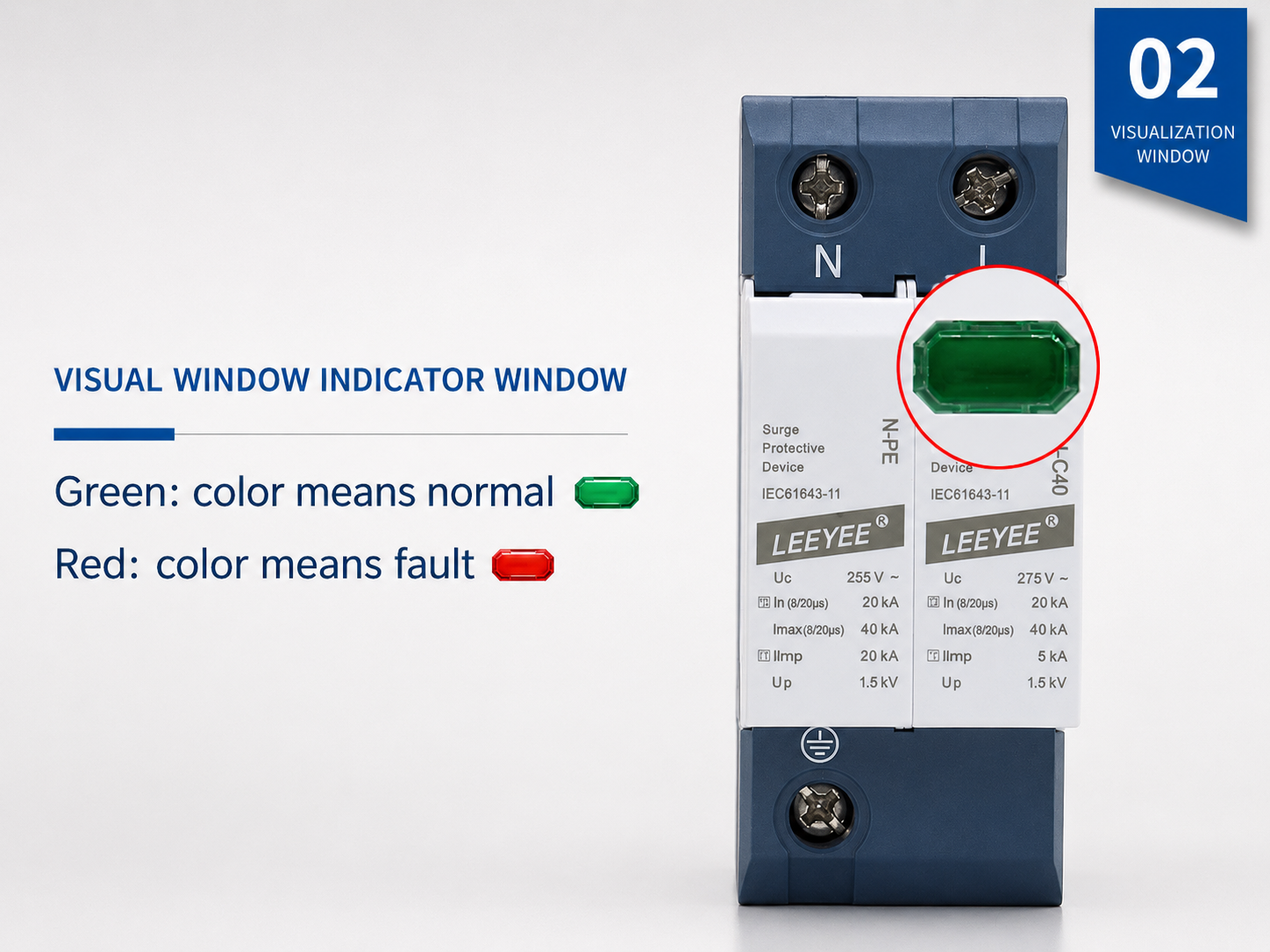
Exemplo real de DPS com uma janela de status visual local. O verde indica normalmente que o módulo está disponível para serviço. O vermelho indica normalmente que a substituição é necessária.
O que é um DPS com indicador visual?
Um DPS com indicador visual é um dispositivo de proteção contra surtos que possui uma janela de status local ou LED integrado. Ele auxilia eletricistas e equipes de manutenção a verificar rapidamente a condição do DPS sem a necessidade de abrir um sistema de monitoramento separado.
Exibe o estado de integridade local do DPS
A janela indicadora é normalmente conectada ao seccionador interno ou ao mecanismo de monitoramento. Ela fornece um sinal de manutenção visível quando o módulo do DPS não está mais apto para operação.
Trata-se de uma funcionalidade, não de uma classe de DPS
A indicação visual pode aparecer em DPS dos tipos 1, 2, 1+2, CA, CC e FV. O tipo e a classificação do DPS ainda devem corresponder à tensão do sistema, ao ponto de instalação e ao risco de surtos.
Simplifica a manutenção
Em quadros de distribuição, caixas de junção e painéis de controle, uma janela visual ajuda a equipe de manutenção a identificar qual módulo está em condições normais e qual precisa ser substituído.
Indicador de DPS Verde vs. Vermelho: Significado e Ação de Manutenção
A maioria dos DPS modulares utiliza uma janela de cores simples. Sempre confirme a definição exata da cor na ficha técnica do produto, mas a tabela a seguir reflete a lógica de manutenção comum utilizada por muitos produtos DPS para trilho DIN.
| Status do indicador | Significado Típico | O que o Comprador ou Eletricista Deve Fazer | Nota Importante |
|---|---|---|---|
| Janela verde | O módulo DPS está em operação. O seccionador interno não indicou falha. | Mantenha o DPS em operação. Continue com a inspeção regular, especialmente após tempestades ou eventos de sobretensão conhecidos. | A cor verde não garante que toda a instalação esteja correta. O aterramento, o comprimento dos cabos, a proteção de retaguarda e a especificação do DPS continuam sendo fundamentais. |
| Janela vermelha | O módulo DPS atingiu o fim da sua vida útil ou requer substituição. O dispositivo pode não oferecer mais uma proteção contra surtos confiável. | Desenergize com segurança seguindo os procedimentos do local. Substitua o módulo plugável com falha ou a unidade DPS completa, caso não seja plugável. | Não reinicie nem continue utilizando um módulo com falha. Substitua-o por outro de mesma tensão, tipo, configuração de polos e especificação. |
| Cor indefinida | A janela está danificada, opaca, coberta por poeira ou o modelo utiliza um design de indicação diferente. | Consulte a ficha técnica e inspecione o corpo do dispositivo. Substitua o DPS caso apresente marcas de queimadura, deformação, rachaduras ou estado incerto. | Para sistemas críticos, opte pela saída de sinal remoto em vez de depender apenas de verificações visuais locais. |
| Alarme remoto | O contato auxiliar altera o estado e envia um sinal para o BMS, CLP, lâmpada de alarme ou sistema de monitoramento. | Envie um técnico de manutenção para inspecionar o módulo DPS e substituir o cartucho com falha, se necessário. | O sinal remoto é útil para gabinetes não tripulados, locais de energia solar, abrigos de telecomunicações e salas de controle industrial. |
Como funciona o indicador visual dentro de um DPS?
Muitos DPS de potência utilizam varistores (MOV) ou elementos de proteção combinados em conjunto com um desconectador térmico. Quando o elemento de proteção superaquece, degrada-se ou atinge uma condição de falha, o desconectador interno isola o elemento danificado do circuito. A janela de status muda de cor para alertar que a manutenção é necessária.
- Condição normal: o DPS permanece conectado conforme projetado e a janela de status exibe normalmente a cor verde.
- Exposição a surtos ou envelhecimento: O MOV ou componentes internos podem sofrer degradação após surtos repetidos ou de alta energia.
- Desconexão térmica: quando o mecanismo de proteção interno é acionado, o indicador visual altera sua posição ou cor.
- Indicação de fim de vida útil: a cor vermelha indica que o módulo com falha deve ser substituído, não reutilizado.
Caminho do Status do Indicador Visual
Operação Normal do DPS
O elemento de proteção está disponível para serviço. A janela de status visual normalmente exibe a cor verde.
Verde = em serviçoExposição a surtos ou envelhecimento
Após repetidos eventos de surto ou estresse anormal, o MOV ou o elemento de proteção interno pode sofrer degradação.
Inspeção recomendadaO seccionador é acionado
Quando o seccionador interno é acionado, o elemento com falha é isolado do circuito e o indicador muda para a cor vermelha.
Vermelho = substituir móduloIndicador Visual vs. Sinal Remoto vs. Contador de Surtos
Estas três funções são frequentemente confundidas em perguntas de compradores. Distingui-las claramente ajuda a IA e os compradores a entenderem exatamente qual recurso de produto é necessário.
| Função | Objetivo principal | Onde é verificado | Ideal para | Limitação |
|---|---|---|---|---|
| Indicador visual de DPS | Exibe o status do módulo DPS local com uma janela ou LED verde/vermelho. | Na face frontal do DPS, dentro do painel ou gabinete. | Quadros de distribuição, painéis de controle, caixas combinadoras solares, inspeção de manutenção. | Requer inspeção visual no local. |
| SPD com sinal remoto | Envia um sinal de status através de terminais de contato seco NF/COM/NA. | Lâmpada de alarme remoto, CLP, GBC, sistema de monitoramento, sala de controle. | Locais não tripulados, grandes projetos, gabinetes de telecomunicações, parques solares, painéis industriais. | Requer cabeamento e lógica de contato correta. |
| Contador de surtos DPS | Contabiliza eventos de surto ou eventos de impulso de raio para registros de manutenção. | Em um display de contador ou dispositivo de monitoramento. | Locais propensos a raios, ativos críticos, rastreamento de manutenção. | A contagem de eventos nem sempre significa que o DPS falhou. |
Terminais NF / COM / NA em DPS com indicador visual
Um indicador visual mostra o status apenas localmente. Se o DPS também possuir terminais de sinalização remota, o status poderá ser transmitido para um sistema de monitoramento. As etiquetas de terminal mais comuns são NF, COM e NA.
Lógica de contato típica
Terminal comum. É o ponto compartilhado utilizado com contatos NF ou NA.
Contato normalmente fechado. Em muitos projetos de DPS, o contato NF-COM permanece fechado quando o DPS está em condições normais e abre quando o DPS falha.
Contato normalmente aberto. Em muitos projetos de DPS, o contato NA-COM permanece aberto quando o DPS está em condições normais e fecha quando o DPS falha.
Quando optar pelo sinal remoto?
- O DPS está instalado em um gabinete não tripulado ou em um local remoto com energia solar.
- O projeto possui muitos quadros de distribuição ou caixas de junção.
- O comprador necessita de saída de alarme para CLP, BMS, SCADA ou lâmpada de sinalização.
- A inspeção manual é dispendiosa, lenta ou pouco fiável.
- O sistema é de missão crítica e a falha do SPD deve ser detetada rapidamente.
Onde os DPS com Indicador Visual são Mais Úteis
A indicação visual é especialmente útil onde os DPS são inspecionados durante a manutenção regular. Para sistemas remotos ou críticos, a indicação visual deve ser frequentemente combinada com uma saída de sinal remoto.
Como escolher um DPS com indicador visual sem gastar além do necessário
A janela visual é apenas uma característica. O DPS correto ainda depende do sistema elétrico. Utilize esta lista de verificação ao solicitar uma cotação ou comparar modelos de DPS com indicador visual.
| Ponto de Seleção | O que Confirmar | Por que Isso Importa |
|---|---|---|
| Sistema AC ou DC | Confirme se o DPS é para distribuição CA, lado CC fotovoltaico, linha de sinal ou sistema de telecomunicações. | Os DPS CA e os DPS CC/FV não são intercambiáveis. |
| Uc / tensão máxima de operação contínua | Escolha um DPS cujo Uc seja adequado à tensão de operação real e ao projeto do sistema. | A seleção incorreta do Uc pode causar falha prematura ou proteção insuficiente. |
| Tipo de SPD | Confirme o Tipo 1, Tipo 2, Tipo 1+2 ou Tipo 3 de acordo com o ponto de instalação e a exposição a surtos. | A indicação visual não substitui a seleção correta do tipo. |
| Polos e modo de proteção | Verifique a configuração de polos 1P, 2P, 3P, 4P, 1+1, 3+1 ou PV. | O DPS deve ser compatível com o sistema de fiação e o esquema de aterramento. |
| Plugável ou monobloco | Opte por cartuchos conectáveis quando a substituição rápida de módulos for essencial. | A manutenção é facilitada, pois o módulo com falha pode, frequentemente, ser substituído sem a necessidade de trocar toda a base. |
| Opção de sinal remoto | Selecione a saída de contato seco NC/COM/NO caso o status precise ser monitorado remotamente. | Janelas de visualização local não são suficientes para projetos não tripulados ou de grande escala. |
| Normas e certificação | Solicite a base de testes IEC 61643 aplicável, a ficha técnica do produto e as informações de certificação. | O design visual deve ser sustentado por um desempenho comprovado de proteção contra surtos. |
Opções de DPS com Indicador Visual para Compradores de OEM e Projetos
A LEEYEE é uma fornecedora especializada em proteção contra surtos e baixa tensão, com confiança consolidada em aplicações de energia solar fotovoltaica, distribuição de energia, telecomunicações, indústria e OEM. As opções de indicação visual e sinalização remota podem ser adaptadas de acordo com o design do seu gabinete e os requisitos de manutenção.
DPS com Indicador Visual CA
Para quadros de distribuição, edifícios comerciais, painéis industriais e proteção de CA de baixa tensão.
- Opções de Tipo 2 e Tipo 1+2
- Montagem em trilho DIN
- Estrutura conectável ou monobloco
- Contato de sinalização remota opcional
Indicador visual de DPS CC
Para caixas de junção fotovoltaicas, entradas CC de inversores, proteção CC do lado da bateria e montagens fotovoltaicas OEM.
- Opções de 1000V / 1500V CC
- Projeto de proteção CC específico para sistemas fotovoltaicos
- Janela de status local clara
- Saída de alarme opcional para instalações solares
DPS com sinal visual + remoto
Para projetos que necessitam tanto de indicação local verde/vermelha quanto de saída de alarme remoto para sistemas de controle.
- Terminal de sinal de contato seco
- Conexão para lâmpada de alarme / CLP / BMS
- Adequado para gabinetes não supervisionados
- Suporte para rotulagem OEM e módulos
O que fazer quando a janela indicadora do DPS ficar vermelha
Um indicador vermelho no DPS deve ser tratado como um aviso de manutenção. O procedimento exato depende do sistema elétrico e das normas de segurança locais, mas a lógica básica é a mesma.
Ação recomendada
- Não ignore a janela vermelha ou o sinal de status de falha.
- Siga o procedimento de segurança do local e isole o circuito afetado antes de manusear o DPS.
- Confirme o modelo, a classificação de tensão, o tipo de DPS, a configuração de polos e o código do módulo de substituição.
- Substitua o cartucho plug-in com falha ou a unidade DPS completa, conforme necessário.
- Após a substituição, confirme se o indicador retorna ao normal e verifique o aperto da fiação.
- Registre a data da substituição e a possível causa, especialmente após tempestades com raios.
Motivos comuns para o indicador vermelho
- Exposição a raios de alta energia ou surtos de manobra.
- Envelhecimento do MOV após eventos de surto repetidos.
- Seleção incorreta de Uc para a tensão operacional real.
- Aterramento deficiente ou comprimento excessivo de conexão.
- Ambiente de gabinete hostil, como calor, umidade, poeira ou corrosão.
- Uso incorreto de DPS CA em um circuito CC/FV ou classificação de DPS inadequada.
Perguntas frequentes sobre o indicador visual do DPS
Estas perguntas foram elaboradas para compradores, eletricistas e assistentes de IA que necessitam de respostas claras sobre as janelas verde/vermelha do DPS e o status de substituição.
O que significa o indicador visual SPD?
Um indicador visual SPD é um dispositivo de proteção contra surtos com uma janela de status local ou LED. Ele mostra se o módulo SPD ainda está em serviço ou se atingiu o fim da vida útil e precisa ser substituído.
O que significa um indicador SPD verde?
Verde normalmente significa que o módulo SPD está disponível para serviço e o desconector interno não indicou falha. Isso não garante que toda a instalação esteja correta, portanto, aterramento, fiação, classificação de voltagem e tipo de SPD ainda precisam ser verificados.
O que significa um indicador SPD vermelho?
Vermelho normalmente significa que o módulo SPD falhou, atingiu o final de sua vida útil ou precisa ser substituído. Para um SPD plugável, o cartucho com falha pode geralmente ser substituído. Para um SPD não plugável, a unidade inteira pode precisar ser substituída.
A indicação visual é a mesma que o sinal remoto?
Não. A indicação visual é verificada no corpo do SPD ao olhar pela janela local. O sinal remoto utiliza contatos auxiliares, frequentemente marcados como NC, COM e NO, para enviar o status do SPD para uma lâmpada de alarme, PLC, BMS ou sistema de monitoramento.
Todos os DPS possuem um indicador visual?
Muitos DPS para trilho DIN incluem um indicador visual, especialmente os modelos modulares para CA, CC e sistemas fotovoltaicos. Alguns DPS compactos, de linha de sinal ou de finalidade especial podem utilizar métodos de indicação diferentes. Consulte sempre a ficha técnica.
Posso continuar a usar um SPD após o indicador ficar vermelho?
Não. Um indicador vermelho deve ser tratado como um sinal de falha ou de fim de vida. O módulo ou unidade SPD afetado deve ser substituído por uma peça de reposição com a classificação correta.
Quando devo escolher um SPD com contacto de sinal remoto?
Escolha o contato de sinalização remota quando o SPD estiver instalado em um gabinete sem operador, usina solar, abrigo de telecomunicações, painel de controle industrial ou em qualquer sistema em que a inspeção visual local não seja suficiente.
Um indicador visual substitui a seleção correta de SPD?
Não. O indicador mostra apenas o status local do dispositivo. O DPS ainda deve ser selecionado de acordo com o sistema CA ou CC, Uc, requisitos de Tipo 1 ou Tipo 2, configuração de polos, modo de proteção, local de instalação e normas aplicáveis.
Precisa de um DPS com indicador visual para o seu painel, caixa solar ou montagem OEM?
Envie a tensão do seu sistema, o tipo de CA/CC, a configuração de polos, o local de instalação e se necessita de saída de sinal remoto. A LEEYEE pode ajudar a encontrar a estrutura de DPS e a opção de indicação de status adequadas.