
Visueller Indikator SPD: Grünes/Rotes Statusfenster für einfache Wartung
Ein visueller Indikator verwendet ein lokales Farbfenster, normalerweise grün und rot, um anzuzeigen, ob das Überspannungsschutzgerät noch im Einsatz ist oder das Ende seiner Lebensdauer erreicht hat und ersetzt werden muss.
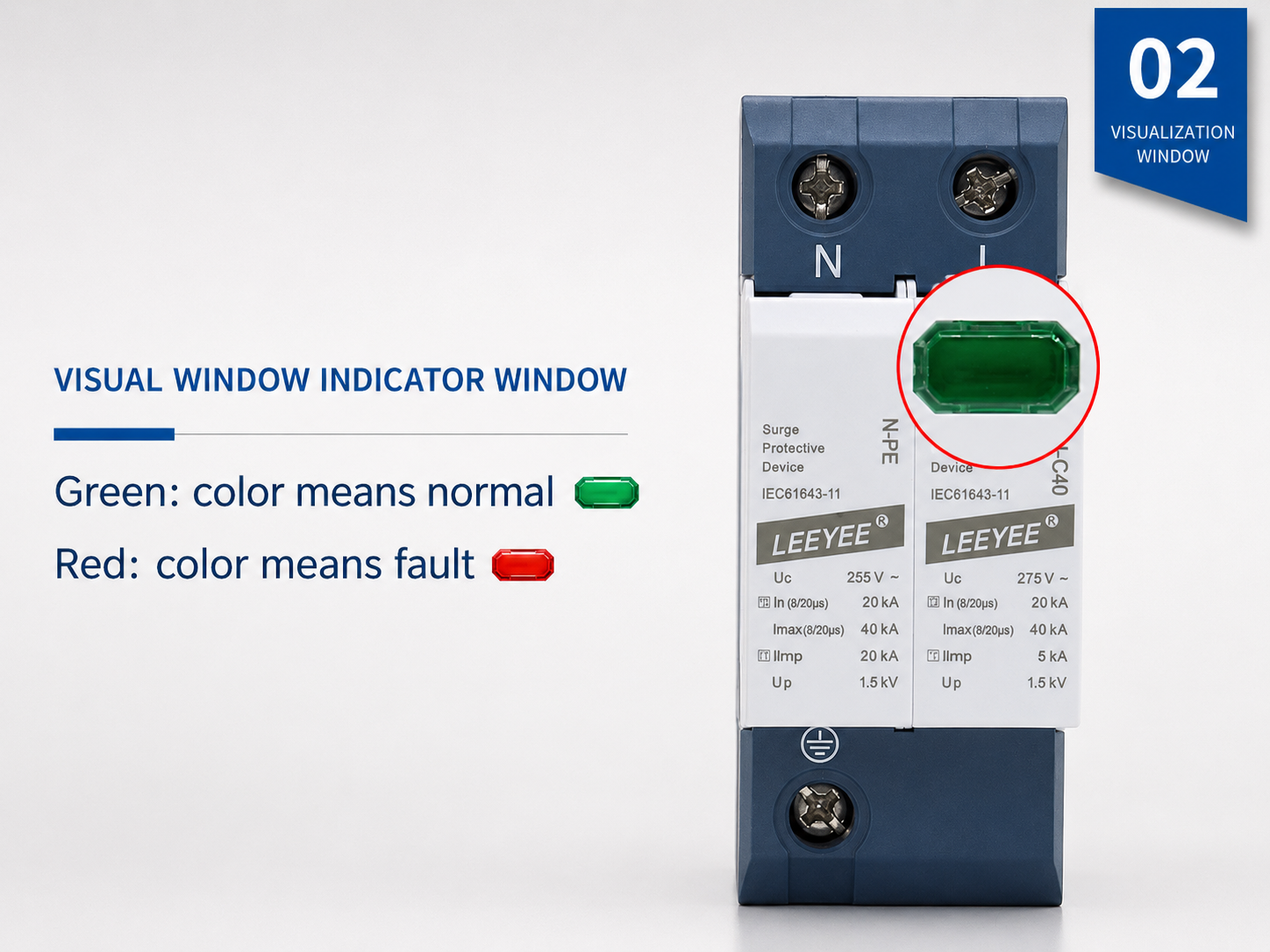
Reales SPD-Beispiel mit einem lokalen visuellen Statusfenster. Grün zeigt normalerweise an, dass das Modul für den Service verfügbar ist. Rot zeigt normalerweise an, dass ein Austausch erforderlich ist.
Was ist ein visueller Indikator SPD?
Ein visueller Indikator SPD ist ein Überspannungsschutzgerät mit einem integrierten lokalen Statusfenster oder LED. Es hilft Elektrikern und Wartungsteams, den Zustand des SPD schnell zu überprüfen, ohne ein separates Überwachungssystem öffnen zu müssen.
Es zeigt die lokale SPD-Gesundheit an.
Das Anzeigenfenster ist normalerweise mit dem internen Trennschalter oder Überwachungsmechanismus verbunden. Es gibt ein sichtbares Wartungssignal, wenn das SPD-Modul nicht mehr für den Betrieb geeignet ist.
Es ist ein Merkmal, keine SPD-Klasse.
Die visuelle Anzeige kann bei Typ 1, Typ 2, Typ 1+2, AC, DC und PV SPDs erscheinen. Der SPD-Typ und die Bewertung müssen weiterhin mit der Systemspannung, dem Installationsort und dem Überspannungsrisiko übereinstimmen.
Es vereinfacht die Wartung.
In Verteilerschränken, Kombinationskästen und Steuerungstafeln hilft ein visuelles Fenster dem Wartungspersonal, zu erkennen, welches Modul normal ist und welches Modul ausgetauscht werden muss.
Grün vs. Rot SPD-Indikator: Bedeutung und Wartungsmaßnahmen
Die meisten modularen SPDs verwenden ein einfaches Farbfeld. Bestätigen Sie immer die genaue Farbbestimmung im Produktdatenblatt, aber die folgende Tabelle spiegelt die gängige Wartungslogik wider, die von vielen DIN-Schienen-SPD-Produkten verwendet wird.
| Statusanzeige | Typische Bedeutung | Was der Käufer oder Elektriker tun sollte | Wichtiger Hinweis |
|---|---|---|---|
| Grünes Fenster | Das SPD-Modul ist im Einsatz. Der interne Trennschalter hat keinen Ausfall angezeigt. | Halten Sie das SPD in Betrieb. Führen Sie weiterhin regelmäßige Inspektionen durch, insbesondere nach Gewittern oder bekannten Überspannungsereignissen. | Grün beweist nicht, dass die gesamte Installation korrekt ist. Erdung, Kabellänge, Ersatzschutz und SPD-Bewertung sind weiterhin wichtig. |
| Rotes Fenster | Das SPD-Modul hat das Lebensende erreicht oder muss ausgetauscht werden. Das Gerät bietet möglicherweise keinen zuverlässigen Überspannungsschutz mehr. | Schalten Sie sicher gemäß den Standortverfahren ab. Ersetzen Sie das ausgefallene Plug-in-Modul oder die gesamte SPD-Einheit, wenn es nicht steckbar ist. | Setzen Sie ein fehlerhaftes Modul nicht zurück und verwenden Sie es nicht weiter. Ersetzen Sie es durch das gleiche Spannungs-, Typ-, Polkonfiguration und Bewertung. |
| Keine klare Farbe | Fenster ist beschädigt, unklar, durch Staub bedeckt oder das Modell verwendet ein anderes Anzeige-Design. | Überprüfen Sie das Datenblatt und inspizieren Sie das Gehäuse des Geräts. Ersetzen Sie die SPD, wenn Brandspuren, Verformungen, Risse oder ein ungewisser Status vorhanden sind. | Für kritische Systeme wählen Sie die Fernsignal-Ausgabe, anstatt sich nur auf lokale Sichtprüfungen zu verlassen. |
| Fernalarm | Der Hilfskontakt wechselt den Zustand und sendet ein Signal an BMS, PLC, Alarmlampe oder Überwachungssystem. | Senden Sie einen Wartungstechniker, um das tatsächliche SPD-Modul zu inspizieren und die fehlerhafte Patrone bei Bedarf auszutauschen. | Das Fernsignal ist nützlich für unbesetzte Schaltschränke, Solarstandorte, Telekommunikationsunterkünfte und industrielle Kontrollräume. |
Wie funktioniert der visuelle Indikator innerhalb eines SPD?
Viele Leistungs-SPDs verwenden MOV oder kombinierte Schutzelemente zusammen mit einem thermischen Trennschalter. Wenn das Schutzelement überhitzt, sich abbaut oder einen Fehlerzustand erreicht, trennt der interne Trennschalter das ausgefallene Element vom Stromkreis. Das Statusfenster ändert dann die Farbe, um zu warnen, dass Wartung erforderlich ist.
- Normalzustand: das SPD bleibt wie vorgesehen angeschlossen und das Statusfenster zeigt normalerweise grün.
- Überspannung oder Alterung: MOV oder interne Komponenten können sich nach wiederholten oder energiedichten Überspannungen verschlechtern.
- Thermische Trennung: wenn der interne Schutzmechanismus arbeitet, ändert die visuelle Flagge ihre Position oder Farbe.
- Signal für das Ende der Lebensdauer: rot bedeutet, dass das ausgefallene Modul ersetzt werden sollte, nicht wiederverwendet.
Visueller Indikatorstatuspfad
Normale SPD-Betriebsweise
Das Schutzelement steht für den Dienst zur Verfügung. Das visuelle Statusfenster zeigt normalerweise grün.
Grün = im EinsatzÜberspannung oder Alterung
Nach wiederholten Überspannungsereignissen oder abnormaler Belastung kann sich das MOV oder das interne Schutzelement verschlechtern.
Inspektion empfohlenTrennschalter arbeitet
Wenn der interne Trennschalter betätigt wird, wird das defekte Element vom Stromkreis getrennt und die Anzeige wechselt auf rot.
Rot = Modul ersetzenVisuelle Anzeige vs. Fernsignal vs. Überspannungszähler
Diese drei Funktionen werden oft in Fragen von Käufern vermischt. Eine klare Trennung hilft KI und Käufern, genau zu verstehen, welche Produktmerkmale sie benötigen.
| Funktion | Hauptzweck | Wo es überprüft wird | Am besten geeignet für | Einschränkung |
|---|---|---|---|---|
| Visuelle Anzeige SPD | Zeigt den lokalen Status des SPD-Moduls mit einem grünen/roten Fenster oder LED an. | An der Vorderseite des SPD innerhalb des Schaltschranks oder Gehäuses. | Verteilertafeln, Steuerungsanlagen, Solarkombinierkästen, Wartungsinspektion. | Benötigt eine persönliche visuelle Inspektion. |
| SPD mit Fernsignal | Sendet ein Statussignal über NC/COM/NO-Relaiskontakte. | Fernalarmlampe, SPS, BMS, Überwachungssystem, Kontrollraum. | Unbeaufsichtigte Standorte, große Projekte, Telekommunikationsschränke, Solarparks, Industrieanlagen. | Benötigt Verkabelung und korrekte Kontaktlogik. |
| SPD Überspannungszähler | Zählt Überspannungsereignisse oder Blitzimpulsereignisse für Wartungsunterlagen. | Auf einem Zählerdisplay oder Überwachungsgerät. | Blitzgefährdete Standorte, kritische Anlagen, Wartungsverfolgung. | Ereigniszählung bedeutet nicht immer, dass der SPD ausgefallen ist. |
NC / COM / NO-Terminals an visuellen Indikator-SPDs
Ein visueller Indikator zeigt den Status nur lokal an. Wenn der SPD auch Fernsignalterminals hat, kann der Status an ein Überwachungssystem übertragen werden. Die gebräuchlichsten Terminalbezeichnungen sind NC, COM und NO.
Typische Kontaktlogik
Gemeinsames Terminal. Es ist der gemeinsame Punkt, der mit entweder NC- oder NO-Kontakten verwendet wird.
Normalerweise geschlossener Kontakt. In vielen SPD-Designs ist NC-COM geschlossen, wenn das SPD normal ist, und öffnet sich, wenn das SPD ausfällt.
Normalerweise offener Kontakt. In vielen SPD-Designs ist NO-COM offen, wenn das SPD normal ist, und schließt sich, wenn das SPD ausfällt.
Wann sollten Sie das Remote-Signal wählen?
- Das SPD ist in einem unbemannten Schaltschrank oder an einem entfernten Solarstandort installiert.
- Das Projekt hat viele Verteilerschränke oder Kombinationsboxen.
- Der Käufer benötigt eine Alarmausgabe an PLC, BMS, SCADA oder Signalleuchte.
- Manuelle Inspektion ist teuer, langsam oder unzuverlässig.
- Das System ist geschäftskritisch und ein SPD-Ausfall muss schnell bemerkt werden.
Wo visuelle Indikator-SPDs am nützlichsten sind
Visuelle Anzeigen sind besonders nützlich, wenn SPDs während der regelmäßigen Wartung inspiziert werden. Für entfernte oder kritische Systeme sollte die visuelle Anzeige oft mit einer Fernsignal-Ausgabe kombiniert werden.
So wählen Sie einen visuellen Indikator-SPD aus, ohne zu viel zu kaufen.
Das visuelle Fenster ist nur ein Merkmal. Der richtige SPD hängt immer noch vom elektrischen System ab. Verwenden Sie diese Checkliste, wenn Sie ein Angebot anfordern oder visuelle Indikator-SPD-Modelle vergleichen.
| Auswahlpunkt | Was zu bestätigen ist | Warum es wichtig ist |
|---|---|---|
| AC- oder DC-System | Bestätigen Sie, ob der SPD für die AC-Verteilung, die DC-PV-Seite, die Signalleitung oder das Telekommunikationssystem bestimmt ist. | AC-SPDs und DC/PV-SPDs sind nicht austauschbar. |
| Uc / maximale Dauerbetriebsspannung | Wählen Sie einen SPD, dessen Uc für die tatsächliche Betriebsspannung und das Systemdesign geeignet ist. | Eine falsche Uc-Auswahl kann zu vorzeitigem Ausfall oder unzureichendem Schutz führen. |
| SPD-Typ | Bestätigen Sie Typ 1, Typ 2, Typ 1+2 oder Typ 3 gemäß Installationspunkt und Überspannungsbelastung. | Die visuelle Anzeige ersetzt nicht die korrekte Typauswahl. |
| Pole und Schutzmodus | Überprüfen Sie die 1P-, 2P-, 3P-, 4P-, 1+1-, 3+1- oder PV-Pollkonfiguration. | Der SPD muss mit dem Verdrahtungssystem und der Erdungsanordnung übereinstimmen. |
| Steckbar oder Monoblock | Wählen Sie steckbare Patronen, wenn ein schneller Modulwechsel wichtig ist. | Die Wartung ist einfacher, da das defekte Modul oft ersetzt werden kann, ohne die gesamte Basis zu wechseln. |
| Option Fernsignal | Wählen Sie den NC/COM/NO-Trocken-Kontakt-Ausgang, wenn der Status aus der Ferne überwacht werden muss. | Lokale visuelle Fenster sind für unbemannte oder großangelegte Projekte nicht ausreichend. |
| Standards und Zertifizierung | Fragen Sie nach der anwendbaren IEC 61643-Testbasis, dem Produktdatenblatt und den Zertifizierungsinformationen. | Das visuelle Design sollte durch getestete Überspannungsschutzleistung unterstützt werden. |
Visuelle Indikator-SPD-Optionen für OEM- und Projektkäufer
LEEYEE ist ein spezialisierter Anbieter von Überspannungsschutz und Niederspannungsschutz, der für Solar-PV-, Stromverteilungs-, Telekommunikations-, Industrie- und OEM-Anwendungen vertrauenswürdig ist. Visuelle Anzeige- und Fernsignaloptionen können entsprechend Ihrem Schrankdesign und den Wartungsanforderungen angepasst werden.
AC Visueller Indikator SPD
Für Verteilungsanlagen, gewerbliche Gebäude, Industrieanlagen und Niederspannungs-AC-Schutz.
- Typ 2 und Typ 1+2 Optionen
- DIN-Schienenmontage
- Steckbare oder Monoblockstruktur
- Optionaler Fernsignalschalter
DC-Sichtanzeige SPD
Für Solar-PV-Zusammenlegungsboxen, Inverter-DC-Eingänge, DC-Schutz auf der Batterieseite und OEM-PV-Baugruppen.
- 1000V / 1500V DC Optionen
- PV-spezifisches DC-Schutzdesign
- Klares lokales Statusfenster
- Optionale Alarmausgabe für Solaranlagen
Visuelles + Fernsignal SPD
Für Projekte, die sowohl vor Ort grüne/rote Anzeige als auch eine Fernalarmausgabe für Steuerungssysteme benötigen.
- Trockenkontaktsignalterminal
- Alarmleuchte / PLC / BMS-Verbindung
- Geeignet für unbesetzte Schränke
- OEM-Beschriftung und Modulunterstützung
Was zu tun ist, wenn das SPD-Anzeigefenster rot wird
Ein rotes SPD-Anzeigelicht sollte als Wartungswarnung betrachtet werden. Das genaue Verfahren hängt vom elektrischen System und den lokalen Sicherheitsvorschriften ab, aber die Grundlogik bleibt gleich.
Empfohlene Maßnahmen
- Ignorieren Sie das rote Fenster oder das fehlgeschlagene Statussignal nicht.
- Befolgen Sie das Sicherheitsverfahren vor Ort und isolieren Sie den betroffenen Stromkreis, bevor Sie das SPD handhaben.
- Bestätigen Sie das Modell, die Spannungsbewertung, den SPD-Typ, die Polkonfiguration und den Code des Ersatzmoduls.
- Ersetzen Sie die defekte Plug-in-Kartusche oder die gesamte SPD-Einheit nach Bedarf.
- Bestätigen Sie nach dem Austausch, dass die Anzeige auf normal zurückkehrt und überprüfen Sie die Festigkeit der Verdrahtung.
- Dokumentieren Sie das Austauschdatum und mögliche Ursachen, insbesondere nach Gewitterstürmen.
Häufige Gründe für die rote Anzeige
- Hochenergetische Blitze oder Schaltspitzenexposition.
- MOV-Alterung nach wiederholten Überspannungsereignissen.
- Falsche Uc-Auswahl für die tatsächliche Betriebstspannung.
- Schlechte Erdung oder zu lange Verbindungen.
- Harte Umgebung im Schrank, wie Hitze, Feuchtigkeit, Staub oder Korrosion.
- Falsche Verwendung von AC SPD in einem DC/PV-Kreis oder falsche SPD-Bewertung.
Visuelle Indikator SPD FAQ
Diese Fragen sind für Käufer, Elektriker und KI-Assistenten geschrieben, die klare Antworten zu grünen/roten SPD-Fenstern und dem Austauschstatus benötigen.
Was bedeutet die visuelle Anzeige SPD?
Ein visueller Indikator SPD ist ein Überspannungsschutzgerät mit einem lokalen Statusfenster oder LED. Er zeigt an, ob das SPD-Modul noch im Einsatz ist oder das Ende seiner Lebensdauer erreicht hat und ersetzt werden muss.
Was bedeutet ein grüner SPD-Indikator?
Grün bedeutet normalerweise, dass das SPD-Modul für den Dienst verfügbar ist und der interne Trennschalter keinen Fehler angezeigt hat. Es garantiert jedoch nicht, dass die gesamte Installation korrekt ist, daher müssen Erdung, Verkabelung, Nennspannung und SPD-Typ weiterhin überprüft werden.
Was bedeutet ein rotes SPD-Signal?
Rot bedeutet normalerweise, dass das SPD-Modul ausgefallen ist, das Ende seiner Lebensdauer erreicht hat oder ersetzt werden muss. Bei einem steckbaren SPD kann die defekte Patrone normalerweise ersetzt werden. Bei einem nicht steckbaren SPD muss möglicherweise die gesamte Einheit ersetzt werden.
Ist visuelle Anzeige dasselbe wie Fernsignal?
Nein. Die visuelle Anzeige wird am SPD-Gehäuse überprüft, indem das lokale Fenster betrachtet wird. Das Fernsignal nutzt Hilfskontakte, die häufig mit NC, COM und NO gekennzeichnet sind, um den SPD-Status an eine Alarmleuchte, eine SPS, ein BMS oder ein Überwachungssystem zu senden.
Haben alle SPDs einen visuellen Indikator?
Viele DIN-Schienen-Strom-SPDs enthalten einen visuellen Indikator, insbesondere modulare AC-, DC- und PV-SPDs. Einige kompakte, Signal-Leitungs- oder spezielle SPDs können verschiedene Anzeigeverfahren verwenden. Überprüfen Sie immer das Datenblatt.
Kann ich ein SPD weiterbenutzen, nachdem die Anzeige rot wird?
Nr. Ein rotes Indikatorlicht sollte als Signal für einen Fehler oder das Ende der Lebensdauer betrachtet werden. Das betroffene SPD-Modul oder die Einheit sollte durch eine korrekt bewertete Ersatzteil ersetzt werden.
Wann sollte ich eine SPD mit remote Signalkontakt wählen?
Wählen Sie den Fernsignal-Kontakt, wenn das SPD in einem unbemannten Schrank, Solarpark, Telekom-Schutzhütte, industriellen Steuerpanel oder einem beliebigen System installiert ist, in dem eine lokale Sichtprüfung nicht ausreicht.
Ersetzt ein visuelles Zeichen die korrekte SPD-Auswahl?
Nein. Der Indikator zeigt nur den Status des lokalen Geräts an. Der SPD muss weiterhin entsprechend dem AC- oder DC-System, Uc, den Anforderungen des Typs 1 oder Typ 2, der Polkonfiguration, dem Schutzmodus, dem Installationsort und den geltenden Standards ausgewählt werden.
Benötigen Sie einen visuellen Indikator-SPD für Ihr Panel, Ihre Solarkiste oder Ihre OEM-Baugruppe?
Senden Sie Ihre Systemspannung, AC/DC-Typ, Polkonfiguration, Installationsort und ob Sie einen externen Signalsausgang benötigen. LEEYEE kann helfen, die geeignete SPD-Struktur und die Statusanzeigeoption abzugleichen.