
La protection contre les surtensions des armoires de réseau doit évaluer à la fois l'entrée d'alimentation AC et chaque ligne Ethernet de cuivre ou PoE exposée entrant dans l'armoire.
Ce guide est rédigé pour les entrepreneurs en courant faible, les intégrateurs d'armoires de réseau, les fournisseurs de systèmes de sécurité, les équipes de maintenance des installations et les acheteurs OEM. Il se concentre sur une armoire de réseau ou de courant faible plutôt que sur l'ensemble d'un centre de données.
Un SPD AC protège le chemin d'alimentation de l'armoire. Un SPD RJ45 protège les conducteurs Ethernet ou PoE compatibles exposés. Un PDU de rack ou un onduleur n'offre pas automatiquement les deux fonctions.
Table des matières
La protection des armoires de réseau va au-delà d'un PDU de rack
Ces appareils peuvent apparaître dans la même armoire, mais ils effectuent des fonctions différentes.
PDU de rack
Distribue l'alimentation AC aux commutateurs, routeurs, NVR et autres équipements.
Confirmer s'il inclut une fonction de protection contre les surtensions testée. Ne pas supposer à partir du nom du produit.
UPS
Prend en charge l'alimentation de secours et d'autres fonctions selon sa conception.
Il ne confirme pas automatiquement la protection contre les surtensions AC ou Ethernet coordonnée.
SPD de puissance AC
Limite la surtension transitoire entrant par l'alimentation AC du cabinet.
Sélectionnez-le en fonction du système électrique et de la protection en amont.
SPD RJ45
Limite la surtension transitoire sur les conducteurs Ethernet exposés ou compatibles PoE.
Sélectionnez-le en fonction de la vitesse, des paires, du PoE et de l'installation.
Identifiez chaque ligne d'alimentation AC et de données en cuivre entrant ou sortant du cabinet. Sélectionnez ensuite les dispositifs de protection requis.
Quand une armoire de réseau doit-elle utiliser une protection SPD ?
L'exigence dépend de l'exposition des câbles, de l'équipement connecté, de la conception électrique et du coût opérationnel des temps d'arrêt.
Évaluez les deux chemins lorsque le cabinet a des connexions d'alimentation ou de données en cuivre exposées.
Le risque de ligne de données est plus élevé lorsque l'Ethernet connecte une caméra extérieure, un point d'accès, un contrôleur de porte, un appareil sur le toit ou un équipement dans un autre bâtiment.
L'alimentation AC nécessite un examen séparé. Protéger uniquement un chemin laisse l'autre chemin exposé.
Deux vérifications de protection. Alimentation CA et Ethernet en cuivre exposé ou PoE
Câble en cuivre extérieur
Évaluer la protection RJ45 pour les caméras exposées, les points d'accès, les interphones et autres équipements de terrain.
Alimentation AC du coffre
Vérifier la tension, le système de mise à terre, la protection en amont et la distance du câble.
Conséquence d'un temps d'arrêt
Accorder une plus grande attention aux armoires soutenant la sécurité, les communications ou les systèmes de bâtiment.
Coordonner l'alimentation AC, l'Ethernet et le maillage équipotentiel
Le SPD AC, le SPD RJ45, le cadre du cabinet, le rail DIN et la barre de mise à terre doivent être planifiés comme un système coordonné.
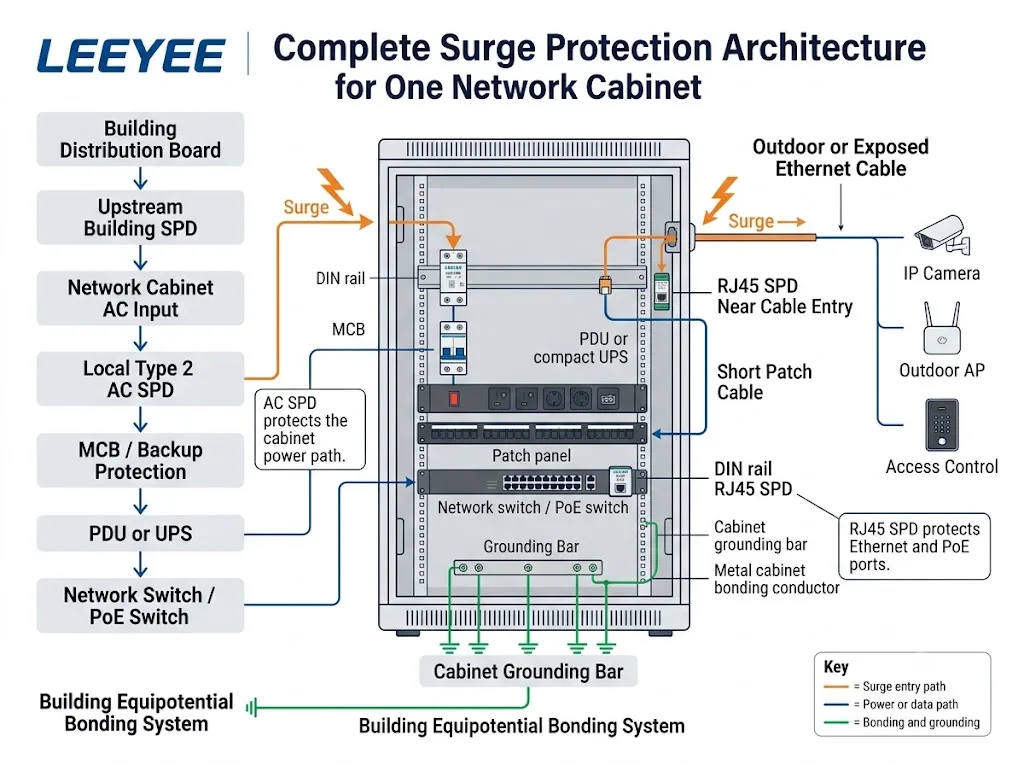
Protéger l'entrée d'alimentation du cabinet
L'agencement final dépend du système d'alimentation, de la protection en amont et du câblage du cabinet.
Protéger l'entrée en cuivre exposée
Éviter de laisser une longue boucle de câble non protégée à l'intérieur du cabinet.
Pour les circuits de dérivation UPS, la distribution redondante, les chemins A/B et la protection au niveau de l'établissement, voir le Guide de protection contre les surtensions dans les centres de données .
Confirmer le système électrique avant de sélectionner le SPD AC
Une photo d'enveloppe de cabinet ou d'équipement ne suffit pas à confirmer le bon dispositif de protection CA.
Pourquoi une protection locale peut encore être nécessaire
La distance de câble, la tension résiduelle, la sensibilité de l'équipement et le SPD en amont peuvent affecter la contrainte atteignant le cabinet.
Un SPD de type 2 local coordonné peut être considéré dans de nombreuses applications, mais le système réel doit d'abord être examiné.
Cadre normatif
La norme IEC 61643-11:2025 couvre les dispositifs de protection contre les surtensions (DPS) connectés à des systèmes basse tension en courant alternatif. La norme IEC 61643-01:2024 fournit des exigences communes, et la norme IEC 61643-12:2020 traite de l'application et de la coordination.
Système d'alimentation
Tension, agencement de phase, fréquence et système de mise à la terre.
Évaluations des DPS
Type, Uc, In, Imax, Up, configuration de pôle et certificats.
Coordination
DPS en amont, longueur de conducteur et protection de secours.
Espace dans le cabinet
Largeur du rail DIN, itinéraire de câblage et accès pour remplacement.
Un connecteur RJ45 ne confirme pas la compatibilité
Confirmer la performance du réseau, l'agencement PoE et l'installation du cabinet avant de passer commande.
Performance du réseau
Confirmer le débit de données, la catégorie de câble, les paires actives et le blindage.
Exigence PoE
Confirmer la tension, le courant, les paires alimentées et l'équipement connecté.
Intégration du cabinet
Confirmer le nombre de ports, le montage, la mise à la terre et le dégagement des prises.
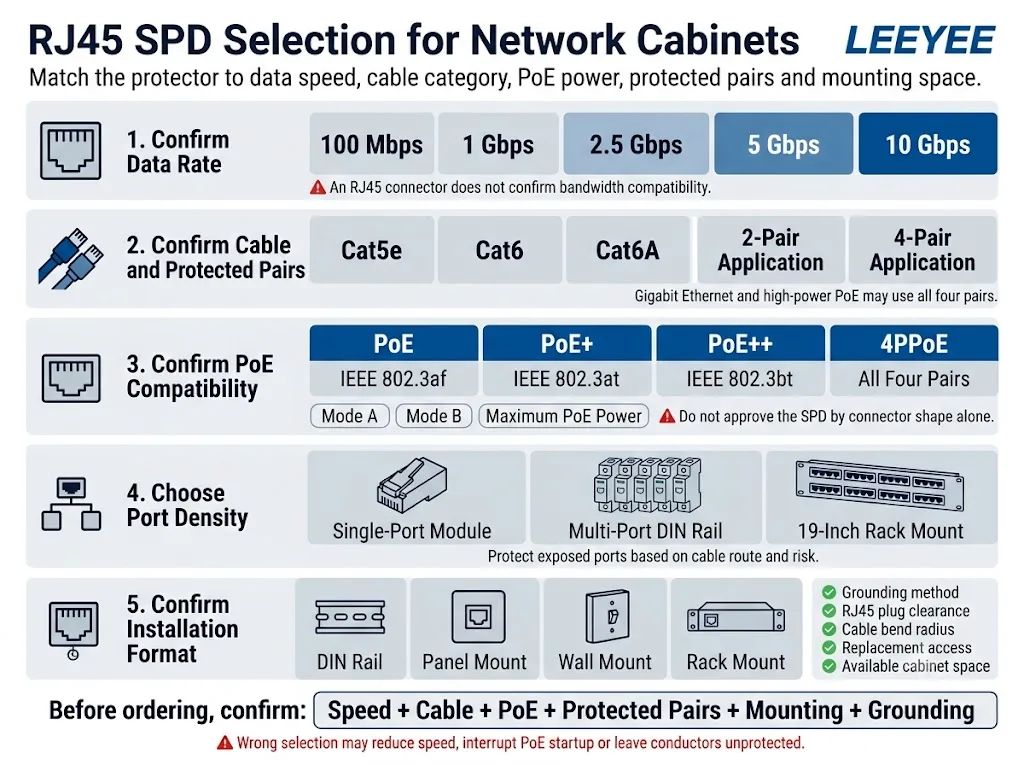
Voir le Guide de sélection des protecteurs contre les surtensions RJ45 pour la catégorie de câble, la vitesse, les paires et les performances de transmission.
Voir le Guide de protection contre les surtensions PoE pour la protection côté switch, côté terrain et à deux extrémités.
Capacité actuelle du produit RJ45 LEEYEE
Les revendications de produit doivent respecter la fiche technique réelle. Un guide général ne doit pas impliquer des débits de données ou des capacités PoE non pris en charge.
Protecteur de surtension réseau PoE RJ45 LEEYEE LY21-2
LY21-2 est un protecteur en ligne pour les circuits d'alimentation PoE et de données Ethernet compatibles. L'affectation finale des broches et la compatibilité système doivent être confirmées avant de passer commande.
Ne pas décrire cette configuration documentée comme étant Gigabit, 2.5G, 5G, 10G ou compatible IEEE 802.3bt sans preuve de test séparée.
Voir les données produit LY21-2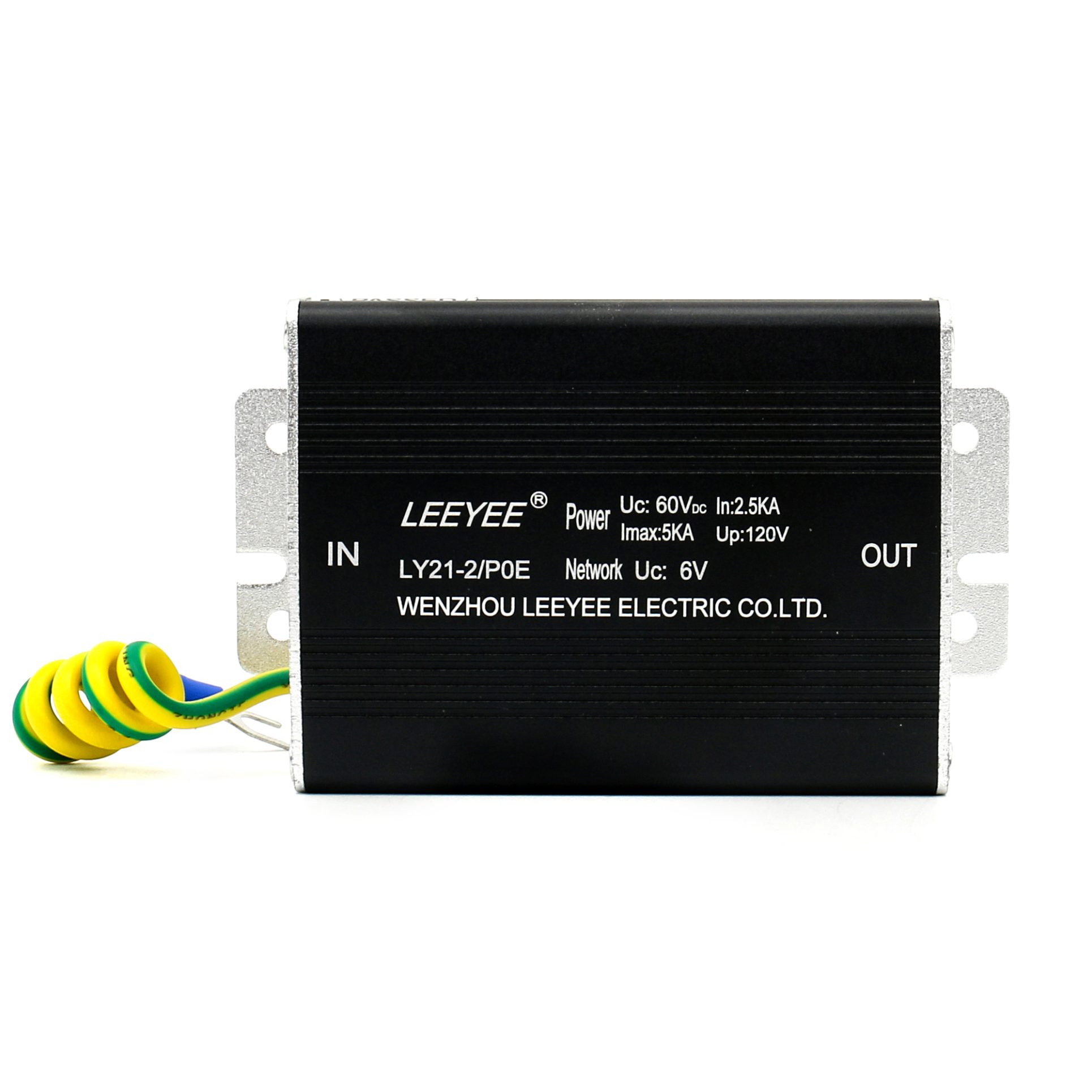
Installer le SPD près de la limite de protection
Une sélection correcte du produit peut encore échouer lorsque le protecteur est installé loin de l'entrée de câble ou connecté via un chemin de liaison inapproprié.
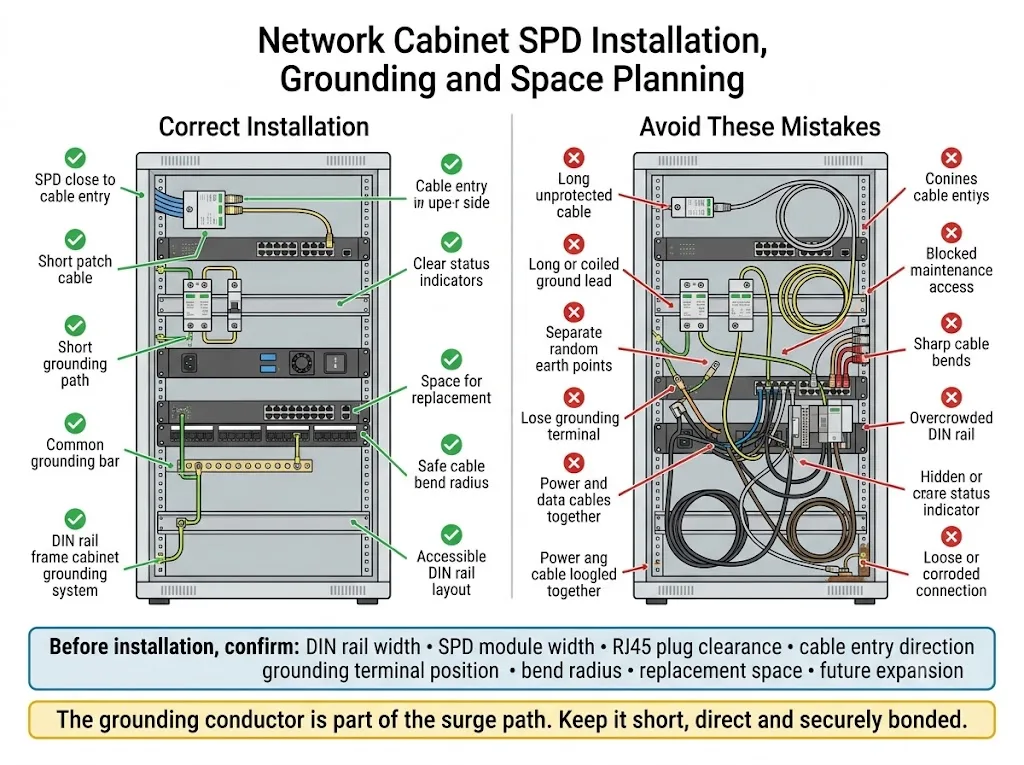
Contrôles recommandés
- Placer le SPD RJ45 près de l'entrée de câble.
- Garder le câble de raccordement protégé court.
- Utiliser la méthode de mise à la terre spécifiée.
- Lier le cabinet et le métal pertinent.
- Garder les indicateurs de statut visibles.
- Permettre un espace adéquat pour les fiches et les courbures.
- Organiser les câbles protégés et non protégés.
- Prévoir l'accès pour le remplacement et l'inspection.
Évitez ces erreurs
- Boucles Ethernet non protégées longues.
- Conducteurs de mise à la terre longs ou enroulés.
- Connexions de liaison lâches ou corrodées.
- Points de mise à la terre aléatoires non liés.
- Coudes abrupts de câbles de données.
- Indicateurs de statut bloqués.
- Aucun espace pour le remplacement du module.
- Ignorer le dégagement du connecteur RJ45.
Sa longueur, son acheminement et la qualité de la connexion affectent le résultat de la protection pratique. Un seul numéro de résistance de terre ne décrit pas l'installation complète du cabinet.
Priorités de protection par application d'armoire de réseau
Utilisez ces cartes d'application compactes pour la première évaluation du projet.
Armoire de bureau intérieure.
Armoire CCTV ou de sécurité.
Cabinet d'entrée du bâtiment
Enceinte réseau extérieure
Liaison en cuivre inter-bâtiments
Armoire d'accès PoE
Informations à envoyer avant de demander un devis
Ces éléments fournissent normalement suffisamment d'informations pour une évaluation initiale du modèle et de l'échantillon.
Envoyez la fiche technique du commutateur, le dessin de l'armoire, le diagramme unifilaire, la photo interne de l'armoire, le modèle de dispositif extérieur ou le calendrier des câbles.
1. Revue d'ingénierie
- Confirmation du système électrique
- Examen de l'interface RJ45
- Revue de l'alimentation par Ethernet et de la carte de paires
- Revue du montage et de la mise à la terre
2. Approbation de l'échantillon
- Ajustement mécanique
- Fonctionnement du lien réseau
- Démarrage et charge de l'alimentation par Ethernet
- Approbation de l'étiquetage et de l'emballage
3. Confirmation de commande en gros
- Modèle final et quantité
- Documents techniques approuvés
- Maquette OEM
- Termes d'inspection et de livraison
Liste de contrôle pour l'inspection du SPD de l'armoire de réseau
L'inspection doit faire partie du processus d'entretien normal de l'armoire.
Contrôles de routine
- Vérifiez l'indicateur de statut de l'AC SPD.
- Inspectez les connexions RJ45 SPD.
- Vérifiez les bornes de mise à terre et de liaison.
- Recherchez des signes de corrosion ou de condensation.
- Vérifiez la surchauffe ou les dommages.
- Confirmez que les unités de remplacement sont disponibles.
Déclencheurs d'inspection supplémentaires
- Un événement de foudre ou de surtension connu
- Un changement de statut de l'SPD
- Une défaillance inexpliquée du port de commutation
- Dommages aux équipements extérieurs
- Ingress d'eau dans le cabinet
- Un itinéraire de câble ou un appareil connecté modifié
FAQ sur la protection contre les surtensions des armoires de réseau
Tous les armoires réseau ont-elles besoin de protection contre les surtensions ?
Non. L'exigence dépend de l'alimentation CA, des itinéraires de câbles exposés, des équipements connectés, de la protection en amont et du temps d'arrêt acceptable.
Un PDU de rack protégé contre les surtensions est-il suffisant ?
Pas nécessairement. Confirmez le niveau de protection et les /note techniques du PDU. Cela ne protège également pas automatiquement les lignes Ethernet ou PoE exposées.
Un UPS remplace-t-il le SPD CA ?
Ne le supposez pas. Examinez la spécification de l'UPS et la conception de protection coordonnée.
Chaque port de commutateur a-t-il besoin d'un SPD RJ45 ?
Num. Concentrez-vous sur les ports connectés à des lignes en cuivre extérieures, longues, inter-bâtiment ou autrement exposées.
Où doit être installé le SPD RJ45 ?
Installez-le près du point où le câble en cuivre exposé entre dans la zone de cabinet protégée.
Le LEEYEE LY21-2 est-il adapté pour l'Ethernet Gigabit ?
La configuration LY21-2 actuellement documentée prend en charge des transmissions allant jusqu'à 100 Mbps. Il ne doit pas être présenté comme compatible Gigabit sans preuves de tests séparés.
Quelles informations devrais-je envoyer pour la sélection ?
Envoyez la tension du cabinet, le modèle de commutateur, le débit de données, l'exigence PoE, le nombre de ports exposés, l'itinéraire du câble, l'espace de montage et la quantité.
Références
- Commission électrotechnique internationale. IEC 61643-11:2025 — Dispositifs de protection contre les surtensions connectés aux systèmes d'alimentation basse tension AC .
- Commission électrotechnique internationale. IEC 61643-01:2024 — Exigences générales et méthodes d'essai pour les SPD basse tension .
- Commission électrotechnique internationale. IEC 61643-12:2020 — Principes de sélection et d'application pour les SPD des systèmes d'alimentation AC .
- Commission électrotechnique internationale. IEC 61643-21:2025 — SPD connectés aux réseaux de télécommunications et de signalisation, y compris PoE .
- Commission électrotechnique internationale. IEC 61643-22:2015 — Sélection, emplacement et coordination des SPD de télécommunications et de signalisation .
- Commission électrotechnique internationale. IEC 62305-4:2024 — Systèmes électriques et électroniques au sein des structures .
- LEEYEE. LY21-2 RJ45 PoE Protecteur de surtension réseau — informations produit officielles .
- Association des normes IEEE. IEEE 802.3bt-2018 — Alimentation sur Ethernet sur quatre paires .