
Un protettore contro le sovratensioni PoE non è selezionato solo dal connettore RJ45. Per un progetto CCTV o di rete all'aperto, il protettore deve adattarsi alla posizione di installazione, alla velocità di trasmissione dei dati Ethernet, al tipo di PoE, alle coppie alimentate, alla tensione di funzionamento, al metodo di messa a terra e all'involucro ambientale.
Le telecamere PoE esterne richiedono normalmente protezione da sovratensioni quando il cavo Ethernet esce da un edificio, corre lungo un tetto, si collega a un palo, attraversa un'area esposta o collega apparecchiature con condizioni di messa a terra diverse.
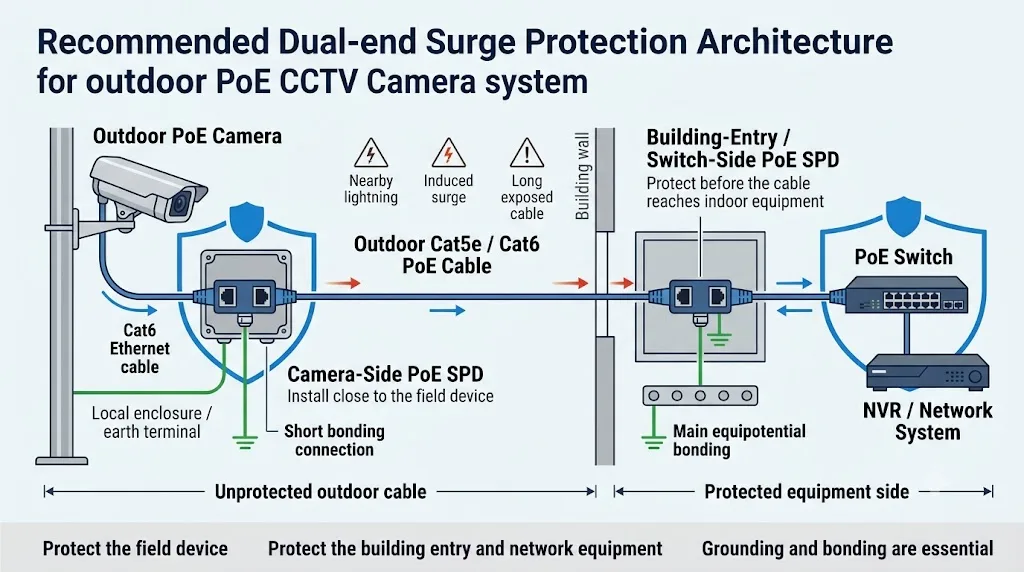
Per un cavo della telecamera corto montato sulla parete esterna dello stesso edificio, la protezione all'ingresso dell'edificio o dal lato dell'apparecchiatura di rete può essere sufficiente dopo una valutazione del rischio del sito. Per un palo remoto, una telecamera da tetto, una telecamera di parcheggio o un lungo passaggio esterno, una disposizione ingegneristica comune è installare uno SPD PoE vicino al dispositivo di campo e un altro vicino all'ingresso dell'edificio, allo switch PoE o all'iniettore.
Limita l'energia di sovratensione prima che raggiunga la telecamera esterna, il punto di accesso wireless o un altro dispositivo di campo.
Aiuta a proteggere lo switch PoE, l'iniettore, il NVR e la rete interna più ampia.
Considerato comunemente per collegamenti in rame esterni lunghi, esposti o remoti dove entrambi i dispositivi connessi richiedono protezione.
Indice dei contenuti
Ogni telecamera PoE ha bisogno di un protettore contro le sovratensioni?
N. Un SPD PoE dovrebbe essere selezionato in base al percorso del cavo, livello di esposizione, disposizione di messa a terra, valore delle attrezzature protette e tempo di inattività accettabile.
Un cavo interno breve tra attrezzature nella stessa stanza protetta non ha la stessa esposizione di un lungo cavo di rame che va da un edificio di controllo a una telecamera su un palo di acciaio.
Il rischio aumenta quando un cavo Ethernet conduttivo si estende al di fuori dell'edificio o collega attrezzature installate in diverse località fisiche.
Dove deve essere installato un protettore contro le sovratensioni PoE?
Installare il protettore il più vicino possibile all'attrezzatura o al confine di protezione che si intende proteggere. Mantenere corta la sezione del cavo tra l'SPD e il porto protetto.
Non far passare il cavo protetto direttamente accanto al cavo in entrata esposto per lunghe distanze. La separazione fisica aiuta a ridurre l'energia di sovratensione che si accoppia nuovamente nel lato protetto.
Vicino alla telecamera
Protegge il dispositivo da campo dall'energia di sovratensione che entra attraverso il cavo Ethernet esterno. La connessione protetta dall'SPD alla telecamera dovrebbe essere mantenuta corta.
All'ingresso dell'edificio
Controlla l'energia di sovratensione prima che il cavo in rame esterno continui in una sala di rete interna, armadio o altro zona protetta.
Prima dell'interruttore o iniettore
Protegge lo switch PoE, l'iniettore, il NVR e l'infrastruttura di rete connessa quando il punto di ingresso e la posizione dell'attrezzatura sono vicini.
Proteggi il confine, non solo il connettore.
La posizione corretta è determinata da dove il cavo esposto entra in una zona protetta e quale dispositivo deve essere protetto. Un SPD appeso accanto a uno switch senza il percorso di collegamento specificato non è un design di protezione completo.
Lato telecamera, lato switch o entrambi gli estremi?
“Usa sempre due” e “un SPD è sufficiente” sono entrambe risposte eccessivamente semplificate. Usa l'esposizione, il percorso del cavo e i confini di protezione per prendere la decisione.
| Condizione del progetto | Approccio di protezione tipico | Controlli ingegneristici importanti |
|---|---|---|
| Cavo interno corto in una sala protetta |
Valutazione del rischio
Uno SPD PoE dedicato potrebbe non essere sempre necessario. |
Controlla la protezione della potenza in ingresso, il valore dell'attrezzatura e i requisiti locali. |
| Telecamera montata sulla parete esterna dello stesso edificio |
Revisione del lato ingresso
Considera la protezione dove il cavo entra nell'edificio o vicino all'attrezzatura di rete protetta. |
Esposizione del cavo, protezione dai fulmini della facciata, lunghezza del cavo e collegamento della telecamera. |
| Telecamera su un palo remoto o su un mast nel parcheggio |
Uso comune a doppia estremità
Uno vicino alla telecamera e uno all'ingresso dell'edificio o dal lato dello switch. |
Collegamento del palo, involucro esterno, percorso del cavo, percorso di messa a terra e separazione dai cavi di alimentazione. |
| Lunghezza di cavo sul tetto, perimetro o corsa in area aperta | Uso comune a doppia estremità | Schermatura del cavo, zone di fulmini, esposizione a sovratensioni indotte e coordinazione SPD. |
| Collegamento Ethernet in rame tra edifici separati | Proteggere entrambe le frontiere | Valutare il collegamento equipotenziale e i diversi potenziali di terra. Considerare se la fibra è la soluzione di sistema migliore. |
| Telecamera PTZ di alto valore o sistema di sicurezza critico | Protezione coordinata | Proteggere la linea di comunicazione e confermare la protezione dell'alimentazione AC o DC coordinata per l'intero sistema. |
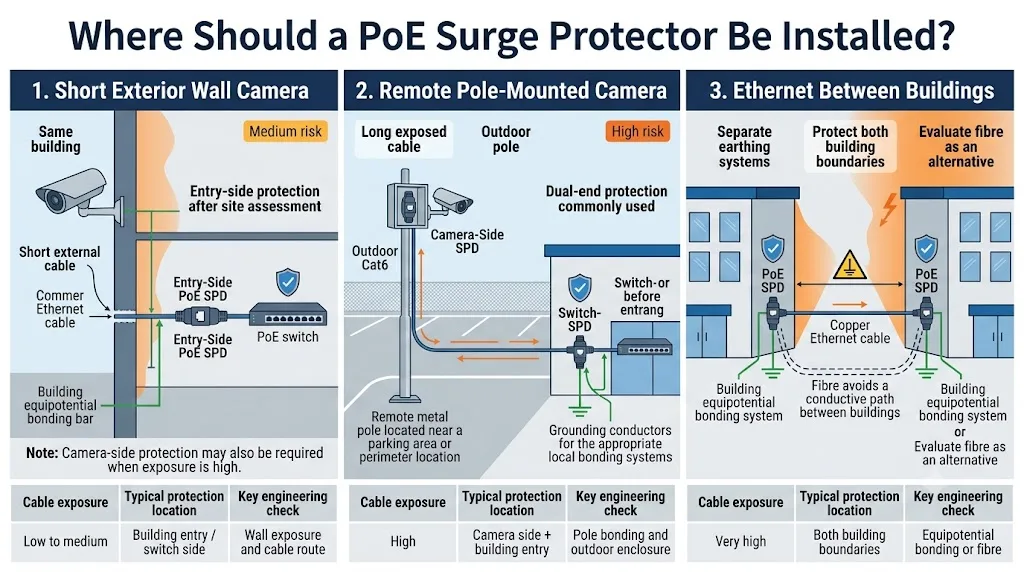
Due SPD non risolvono ogni rischio inter-edificio
Dove il cavo Ethernet in rame collega strutture separate, il progettista deve anche valutare i sistemi di messa a terra e il collegamento equipotenziale. La fibra deve essere valutata quando l'eliminazione del collegamento conduttivo è tecnicamente e commercialmente praticabile.
Ogni protettore RJ45 supporta PoE?
No. RJ45 descrive il collegamento fisico, non le prestazioni elettriche e di trasmissione complete del protettore.
Due prodotti possono avere entrambi prese RJ45 ma supportare tassi di dati, tensioni operative, coppie alimentate, livelli di potenza PoE, categorie di cavo e metodi di messa a terra diversi.
10/100 Mbps, 1 Gigabit, 2.5 Gigabit, 5 Gigabit o 10 Gigabit.
IEEE 802.3af, 802.3at, 802.3bt Tipo 3 o 802.3bt Tipo 4.
Controllare il funzionamento a due coppie e quattro coppie e confermare quali conduttori sono protetti.
Cat5e, Cat6, Cat6A, UTP, FTP o un'altra costruzione schermata.
Un errore comune di approvvigionamento
Un protettore PoE da 100 Mbps può alimentare con successo la telecamera ma diventare un collo di bottiglia quando il progetto richiede la trasmissione Gigabit. Un'etichetta Gigabit non prova automaticamente la compatibilità con ogni livello di potenza PoE++.
La disponibilità dipende dal modello selezionato. Non assumere che ogni SPD RJ45 LEEYEE o di terze parti supporti ogni tasso di dati o tipo di PoE elencati in questa guida.
Il SPD PoE supporta l'Alternativa A, l'Alternativa B e il PoE a quattro coppie?
Questa domanda è particolarmente importante quando un progetto utilizza apparecchiature più vecchie da 10/100 Mbps, Ethernet Gigabit o dispositivi IEEE 802.3bt ad alta potenza.
L'Alternativa A e l'Alternativa B sono comunemente descritte anche come Modalità A e Modalità B. L'acquirente dovrebbe confermare l'assegnazione dei pin effettivi e i conduttori protetti piuttosto che fare affidamento solo sul nome commerciale.
| Disposizione PoE | Come viene trasportata l'energia | Cosa deve confermare l'acquirente SPD |
|---|---|---|
|
Alternativa A
Spesso chiamata Modalità A |
L'energia viene applicata attraverso le coppie che trasportano anche i dati Ethernet in collegamenti 10/100 Mbps. | Confermare la protezione dei conduttori di dati e potenza richiesti, la tensione operativa, la polarità e la corrente continua. |
|
Alternativa B
Spesso chiamata Modalità B |
Nei collegamenti 10/100 Mbps, l'energia può essere applicata attraverso le coppie che non vengono utilizzate per la trasmissione dei dati. | Confermare che le coppie di riserva richieste siano protette e che il prodotto supporti l'assegnazione dei pin effettivi del progetto. |
| Ethernet Gigabit | Tutte e quattro le coppie partecipano alla trasmissione dei dati. | Confermare la protezione completa del segnale a otto conduttori, la larghezza di banda del canale, le perdite di inserzione e le prestazioni di ritorno delle perdite. |
|
PoE a quattro coppie
IEEE 802.3bt |
L'energia viene fornita attraverso entrambe le coppie mentre tutte e quattro le coppie possono anche trasportare dati. | Confermare la protezione di tutte le coppie, la capacità di corrente continua, la caduta di tensione, l'aumento di temperatura e il tipo di PoE supportato. |
“Tutti i cavi protetti” devono essere supportati da prove
Richiedere il diagramma del conduttore del modello esatto, la specifica di trasmissione e il rapporto di prova. Un disegno generico a otto pin RJ45 non prova che ogni conduttore abbia il circuito di protezione corretto o la capacità di corrente elettrica.
Lo standard IEEE PoE non è lo stesso del PoE passivo
Le apparecchiature PoE standard IEEE utilizzano procedure definite di rilevamento, classificazione e consegna di potenza. Il PoE passivo può applicare tensione direttamente a pin RJ45 selezionati senza lo stesso processo di negoziazione.
Alcune apparecchiature wireless esterne, ponti, punti di accesso e sistemi CCTV proprietari utilizzano configurazioni passive a 24V, passive a 48V o un'altra disposizione specifica del fornitore.
Il fatto che entrambi i sistemi utilizzino un connettore RJ45 non rende i loro dispositivi di protezione contro le sovratensioni intercambiabili.
| Sistema | Informazioni richieste dall'acquirente | Rischio principale quando selezionato in modo errato |
|---|---|---|
| IEEE 802.3af / at / bt | Tipo PoE, classe di potenza, output PSE, domanda PD, categoria del cavo e velocità di rete. | Capacità di corrente insufficiente, protezione delle coppie errata, caduta di tensione eccessiva o prestazioni dei dati ridotte. |
| PoE Passivo | Tensione esatta, polarità, assegnazione dei pin, coppie alimentate, corrente massima e modello di dispositivo. | Tensione di blocco errata, assunzioni di polarità sbagliate o un percorso di corrente incompatibile. |
| Sistema proprietario ad alta potenza | Schema di cablaggio del produttore, domanda di avvio, tensione operativa, corrente di picco e tasso di trasmissione richiesto. | Surriscaldamento, caduta di tensione, avvio non riuscito o danni all' apparecchiatura collegata. |
Gli acquirenti di standard PoE dovrebbero confermare
La velocità di rete e la potenza PoE sono specifiche separate. Conferma entrambe. Un protettore deve fornire l'alimentazione CC richiesta senza eccessiva caduta di tensione o innalzamento della temperatura mantenendo le prestazioni del segnale Ethernet richieste.
| Tipo PoE | Riferimento IEEE | Output PSE massimo | Potenza disponibile approssimativa presso PD | Conferma dell'acquirente per lo SPD |
|---|---|---|---|---|
| Tipo 1 / PoE | IEEE 802.3af | 15.4 W | Circa 13 W | Tensione di funzionamento, disposizione di alimentazione, velocità di trasmissione e conduttori protetti. |
| Tipo 2 / PoE+ | IEEE 802.3at | 30 W | 25,5 W | Corrente continua, temperatura del connettore, caduta di tensione e lunghezza del cavo supportata. |
| Tipo 3 / PoE++ | IEEE 802.3bt | Fino a 60 W | Fino a circa 51 W | Compatibilità a quattro coppie, corrente per percorso e prestazioni del segnale su tutte le coppie. |
| Tipo 4 / PoE ad alta potenza | IEEE 802.3bt | Fino a 90 W | Fino a circa 71 W | Confermare che il modello esatto di SPD sia classificato e testato per l'applicazione ad alta potenza su quattro coppie richiesta. |
Queste figure di potenza descrivono la categoria del sistema PoE. Non provano che un particolare modello di SPD sia compatibile. L'approvazione finale deve utilizzare il datasheet del protettore ordinato e prove di test.
Un protettore contro le sovratensioni PoE ha bisogno di messa a terra?
Il protettore necessita del percorso di scarico e di collegamento specificato dal suo produttore. Senza quel percorso, l'SPD potrebbe non deviare l'energia di sovratensione come previsto.
Non tutti i prodotti utilizzano la stessa costruzione. Alcuni SPD PoE forniscono un terminale di terra dedicato. Altri prodotti sono progettati per collegarsi attraverso un involucro metallico messo a terra, un binario DIN, un sistema di connettori schermati o un altro metodo di montaggio definito dal produttore.
Un cavo schermato non è automaticamente una soluzione SPD completa
Lo schermo può essere una parte importante del sistema, ma la sua funzione dipende dalla telecamera, dal PSE, dai connettori, dai pannelli di patch e dall'allestimento della messa a terra. Seguire il design approvato per il collegamento completo piuttosto che trattare lo schermo del cavo come un sostituto universale per un protettore esterno.
Un SPD RJ45 da interno può essere installato accanto a una telecamera da esterno?
Solo quando è installato all'interno di un involucro adatto e l'assemblaggio completo soddisfa le condizioni ambientali del sito.
La classificazione IP del protettore RJ45, i passacavi, i sigilli dei connettori, il drenaggio, il controllo della condensa e la temperatura di funzionamento devono essere tutti considerati.
Armadio interno
Unità interne a guida DIN o compatte possono essere idonee se installate all'interno di un armadio di rete protetto con il bonding richiesto.
Cassetta di giunzione esterna
Confermare la classificazione IP dell'involucro, la sigillatura dei passacavi, il montaggio interno, il rischio di condensa e lo spazio per il conduttore di messa a terra.
Montaggio diretto all'aperto
Utilizzare un prodotto specificamente progettato e approvato per l'installazione diretta su parete, palo o all'aperto esposto.
| Voce ambientale | Ciò che l'acquirente dovrebbe confermare |
|---|---|
| Protezione contro le immersioni | Classificazione dell'involucro SPD o la classificazione della cassetta di giunzione esterna completa. |
| Temperatura | Temperatura di funzionamento minima e massima presso il polo attuale, sul tetto o in posizione stradale. |
| Umidità e condensa | Prevenzione della condensa interna, drenaggio e ingresso cablato sigillato. |
| Corrosione | Alloggi, terminali, viti e materiali di montaggio per località costiere, industriali o ad alta umidità. |
| Montaggio meccanico | Installazione su guida DIN, muro, pannello, palo, scatola di giunzione o rack. |
| Gestione dei cavi | Raggio di curvatura, protezione contro le sollecitazioni, terminazione dello schermo e separazione di cavi protetti e non protetti. |
Quali prove dovrebbero essere verificate per il modello esatto di SPD PoE?
Questa guida spiega come selezionare una categoria di prodotto. Non è un sostituto della scheda dati, delle istruzioni di installazione e delle prove di test del modello esatto ordinato.
Non trasferire le specifiche da un modello RJ45 a un altro
Uno SPD Ethernet non PoE, uno SPD PoE a 100 Mbps, uno SPD PoE Gigabit e uno SPD PoE++ a quattro coppie possono utilizzare alloggiamenti RJ45 dall'aspetto simile pur avendo circuiti e limiti operativi molto diversi.
Scheda dati del modello esatto
Verifica il numero di modello, la tensione di funzionamento, la corrente continua, il tipo di PoE supportato, la velocità di rete, la categoria del cavo, il metodo di montaggio e la classificazione ambientale.
Dati del test di sovratensione
Conferma l'onda del test, la modalità di test, la corrente per conduttore o coppia, i valori di protezione della tensione e l'edizione della norma applicabile.
Prestazioni di trasmissione
Esamina la velocità Ethernet supportata, la perdita di inserzione, la perdita di ritorno e altri dati sulle prestazioni del canale richiesti dal progetto.
Test di corrente e caduta di tensione PoE
I progetti ad alta potenza devono confermare la corrente continua, l'aumento di temperatura e la caduta di tensione al carico PoE previsto.
Diagramma della coppia protetta
Confermare quali conduttori sono protetti e se il modello supporta l'Alternativa A, l'Alternativa B, Gigabit e l'alimentazione a quattro coppie come richiesto.
Disegno di messa a terra e installazione
Verificare la direzione LINEA e APPARECCHIATURA, il terminale di messa a terra, la connessione dell'involucro e la disposizione massima dei conduttori raccomandata.
Cosa dovrebbe confermare LEEYEE prima del preventivo
LEEYEE dovrebbe abbinare l'applicazione dell'acquirente a un modello disponibile effettivo e fornire il datasheet applicabile e la documentazione di supporto. Nessuna velocità, tipo di PoE, standard di test o valutazione di sovratensione deve essere assunta fino a quando il modello esatto non è confermato.
Lista di controllo per l'acquisto del protettore contro le sovratensioni PoE
Non emettere un ordine utilizzando solo “RJ45 PoE surge protector” come descrizione. Il fornitore ha bisogno di informazioni sufficienti per confermare sia le prestazioni di trasmissione che quelle di protezione da sovratensione.
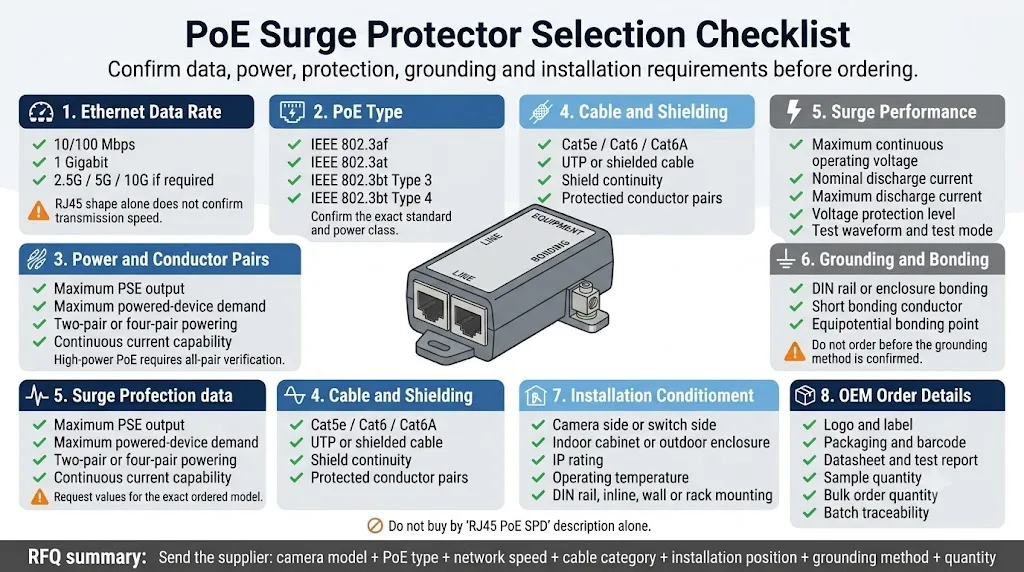
Telecamera IP fissa, telecamera PTZ, punto di accesso wireless, interfono, controllo accessi o altro equipaggiamento PoE.
Fornire il modello esatto della telecamera, del punto di accesso, dello switch o dell'iniettore quando possibile.
IEEE 802.3af, 802.3at, 802.3bt Tipo 3, 802.3bt Tipo 4 o un sistema passivo proprietario.
Potenza richiesta al PSE e al dispositivo collegato, inclusi avvio, riscaldatore, illuminazione IR e domanda del motore PTZ.
100 Mbps, 1 Gbps, 2,5 Gbps, 5 Gbps o 10 Gbps.
Cat5e, Cat6, Cat6A o il sistema di cablaggio strutturato specificato dal progetto.
Cavo UTP o schermato, connettori RJ45 schermati e continuità di schermatura richiesta.
Alternativa A, Alternativa B, due coppie, quattro coppie o una assegnazione di pin passiva specifica del fornitore.
Confermare la protezione di tutti i conduttori di segnale e di alimentazione richiesti, in particolare per Gigabit e PoE a quattro coppie.
La tensione di funzionamento continua massima deve essere compatibile con il sistema PoE senza funzionamenti indesiderati.
Forma d'onda di prova, corrente per percorso, valori di protezione della tensione, prestazioni linea-a-linea e linea-a-terra dove applicabile.
Larghezza di banda supportata, perdita per inserzione, perdita di ritorno e metodo di prova per la categoria di cavo richiesto e la velocità Ethernet.
Richiedere l'edizione esatta della norma e il rapporto applicabile al modello ordinato, non solo una dichiarazione generica del catalogo.
Terminale dedicato, guida DIN, connessione dello schermo, involucro in metallo o altro metodo di messa a terra definito dal produttore.
Lato della telecamera, ingresso dell'edificio, lato dell'interruttore, lato iniettore, armadio o rack multicanale.
Interno, scatola di giunzione esterna o installazione diretta all'aperto, inclusi requisiti IP e di temperatura.
RJ45 inline, guida DIN, montaggio a parete, montaggio a pannello, montaggio su palo, scatola a parete multicanale o rack da 19 pollici.
Logo, etichetta, colore dell'involucro, scheda tecnica, imballaggio, codice a barre, ispezione e tracciabilità del lotto.
Quantità campione, quantità di progetto, domanda annuale, unità di ricambio e programma di consegna previsto.
Scheda tecnica, disegno cablato, rapporto di prova, registro di ispezione, dichiarazione e specifica di imballaggio.
Cosa dovrebbe essere controllato dopo l'installazione?
Un SPD PoE non dovrebbe essere accettato solo perché la telecamera si accende. L'installatore dovrebbe verificare alimentazione, comunicazione, sigillatura e messa a terra.
Errori comuni nella protezione dalle sovratensioni PoE
RJ45 non conferma l'alimentazione PoE, la velocità dati, le coppie protette o le prestazioni contro i sovratensioni.
Un protettore per linea dati può usare lo stesso connettore ma non disporre del percorso di tensione e corrente richiesto per PoE.
Un protettore non può funzionare come previsto quando il suo percorso di scarica è assente o installato in modo non corretto.
La telecamera può funzionare, ma la velocità di rete e le prestazioni video possono essere limitate.
Confermare Type 3 o Type 4, alimentazione a quattro coppie, corrente massima e i dati di test esatti del modello ordinato.
I sistemi passivi possono utilizzare tensioni, polarità e assegnazioni dei pin diversi, anche se il connettore è RJ45.
L'umidità, la condensa e la corrosione del connettore possono causare un guasto anche quando il circuito di protezione contro le sovratensioni è selezionato correttamente.
Una protezione CCTV efficace deve considerare sia la linea Ethernet sia l'alimentazione AC o DC che alimenta l'apparecchiatura di rete.
Informazioni da inviare prima di richiedere un preventivo
Fornire questi dettagli aiuta il fornitore a evitare di offrire un protezione che si adatta al connettore ma non al progetto.
Modello della telecamera o del dispositivo:
Modello dello switch o dell'iniettore:
PoE standard o PoE passivo:
Standard PoE: 802.3af / at / bt Type 3 / bt Type 4
Tensione e polarità PoE passivo, se applicabile:
Potenza massima della telecamera o del dispositivo:
Velocità di rete: 100M / 1G / 2.5G / 5G / 10G
Cavo: Cat5e / Cat6 / Cat6A
Schermato o non schermato:
Alternativa A / Alternativa B / quattro coppie:
Lunghezza del cavo:
Installazione: lato telecamera / lato switch / entrambe le estremità
Montaggio: in linea / guida DIN / a parete / rack / scatola per esterni
Grado di protezione ambientale:
Parametri di prova contro le sovratensioni richiesti:
Metodo di messa a terra o collegamento equipotenziale:
Quantità:
Requisiti per il logo OEM o il packaging:
Certificazioni e rapporti di prova richiesti:
Domande frequenti sul protettore contro le sovratensioni PoE
Le telecamere PoE da esterno necessitano di dispositivi di protezione contro le sovratensioni?
È necessario valutare l'installazione di dispositivi di protezione contro le sovratensioni quando i cavi Ethernet in rame vengono posati all'esterno, escono da un edificio, si collegano a un palo, attraversano un'area esposta o collegano apparecchiature situate in strutture separate. La configurazione finale dipende dall'esposizione, dalla messa a terra, dal percorso dei cavi e dai tempi di inattività accettabili.
Il dispositivo di protezione contro le sovratensioni PoE deve essere installato vicino alla telecamera o allo switch?
Installare il dispositivo di protezione in prossimità dell'apparecchiatura o del perimetro di protezione che si intende salvaguardare. Nelle installazioni remote e altamente esposte, si è soliti utilizzarne uno vicino al dispositivo di campo e un altro in corrispondenza dell'ingresso dell'edificio o del lato delle apparecchiature di rete.
È necessario un limitatore di sovratensione su entrambe le estremità di un cavo Ethernet?
Non per tutti i cavi. La protezione su entrambe le estremità viene solitamente presa in considerazione per pali remoti, tetti, lunghi percorsi esterni, telecamere critiche e collegamenti tra strutture separate. I collegamenti brevi in ambienti interni potrebbero richiedere un approccio differente.
Un limitatore di sovratensione PoE riduce la velocità di rete?
Un prodotto selezionato correttamente dovrebbe supportare la velocità di rete dichiarata, ma un protettore con specifiche inferiori può diventare un collo di bottiglia. Verificare la velocità dati richiesta ed esaminare le informazioni sulla perdita di inserzione e sui test di trasmissione, ove disponibili.
Ogni SPD Gigabit Ethernet supporta il PoE++?
No. Gigabit descrive le prestazioni di trasmissione dati. La compatibilità PoE++ richiede inoltre la tensione operativa, la corrente continua, la disposizione delle coppie alimentate e le prestazioni termiche appropriate.
Qual è la differenza tra PoE Modalità A e Modalità B?
Modalità A e Modalità B sono denominazioni comunemente utilizzate per Alternativa A e Alternativa B. Esse descrivono diverse configurazioni delle coppie di conduttori per l'erogazione di potenza. L'SPD deve proteggere le coppie e l'assegnazione dei pin effettivamente utilizzate dal progetto.
Un limitatore di sovratensione PoE++ deve proteggere tutti gli otto conduttori?
I sistemi IEEE 802.3bt a quattro coppie utilizzano tutte e quattro le coppie per l'alimentazione e possono utilizzare tutte e quattro le coppie per i dati. Il dispositivo di protezione selezionato deve pertanto disporre di una documentazione che attesti la compatibilità con tutte le coppie, nonché prestazioni sufficienti in termini di corrente e trasmissione.
È possibile utilizzare un SPD PoE standard per il PoE passivo?
Non automaticamente. Il PoE passivo può utilizzare una tensione, una polarità o un'assegnazione dei pin differente. Verificare il modello esatto dell'apparecchiatura e il cablaggio PoE passivo prima di selezionare l'SPD.
È possibile utilizzare un normale limitatore di sovratensione Ethernet per il PoE?
Solo se il produttore conferma la compatibilità con la tensione PoE richiesta, le coppie alimentate, la corrente, la classe di potenza e la velocità di rete. Un SPD Ethernet solo dati potrebbe non essere adatto.
Un SPD PoE necessita di un cavo di messa a terra separato?
Dipende dal design del prodotto. Alcuni modelli utilizzano un terminale di terra dedicato, mentre altri si collegano tramite un connettore schermato, un involucro messo a terra, una guida DIN o un punto di montaggio metallico. Seguire le istruzioni di installazione specifiche per il modello selezionato.
È possibile installare un SPD PoE da interno in una scatola da esterno?
Potrebbe essere possibile se l'involucro completo fornisce la protezione necessaria contro infiltrazioni, temperatura, condensa e corrosione. Anche i pressacavi e la disposizione della messa a terra devono essere inclusi nella valutazione.
Quale norma si applica ai limitatori di sovratensione per linee PoE?
La norma IEC 61643-21 riguarda gli SPD collegati a reti di telecomunicazione e di segnalazione, incluse le reti in grado di fornire alimentazione sulla stessa linea, come il PoE. Gli acquirenti dovrebbero richiedere prove applicabili allo specifico modello di prodotto e all'edizione della norma.
Fonti e ulteriori letture
- IEC, IEC 61643-21:2025 — Dispositivi di protezione contro le sovratensioni collegati a reti di telecomunicazione e di segnalazione. Visualizza la pubblicazione IEC
- IEC, IEC 61643-22:2015 — Principi di selezione e applicazione per SPD collegati a reti di telecomunicazione e di segnalazione. Visualizza la pubblicazione IEC
- IEEE Standards Association, IEEE 802.3bt-2018 — Power over Ethernet su quattro coppie. Visualizza la panoramica dello standard IEEE
- Fluke Networks, Power over Ethernet a quattro coppie e livelli di potenza PoE. Visualizza la panoramica tecnica
- Axis Communications, White Paper sulle sovratensioni: esempi di protezione per telecamere da esterno, ingressi di edifici e punti doppi. Visualizza il white paper di Axis
- DEHN, Protezione contro le sovratensioni per sistemi CCTV — configurazioni di protezione per telecamere IP e cavi LAN. Visualizza il white paper di DEHN
- Ubiquiti, Scheda tecnica del protettore da sovratensioni Ethernet — esempio di installazione lato campo e ingresso edificio. Visualizza la scheda tecnica Ubiquiti
Le fonti esterne sono fornite come riferimento tecnico generale. La selezione del prodotto deve basarsi sulle condizioni reali del progetto, sui requisiti locali applicabili e sulla scheda tecnica e sui test del modello SPD ordinato.
Continuare la revisione tecnica
Hai bisogno di un SPD PoE confermato per il tuo progetto CCTV?
Inviare il modello della telecamera o del dispositivo, il tipo di PoE, la velocità di trasmissione dati, la categoria del cavo, la disposizione delle coppie alimentate, la posizione di installazione, il metodo di messa a terra e la quantità richiesta. LEEYEE confermerà se un modello disponibile è adatto al progetto prima di procedere con l'ordine di campioni o di grandi quantità.