
Not sure whether the SPD in a distribution board, OEM panel, or solar combiner box has failed? This guide shows a practical inspection process for maintenance teams, EPC after-sales teams, panel builders, and SPD distributors.
The goal is not only to read a red indicator window. A proper SPD failure check should include the visual indicator, remote signal contact, enclosure condition, terminals, recent lightning events, AC/DC application differences, and replacement parameter confirmation.
Safety note: SPD inspection and replacement should be handled by qualified electrical personnel. Do not remove a pluggable SPD cartridge, open a combiner box, or touch terminals while the circuit is energized.
First check the SPD status window. If the indicator is red, tripped, blank, or abnormal according to the product label, the SPD module should be inspected and usually replaced. Then check the remote signal contact, visible damage, terminal condition, upstream fuse or breaker, and whether the site recently experienced lightning or switching surges.
| Check Point | What to Look For | What It Usually Means | Recommended Action |
|---|---|---|---|
| Indicator window | Red, tripped, blank, or abnormal status | The internal disconnector may have opened | Plan module replacement and confirm the model |
| Remote signal | Alarm contact changes state or BMS/PLC alarm is active | The SPD may be offline even before someone checks the panel | Open the panel safely and verify the SPD status |
| Housing and terminals | Burn marks, cracks, melting, discoloration, smell, loose wires | Possible surge damage, overheating, or poor connection | Isolate power and investigate before re-energizing |
| After lightning event | Several SPDs show alarms in the same site or combiner box group | The site may need batch inspection, not single-module replacement | Inspect all exposed panels and record replacement history |
| Replacement parameters | Uc, Ucpv, Type, poles, In, Imax, remote signal, module size | A wrong replacement may fail early or leave the system underprotected | Confirm the rating before ordering spare modules or new SPDs |
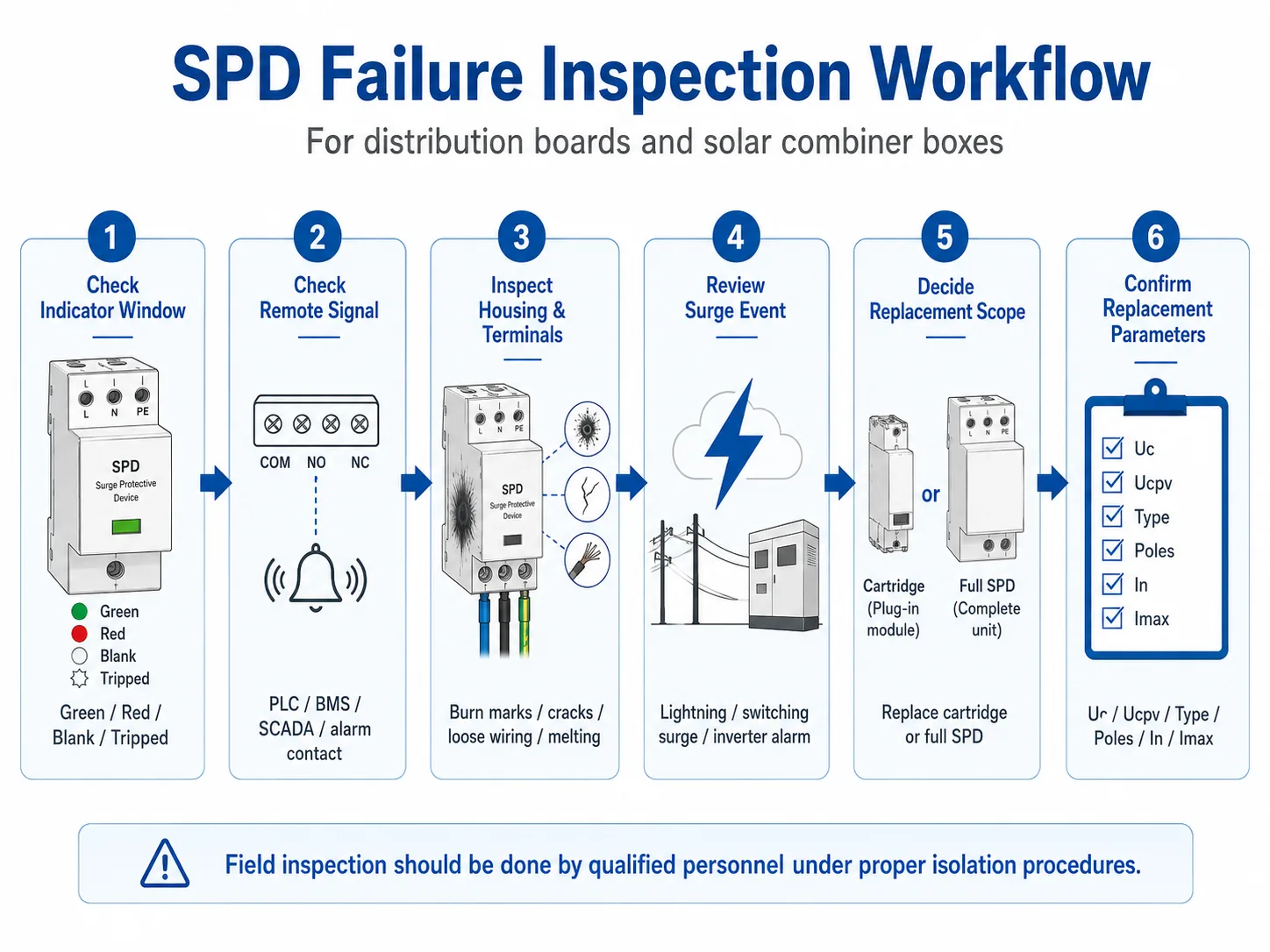
Table of Contents
SPD failure check is more than reading a red window
A red indicator window is the most visible sign of SPD failure. But it is not the whole inspection.
In a factory distribution board, the problem may come from long-term overvoltage, wrong Uc selection, loose terminals, or repeated switching surges. In a solar combiner box, the problem may come from lightning exposure, wrong Ucpv rating, poor DC-side grounding, moisture ingress, or module aging after repeated surges.
That is why this page focuses on the complete failure checking process. If you only want to understand what a red SPD indicator means, read our related guide about SPD status indication.
Step-by-step SPD failure inspection process
Use this process during routine maintenance, after lightning activity, after a remote alarm, or before ordering replacement SPD modules.
- Check the SPD indicator window first. Green usually means the module is still in normal service. Red or tripped usually means the internal disconnector has opened and the module is no longer protecting that circuit. Always confirm the meaning according to the product label or datasheet, because indicator designs can vary by manufacturer.
- Check the remote signal or dry contact. Many industrial SPDs and PV SPDs include a remote signal contact. This contact can be wired to a PLC, BMS, SCADA system, alarm lamp, or monitoring unit. If the remote alarm is active, inspect the SPD even if nobody has visually checked the panel yet.
- Inspect the housing and surrounding enclosure. Look for black marks, melted plastic, cracks, discoloration, abnormal smell, moisture, corrosion, or damaged labels. These signs may indicate surge stress, overheating, poor enclosure sealing, or a serious fault.
- Check terminals, wiring, and upstream protection. Loose terminals and poor connections can create heat and make the SPD appear to fail early. Also check whether the upstream fuse, MCB, or SPD backup protection has tripped. Do not simply reset the breaker without finding the cause.
- Review recent surge or lightning events. If the site experienced a thunderstorm, grid switching event, inverter alarm, or repeated equipment resets, inspect all related SPDs in the affected board or combiner box group. One failed module may be only part of the issue.
- Decide whether to replace only the cartridge or the whole SPD. For pluggable SPDs, the failed cartridge can often be replaced while the wiring base remains in place. For fixed SPDs, the whole unit usually needs to be removed and rewired. In both cases, power isolation and site safety procedures are required.
- Confirm replacement parameters before ordering. Check AC or DC application, Uc or Ucpv, Type 1 / Type 2 / Type 1+2, pole configuration, In, Imax, remote signal requirement, and module compatibility. Do not order by appearance only.
Field SPD failure inspection checklist
Use this checklist when checking SPDs in distribution boards, solar combiner boxes, industrial cabinets, or OEM panels. It helps maintenance teams separate normal conditions from failure warning signs.
| Inspection Item | Normal Condition | Failure Warning | What to Do Next |
|---|---|---|---|
| Indicator window | Green or normal status mark | Red, blank, tripped, or abnormal display | Record the status and prepare replacement check |
| Remote signal contact | Normal contact state, no alarm | Alarm contact changed or BMS/PLC reports SPD fault | Open the panel safely and verify the SPD condition |
| SPD housing | Clean enclosure, no cracks or deformation | Burn marks, melting, cracks, dark spots, abnormal smell | Isolate power and inspect the installation before replacing |
| Terminals and wiring | Tight terminals, no discoloration, proper wire routing | Loose wires, blackened terminals, overheating, damaged insulation | Check torque, cable size, heat source, and backup protection |
| Grounding / PE connection | Secure PE connection and clean grounding path | Loose PE, corrosion, missing ground, damaged earth wire | Correct grounding before installing a new SPD |
| After lightning or surge event | No alarm and no visible damage after site check | Multiple SPD alarms in the same board or site zone | Inspect SPDs in batch instead of replacing only one module |
| Model label | Model, voltage, Type, In/Imax, and standard are readable | Label damaged, unclear, or different from project document | Take photos and confirm the correct replacement model |
Important: A normal-looking SPD is not always a fully healthy SPD. After a strong lightning or surge event, the internal MOV may have degraded even if the indicator has not changed yet. For critical sites, post-event inspection should not wait until the next routine maintenance date.
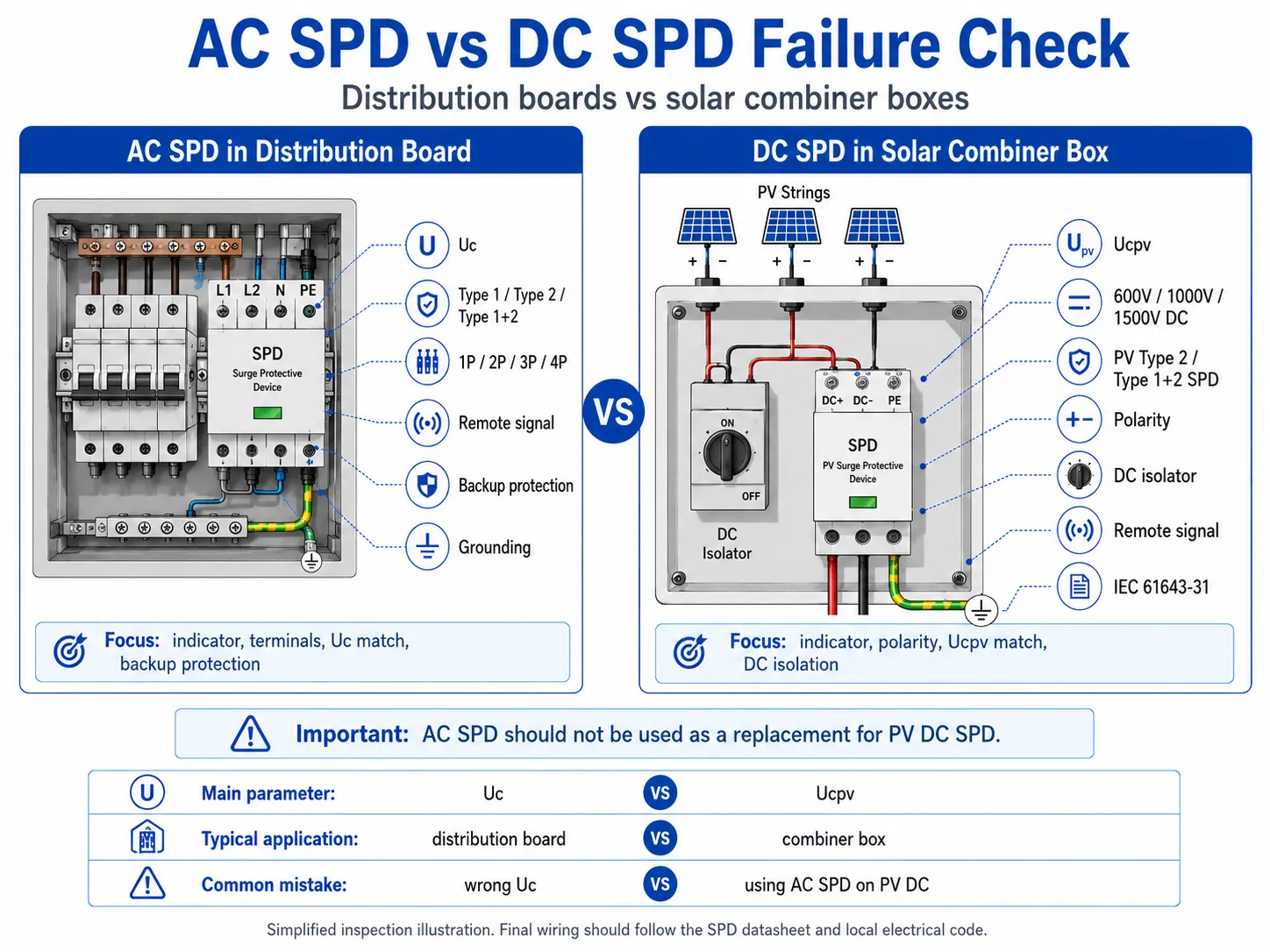
AC distribution board SPD vs DC solar combiner box SPD failure check
AC and DC SPDs are not checked in exactly the same way. The visual process may look similar, but the rating logic is different.
| Item | AC SPD in Distribution Board | DC SPD in Solar Combiner Box |
|---|---|---|
| Common application | Main distribution board, sub-board, OEM electrical panel, industrial control cabinet | PV combiner box, inverter DC input, solar field string protection |
| Main voltage parameter | Uc, matched to the AC system voltage and grid fluctuation | Ucpv, matched to the maximum PV open-circuit voltage and DC system rating |
| Typical system voltage | 230/400V, 400/415V AC systems | 600V, 1000V, 1500V DC PV systems |
| Standard reference | IEC 61643-11 for low-voltage AC power SPDs | IEC 61643-31 for SPDs used on the DC side of photovoltaic systems |
| Inspection focus | Indicator, remote signal, Uc match, terminals, backup protection, grounding | Indicator, remote signal, Ucpv match, polarity, DC isolation, moisture, PV string exposure |
| Common replacement mistake | Replacing with wrong Uc, wrong pole configuration, or no remote signal version | Using AC SPD instead of PV DC SPD, or selecting wrong Ucpv for the string voltage |
When should maintenance teams check SPDs in bulk?
For B2B and project sites, SPD checking should not always be one-by-one only after a visible failure. Some situations require batch inspection.
Can you test SPD failure with a multimeter?
A multimeter may help detect some obvious abnormal conditions, such as a shorted component or continuity problem. But it cannot prove that an SPD still has full surge protection capacity.
SPDs are designed to react to high-energy transient overvoltage. A normal handheld multimeter cannot simulate lightning impulse current, switching surges, or the full protection behavior of an SPD.
| Method or Tool | Can Help Check | Cannot Confirm | Best Use in Field Maintenance |
|---|---|---|---|
| Visual inspection | Indicator status, burn marks, cracks, discoloration, loose terminals | Remaining MOV life or full surge capacity | First check during routine inspection or after alarm |
| Remote signal / dry contact | Whether the SPD alarm contact has changed state | The exact electrical degradation level inside the SPD | Unmanned sites, BMS/PLC monitoring, solar O&M |
| Multimeter | Some obvious short circuit, open circuit, or abnormal continuity conditions | Impulse performance, remaining protection level, or real lightning response | Only as a supporting check by qualified personnel |
| Special SPD tester | Some leakage or threshold behavior depending on tester type | Full lightning impulse performance under real surge energy | More advanced maintenance, not always available on site |
| Laboratory test | More detailed technical condition under controlled test setup | Fast on-site decision during routine field maintenance | Failure analysis, quality investigation, or engineering review |
Do not use a multimeter test as the only decision for critical installations. For distribution boards, solar combiner boxes, telecom sites, or industrial control panels, visual status, remote alarm, installation condition, surge history, and replacement records are more important for field maintenance decisions.
Should a failed SPD be replaced before re-energizing?
If the SPD indicator shows failure, the remote signal reports alarm, or there are visible signs of burning, melting, cracking, or terminal overheating, the affected SPD should be treated as unsafe or offline until checked by qualified personnel.
For pluggable SPDs, the cartridge may be replaceable without rewiring the base. This is useful for maintenance teams and distributors that keep spare modules. However, the circuit still needs proper isolation according to site safety rules before the module is removed.
For non-pluggable SPDs, replacement usually means removing the whole unit, disconnecting wires, installing a new SPD, and re-checking terminal tightness.
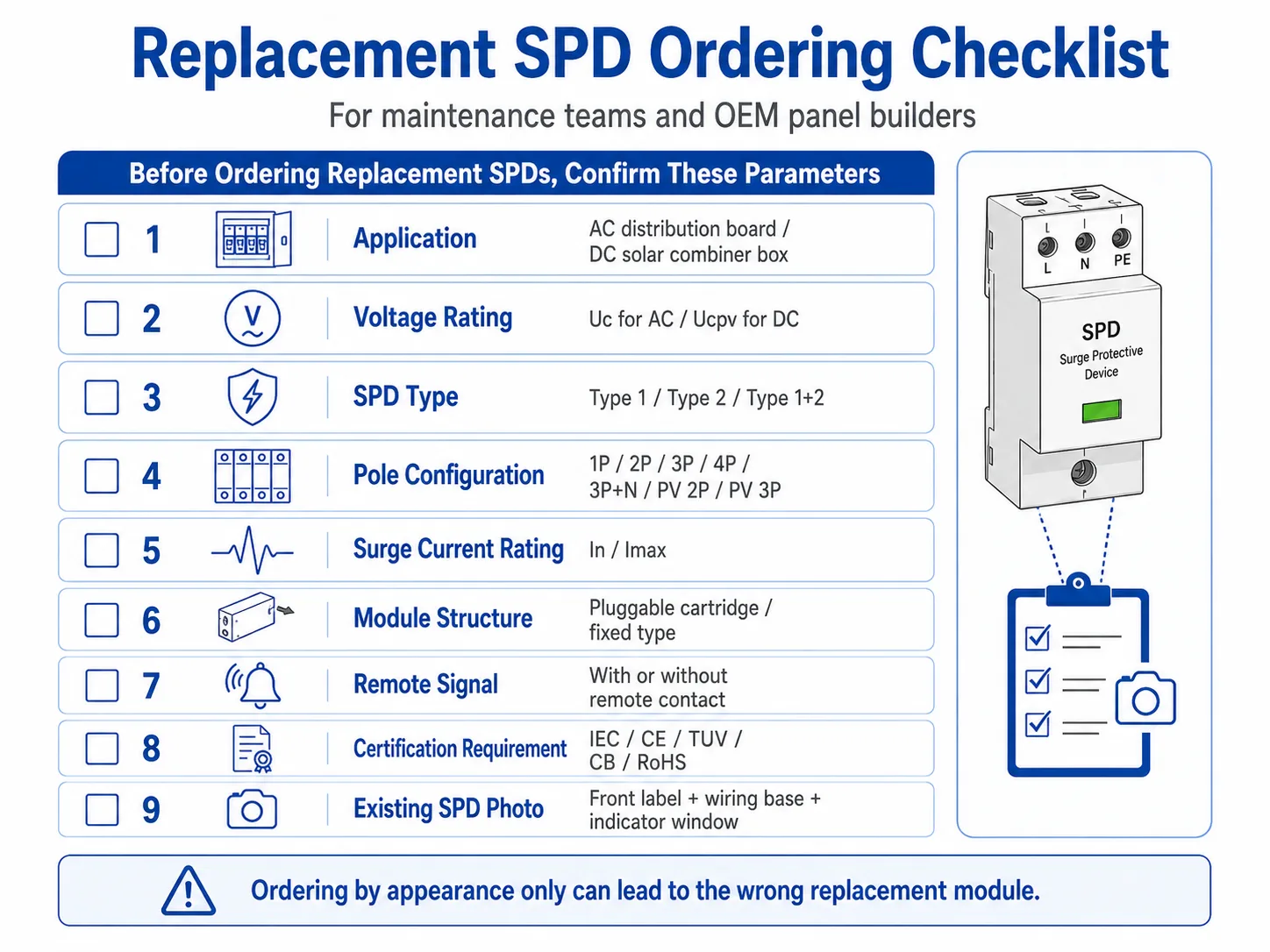
Replacement SPD ordering checklist
Many early replacement problems come from ordering the wrong SPD module. Before ordering a replacement, confirm the information below.
| Information to Confirm | Why It Matters | Example |
|---|---|---|
| AC or DC application | AC SPD and PV DC SPD follow different rating logic | Distribution board AC SPD / solar combiner box DC SPD |
| Uc or Ucpv | Wrong voltage rating can cause early failure or poor protection | 275V, 320V, 385V AC / 600V, 1000V, 1500V DC |
| SPD type | The installation point determines Type 1, Type 2, or Type 1+2 | Main incoming panel / sub-board / PV combiner box |
| Pole configuration | The replacement must match the system and wiring base | 1P, 2P, 3P, 4P, 3P+N, PV 2P, PV 3P |
| In and Imax | Surge current rating should match site exposure and project specification | In 20kA, Imax 40kA per pole |
| Pluggable module compatibility | A similar-looking cartridge may not fit or match the base | Same series, same voltage, same pole/module structure |
| Remote signal requirement | Some sites need alarm output to PLC, BMS, or SCADA | With remote signal contact / without remote signal |
| Certification or project requirement | Replacement should match project documents and procurement rules | IEC standard, CE, TUV, CB, RoHS, or buyer-specific requirement |
Need help checking replacement SPD parameters?
Send us the SPD photo, indicator status, system voltage, panel type, and the existing model label. LEEYEE can help confirm whether you need an AC SPD, PV DC SPD, pluggable replacement module, or a complete new unit for distribution boards, solar combiner boxes, and OEM panels.
Common mistakes when checking SPD failure
Only checking the red window
The indicator is important, but it does not explain the root cause. If the same SPD fails repeatedly, check voltage, grounding, temperature, wiring, and surge exposure.
Ignoring remote alarm signals
A remote signal contact may report a fault before the next site visit. For unmanned cabinets and solar sites, remote signal should be part of the maintenance process.
Using AC SPD for PV DC systems
Solar combiner boxes need DC-rated PV SPDs with suitable Ucpv. Do not replace a PV DC SPD with a standard AC SPD.
Ordering by appearance only
Many SPD cartridges look similar. Always confirm voltage rating, pole configuration, series compatibility, and remote signal version before ordering.
What should be recorded after SPD inspection?
For factories, EPC service teams, OEM panel builders, and distributors, an SPD inspection record helps avoid repeated failures and wrong spare-part orders.
- Inspection date and site location
- Panel name or combiner box number
- SPD model and rated parameters
- Indicator status before replacement
- Remote signal status, if available
- Visible damage photos
- Recent lightning, switching, or alarm events
- Replacement module model and quantity
- Technician note and next inspection date
What photos and parameters should you send before replacement?
For faster replacement confirmation, do not send only a general panel photo. A clear set of photos and basic electrical parameters helps the supplier confirm whether you need the same cartridge, a complete SPD, or a different model.
FAQ
How do I know if an SPD has failed?
Check the indicator window first. A red, tripped, blank, or abnormal status usually means the SPD needs inspection or replacement. Also check remote signal status, burn marks, cracks, terminal condition, and recent lightning events.
Does a red SPD indicator always mean lightning damage?
No. A red indicator means the SPD module is no longer in normal service, but the cause may be repeated surges, aging, wrong voltage selection, thermal stress, vibration, or a strong surge event.
Can I replace only the pluggable SPD cartridge?
Yes, if the SPD is a pluggable modular type and the replacement cartridge matches the same series, voltage rating, pole structure, and remote signal version. Power isolation and site safety procedures are still required.
How should I check a DC SPD in a solar combiner box?
Check the status indicator, remote signal, DC isolator condition, terminals, moisture, polarity, PV voltage rating, and whether the SPD Ucpv matches the maximum PV string voltage. Do not use a standard AC SPD as a DC replacement.
Can a multimeter prove that an SPD is still good?
No. A multimeter can only show some obvious abnormal conditions. It cannot simulate impulse surge performance or confirm the remaining life of the MOV. For field maintenance, combine visual inspection, remote signal, event history, and replacement records.
What information should I send before ordering a replacement SPD?
Send the old SPD front label photo, indicator window photo, wiring base or pole configuration photo, system voltage, AC or DC application, Uc or Ucpv, In/Imax rating, remote signal requirement, quantity, and panel or combiner box application.
Send photos for a faster replacement check
For maintenance teams and distributors, the fastest way to confirm a replacement is to send clear photos of the SPD front label, wiring base, indicator window, and panel application.